What Is App Store Optimization? A Practical ASO Guide
App Store Optimization improves discovery and conversion. Use this Apple-focused ASO workflow, reporting template, and 30-day measurement plan.

App Store Optimization, or ASO, is the continuous process of helping more relevant people find an app and decide to download it.
For an iOS app, that means three connected jobs:
- Discovery: make the app a relevant result for the right search in the right storefront.
- Conversion: make the search result and product page earn the download.
- Learning: measure whether the change attracted useful users, then decide what to keep or test next.
ASO is sometimes called SEO for apps. That is a helpful introduction, but it is not a complete operating model. A keyword ranking can improve while downloads stay flat. Downloads can grow while trials or revenue do not. The work is only useful when those layers are read together.
This guide focuses on Apple's App Store. Google Play has different indexed fields and testing tools, so an Android listing deserves its own store-specific workflow.
ASO versus SEO
Both disciplines begin with the same question: what is the person trying to accomplish? The surfaces and evidence are different.
| Question | SEO | App Store Optimization |
|---|---|---|
| What is optimized? | A web page or site | An app's store metadata and product page |
| Where is discovery measured? | Web search results | App Store search, browse, and other store surfaces |
| What communicates relevance? | Page content, structure, links, and technical signals | App name, subtitle, keyword field, category, and other store context |
| What earns the next action? | Search snippet and landing page | Icon, name, subtitle, rating, screenshots, previews, and product page |
| What is the immediate conversion? | Depends on the page goal | Download or pre-order |
| How is it tested? | Web analytics and controlled site experiments | App Store Connect Analytics and product-page tests |
The common ground is intent. A listing should be a truthful, specific answer to a real user need. The difference is that Apple controls the result format, searchable fields, approval process, and store analytics.
What Apple says affects App Store search
Apple describes two broad groups of search inputs:
- Text relevance, including matches in the app title, subtitle, keywords, and primary category.
- User behavior, including downloads, ratings, reviews, and other factors Apple does not fully enumerate.
Apple does not publish the complete formula or the weight of each input. Treat anyone's exact percentage breakdown as a guess.
The practical response is to work with the documented inputs and observe the result. Do not label retention, release frequency, advertising spend, or a single day's download velocity as direct ranking factors unless Apple documents that relationship. Retention and revenue still matter enormously to the business; they belong in the quality layer of the ASO report, not in a made-up ranking formula.
The searchable metadata
The main fields have different jobs:
| Field | Role in the workflow |
|---|---|
| App name | A memorable brand and the clearest description that fits naturally; up to 30 characters |
| Subtitle | A visible, concise value proposition; up to 30 characters |
| Keyword field | Additional relevant terms that are absent from the visible fields; 100 characters total |
| Primary category | The most accurate category for discovery, browsing, and search context |
| Localizations | Market-specific names, subtitles, keywords, descriptions, screenshots, and previews |
Apple's keyword guidance is unusually concrete: separate terms with commas and no spaces, avoid repeating words already in the name, subtitle, or category, and skip duplicate plurals, generic terms, filler, and unnecessary special characters. Competing app names, irrelevant terms, and unauthorized protected terms are not acceptable shortcuts.
Promotional text does not affect App Store search ranking. Apple's product-page guidance also advises against adding unnecessary keywords to the description in an attempt to improve search results. Write those fields to explain the app to a person.
Use the App Store keyword research workflow when the target terms are still guesses. The free App Store keyword checker is a quick way to inspect one candidate before editing metadata.
The three layers of an ASO system
ASO becomes easier to diagnose when discovery, conversion, and acquired-user quality are kept separate.
| Layer | What you change | What you watch | The question it answers |
|---|---|---|---|
| Discovery | Name, subtitle, keyword field, category, localization | Keyword position, impressions, result-page competitors | Are relevant people finding the app? |
| Conversion | Icon, rating context, screenshots, previews, description, offer | Product page views, downloads, conversion rate | Does the listing make the value clear enough to download? |
| Acquired-user quality | Onboarding and product experience, not store metadata alone | Activation, trial starts, revenue, retention, refunds | Did the acquired users fit the product? |
That third layer prevents an attractive but low-value keyword from looking like a win. It is a business decision layer, not a claim that every downstream metric directly changes organic rank.
Discovery is storefront-specific
A rank without a country or region is incomplete. The phrase, competition, existing metadata, and visible product page can differ by storefront. Choose one search job and one storefront before changing anything.
For example:
Improve visibility for "meal planner" in the United Kingdom while protecting the app's existing "grocery list" ranking.
That is measurable. "Do ASO" is not.
If the app already appears but sits outside the useful range, follow the focused guide to improving App Store search ranking. If the opportunity is a new language or country, use the App Store localization workflow.
Conversion starts in the search result
Depending on platform and asset orientation, the result can show the app's name, subtitle, rating, and up to three screenshots or app previews. Those elements have to tell one coherent story before the visitor opens the full page.
Apple allows up to 10 screenshots, but the first images carry a special burden: they may be the product proof visible in search. Show the actual interface and the outcome behind the target intent. The screenshot optimization guide covers the complete first-three-image workflow.
For creative testing, distinguish two Apple tools:
- Product Page Optimization compares treatments against the default page. Apple reports conversion, estimated lift, and confidence in App Store Connect Analytics.
- Custom product pages are additional intent-specific pages with their own assets and URLs. Apple currently allows up to 70, and selected keywords can make a relevant custom page appear in search instead of the default page.
Use Product Page Optimization when the question is "Which version converts better?" Use a custom product page when the question is "Which page best matches this audience or intent?"
A repeatable ASO workflow
1. Choose one user job and storefront
Write the need in the user's language, then inspect the live result page. Record the country, current position, nearby competitors, and the product promise shown above the fold.
Keep a few valuable terms as guardrails. A new target is not a win if the edit silently removes an existing source of qualified downloads.
2. Save a baseline
Before submission, save:
- current app name, subtitle, keywords, category, and localization,
- target and protected keyword positions,
- unique impressions, product page views, downloads, and conversion rate,
- relevant activation, trial, revenue, or retention measure,
- release dates, Apple Ads changes, seasonality, and featuring events.
Without the change log, a later chart can show movement but not explain it.
3. Map the intent to metadata
Give each important concept one useful home. Let the name and subtitle stay readable; use the hidden keyword field for supporting words that do not already appear in those visible fields.
Check every word against the product. Search volume does not make an irrelevant term safe or useful. If the result page solves a different job, choose another target.
4. Make the product page prove the same promise
The target keyword, subtitle, first screenshot, and first moments of the app should feel like one journey. If the metadata promises a receipt scanner but the first screenshot leads with a generic spending chart, the user has to infer too much.
Review the icon and rating beside the actual neighboring results. Conversion happens in context, not on a clean design canvas.
5. Ship one coherent change
Change the smallest set of elements that can test the hypothesis. A new subtitle and aligned first screenshots can be coherent. Replacing every localization, all creative, pricing, onboarding, and ad spend at once is not.
Write the hypothesis before release:
If we put "receipt scanner" in the UK subtitle and lead with the scan-to-expense outcome, search visibility and download conversion for that intent should improve without weakening "expense tracker."
6. Measure the whole funnel
Apple's acquisition analytics connects impressions, product page views, downloads, and later usage or monetization to acquisition sources. Segment by territory and device when the experiment calls for it.
There is an important reporting trap: Apple's App Store search source includes views and downloads from ads in App Store search results. It is not an organic-only bucket. Mark Apple Ads spend, campaign, and targeting changes beside every ASO release. For the detailed separation, use the Apple Ads-to-ASO workflow.
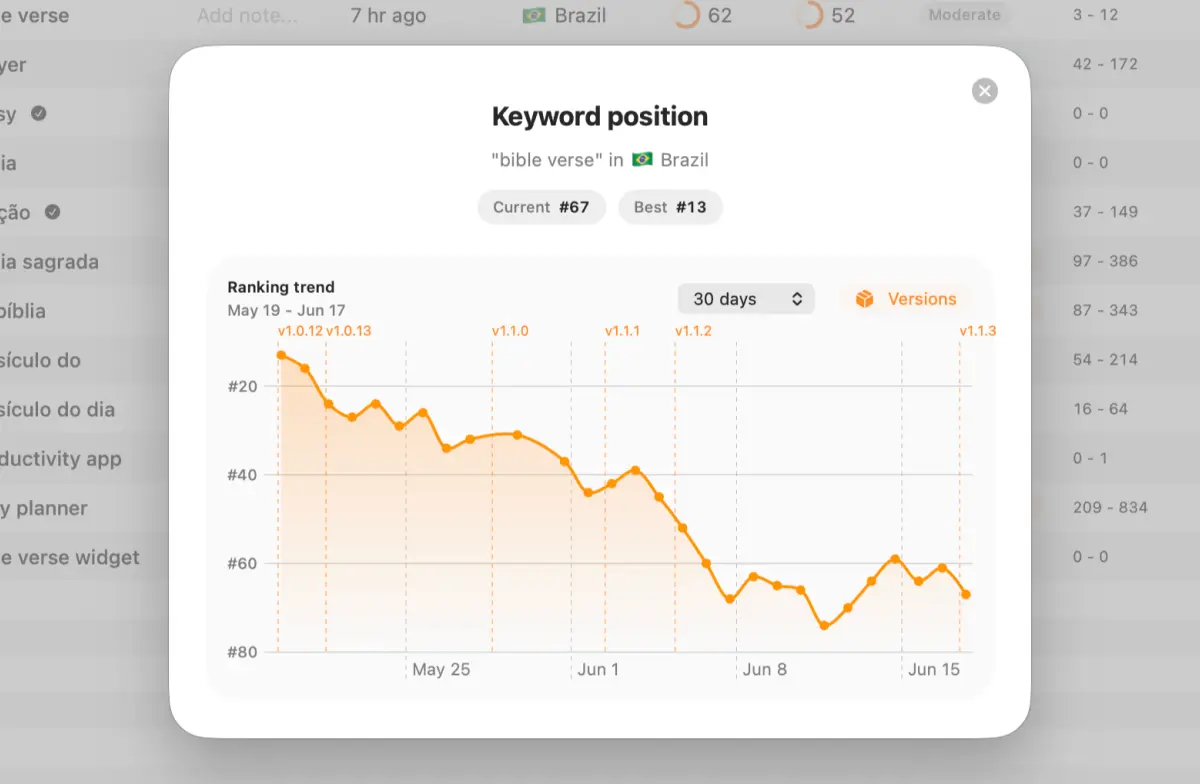
Rank history helps identify when movement began. App Store Connect helps show what happened to the broader funnel. Neither alone proves that one keyword caused every download.
An App Store optimization report that leads to a decision
An ASO report should not be a page of rankings with green and red arrows. Its job is to preserve the experiment and make the next action obvious.
Use this seven-part structure:
- Executive summary: one sentence on what changed, what happened, and what you recommend.
- Change record: exact before-and-after metadata or creative, release time, storefront, and app version.
- Intent: target keyword or audience, protected terms, and the reason this opportunity was chosen.
- Visibility: target ranks, recent range, impressions, and changes in the live result page.
- Conversion: unique product page views, total downloads, and Apple's conversion rate.
- Acquired-user quality: activation, trial, revenue, retention, or another product-specific outcome.
- Context and decision: paid spend, featuring, releases, seasonality, confidence limits, and one next action.
Apple defines App Store conversion rate as total downloads and pre-orders divided by unique-device impressions. Use that official metric consistently. A separate page-view-to-download ratio can be useful for internal diagnosis, but label it as your own calculation rather than Apple's conversion rate.
| Pattern in the report | Likely constraint to investigate | Sensible next action |
|---|---|---|
| Rank improves; impressions do not | The term may have little demand | Keep only if downstream quality is strong; otherwise test a better target |
| Impressions rise; conversion falls | Creative or intent fit may be weak | Inspect the result page and first screenshots before adding more keywords |
| Conversion rises; visibility is flat | The page improved, but discovery did not | Keep the creative winner and run a separate metadata experiment |
| Downloads rise; activation falls | The new audience may be a poor fit | Narrow the promise or stop targeting the misleading term |
| Search downloads rise with ad spend | Paid and organic effects are mixed | Segment Apple Ads reporting and hold spend steady for the next comparison |
| One storefront wins; another loses | Wording or competition is local | Split the localization decision instead of applying one global verdict |
A worked ASO report example
This is a hypothetical calculation, not an App Store benchmark.
An app changes its UK subtitle and first screenshot for "receipt scanner." Over the next comparable period:
- target rank moves from 18 to 11,
- unique impressions move from 12,000 to 13,500,
- total downloads move from 2,160 to 2,700,
- Apple's conversion rate moves from 18% to 20%,
- trial-start rate stays at 7%,
- Apple Ads spend and the app version remain unchanged.
A useful summary would be:
The UK receipt-scanner update improved target visibility and App Store conversion while trial quality held steady. Keep the new creative, protect the existing expense-tracker terms, and test one keyword-field refinement next.
The report does not claim that moving seven rank positions caused all 540 additional downloads. It records aligned evidence, unchanged confounders, and a reversible next step.
A practical 30-day ASO cadence
Day 0: preserve the experiment
Save the baseline, metadata, screenshots, target terms, country, product metrics, and paid campaign settings. Confirm the hypothesis and the rollback condition.
Days 1 to 3: verify, do not judge
Confirm the approved metadata and assets are live in the target storefront. Check for accidental omissions or truncated copy. Do not call the experiment after one volatile ranking snapshot.
Day 7: check direction
Review the target and protected rankings, live competitors, impressions, and obvious paid or release changes. Fix implementation mistakes; avoid rewriting a valid test because of ordinary daily movement.
Day 14: read visibility with conversion
Compare a like-for-like period. Ask whether discovery moved, whether the listing converted, and whether the audience reached the first meaningful product outcome.
Day 30: decide
Choose one outcome: keep, refine, reverse, or run a controlled creative test. Record the result and the next hypothesis. The weekly ASO measurement guide provides the detailed metric routine.
Common ASO mistakes
- Treating a keyword ranking as the final business outcome.
- Changing several storefronts and product surfaces without a preserved baseline.
- Repeating words across the app name, subtitle, keyword field, and category.
- Adding keywords to promotional text even though Apple says it does not affect ranking.
- Calling App Store search acquisition organic when Apple says it also includes search-result ads.
- Translating metadata literally without researching the local result page.
- Using Product Page Optimization and custom product pages as if they solve the same problem.
- Reporting retention or revenue as a proven direct ranking input.
- Publishing a monthly dashboard without a decision, owner, or next experiment.
The useful definition of ASO
App Store Optimization is not a one-time metadata fill-in. It is a controlled loop that connects a relevant search, truthful store metadata, persuasive product proof, and measurable user value.
Start with one keyword and one storefront. Preserve the baseline. Make the smallest coherent change. Then report discovery, conversion, and acquired-user quality without inventing certainty the data cannot support.
AppSprint's keyword research workspace brings demand, difficulty, competitors, metadata, and ranking context into that loop. You can also start with a single term in the free App Store keyword checker.
Sources
- App Store search - Apple's current search inputs, keyword rules, result elements, categories, ratings, localization, custom-page keywords, and Apple Ads reporting caveat
- Creating your product page - Current app name, subtitle, screenshots, description, keyword, localization, Product Page Optimization, and custom-page guidance
- App Store Connect acquisition analytics - Current acquisition funnel, territory and device segmentation, source attribution, and the inclusion of search-result ads in App Store search
- App Store Connect metric definitions - Official definitions for impressions, product page views, downloads, conversion, usage, and monetization metrics
- Product Page Optimization analytics - Current treatment, conversion, lift, confidence, and result-reporting definitions
- Custom product pages - Current page limits, assets, keyword assignment, URLs, Apple Ads use, and analytics
Research, analyze, optimize
Find the right keywords, study the competitors already earning attention, and turn that into a stronger App Store page.
Available for macOS 14.6 and above


Loved by 544 users
Related articles
See all posts →
App Store Rank Tracking After a Metadata Update
Track keyword rankings before and after an App Store metadata update, separate visibility from conversion, and decide what to keep or change next.

How to Find Your Competitors' App Store Keywords
Find competitors' App Store keywords from public rankings, metadata, result pages, and country gaps, then turn the evidence into a focused ASO test.
How to Recover From an App Store Ranking Drop
Diagnose an App Store keyword ranking drop, separate metadata problems from market movement, and choose the safest recovery action.