How to Improve Your App Store Search Ranking
Improve your App Store search ranking with accurate metadata, winnable keywords, stronger search-result creative, and a measured update loop.

To improve your App Store search ranking, make your app a clearer match for one search and a more convincing result when it appears.
Apple describes two broad inputs: text relevance, including matches in the app title, subtitle, keywords, and primary category, plus user behavior such as downloads, ratings, and reviews. Apple does not publish the full formula or the weight of each signal.
That boundary is useful. It keeps the work focused on what you can observe and change.
Here, ranking means your organic position for a keyword in a particular App Store country or region. Top charts are a different problem.
Start with one keyword in one storefront
"Improve our ranking" is too vague to act on. A usable target looks like this:
Move from position 17 into the top 10 for "meal planner" in the United States without losing the app's existing "grocery list" visibility.
Before touching App Store Connect, record:
- the keyword and country,
- the current position and recent range,
- search popularity and competition,
- the apps currently above you,
- the metadata version that produced the baseline.
Rankings are storefront-specific. A term can be reachable in Canada and crowded in the United States, even when both listings use English.
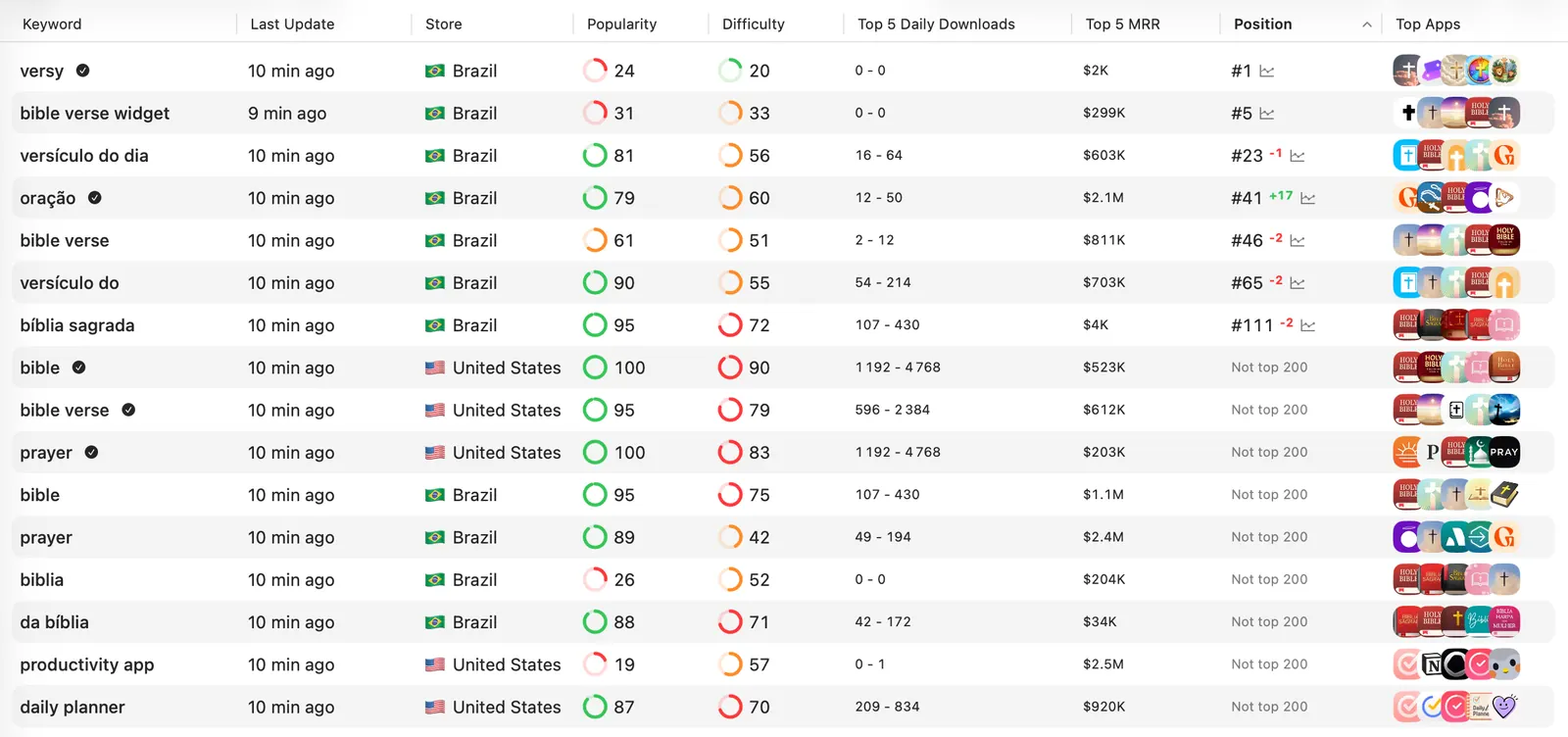
I usually start with relevant terms around positions 11 to 30. They already have some connection to the app, and the result page is close enough to study. A position outside the top 200 often calls for a more basic relevance check before any creative test.
Diagnose the constraint before choosing the fix
The ranking number does not tell you what to edit. Read it beside demand and acquisition data.
| Pattern | First place to investigate |
|---|---|
| Not ranked for a relevant term | Searchable metadata, category, and wording |
| Position 11 to 30 with real demand | Intent fit and competitors in the current result page |
| Rank rises but impressions stay flat | The term may have little search demand |
| Search impressions rise but downloads do not | Icon, rating, subtitle, screenshots, or intent mismatch |
| One country improves and another falls | Local wording and storefront competition |
| Most tracked terms fall after an update | The metadata tradeoff and exact release timing |
This stops a common mistake: rewriting screenshots to solve a metadata problem, or stuffing more keywords into a listing whose real problem is conversion.
Put the search concept in an indexed field
Apple confirms that the app name, subtitle, keyword field, company name, and categories contribute to searchability. The primary and optional secondary categories are indexed by the search algorithm.
Use each field for a specific job:
| Field | Practical use |
|---|---|
| App name | Brand plus the clearest core search concept when it fits naturally |
| Subtitle | A second relevant concept and a visible reason to choose the app |
| Keyword field | Supporting words and phrases that are absent from the visible fields |
| Primary category | The most accurate description of what the app mainly does |
| Secondary category | Additional accurate category context |
The app name and subtitle are limited to 30 characters. The localized keyword field accepts up to 100 bytes.
Do not spend that space repeating words already present in the app name, subtitle, or category. Apple also tells developers to avoid plurals of words already used, generic filler, competing app names, and irrelevant terms. Keyword stuffing can lead to App Review trouble.
Two fields deserve a separate warning:
- Apple says promotional text does not affect App Store search ranking.
- Apple describes the app description as product-page content and a source for web search engines, rather than an App Store keyword field.
Write both for people. Repeating a target keyword there will not repair weak indexed metadata.
Choose a result page you can plausibly enter
Relevance is necessary, but competition still decides how difficult the move will be.
Open the live result page for the keyword and ask:
- Do the leading apps solve the same job as yours?
- Are apps of a similar size visible, or only established brands?
- Which words repeat in their names and subtitles?
- What promise appears in the first screenshot?
- Does your app offer a clearer angle for the same intent?
Apple itself recommends weighing a strong rank for a less common term against a weak rank for a popular, highly competitive term. For a smaller app, "daily migraine journal" may be a better starting point than "health."
My bias is simple: earn visibility for a narrow term that fits the product before spending the strongest metadata fields on a category giant.
Use App Store keyword research when the target is still a guess. The free keyword checker is enough for a first pass; a promising term can then move into competitor analysis and rank tracking.
Improve what users see in the search result
Search results can show the app name, subtitle, rating, and up to three screenshots or app previews. App Tags may appear too. These elements have to make sense together before someone opens the full product page.
Suppose the target is "interval running timer." A first screenshot about a broad fitness dashboard delays the proof. Show the interval timer and its outcome immediately.
Check the result at actual device size:
- Can a user understand the app from the name and first screenshot?
- Does the subtitle add useful context instead of repeating the name?
- Is the rating competitive with nearby results?
- Do the visible screenshots answer the same intent as the keyword?
Screenshots are not listed by Apple as a text-relevance field. Their immediate job is to help the result earn a download. For creative testing, use Product Page Optimization instead of replacing assets from instinct alone.
For distinct intents, Apple now lets you assign keywords to a custom product page so that page can appear in search instead of the default page. Keep each keyword combination unique to one page and make the screenshots specific to that intent.
Review ratings and App Tags
Apple says ratings and reviews can influence App Store search rank. They also sit beside the listing and affect trust.
Ask for a rating after the user has received value, such as completing a useful task or returning to the app successfully. Review recurring complaints before increasing the prompt volume. A better prompt cannot compensate for a problem every new reviewer encounters.
In the United States, check the app's generated App Tags in App Store Connect. Apple says these tags are built from metadata, AI, and human curation and can appear in search results and on product pages. Keep accurate tags selected and remove misleading context. Apple currently limits this feature to the U.S. storefront.
Localize the search match, not just the words
Localization creates a separate chance to fit the language and competition of each storefront.
Research the phrase people actually use in that market. Then review the local result page, not a translation in isolation. A technically correct translation can still sound unlike a search query or point at the wrong product category.
Keep the experiment small. Update one localization, preserve a valuable existing term, and record the before-and-after metadata. The App Store localization guide covers the broader country workflow.
Measure the update as a controlled release
Save the baseline before submission. Once the update is approved, confirm the public metadata in the target storefront. Apple says app information may take up to 24 hours to appear in some countries or regions.
Then watch two layers:
- Keyword position for the exact search and country.
- App Store Connect acquisition data filtered to App Store Search.
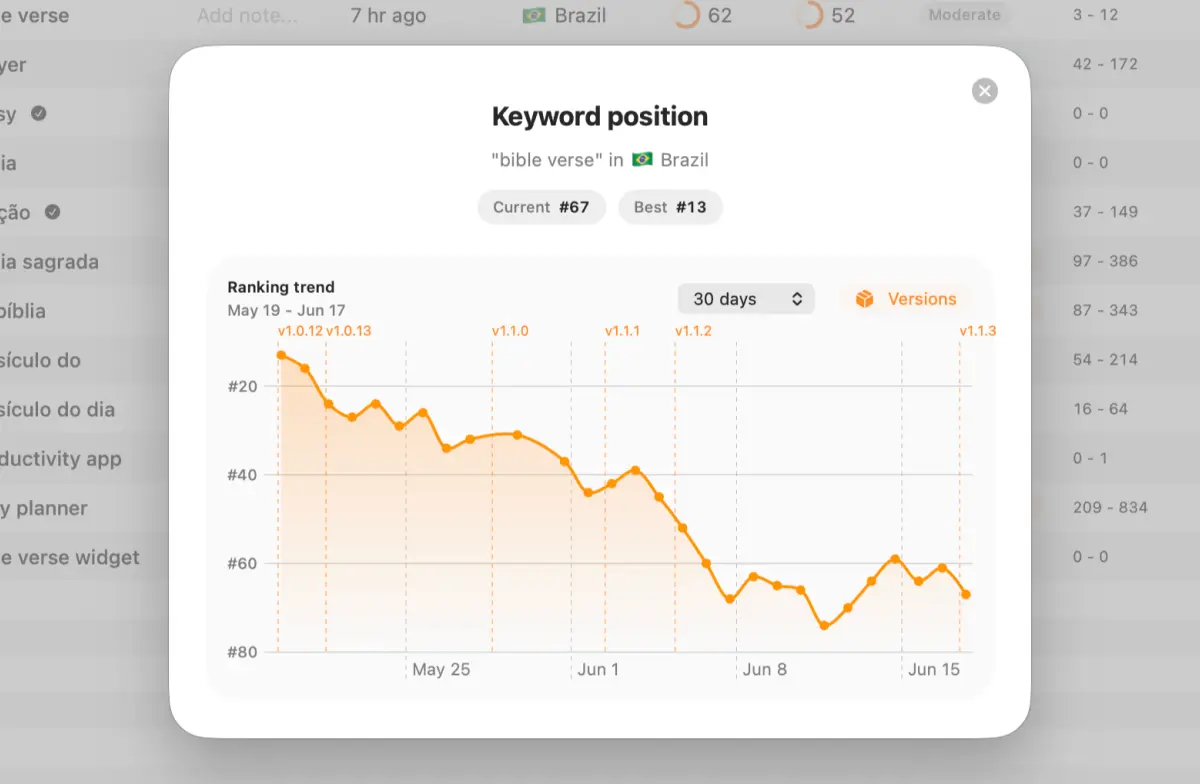
In App Analytics, compare impressions, product page views, conversion rate, and downloads. Apple defines conversion rate as total downloads and pre-orders divided by unique-device impressions. It covers a wider acquisition funnel than one keyword, so treat it as supporting evidence rather than proof that the target term caused every change.
Apple also notes that Apple Ads performance appears in the App Store Search source data. Mark paid campaign changes in the same log so a budget increase does not get credited to metadata.
A practical review rhythm is:
- First 24 hours: confirm the new listing is visible.
- Day 7: review rank direction and check the result page again.
- Day 14: compare search impressions, conversion, and downloads with the baseline.
- Day 28: keep the change, refine one constraint, or restore a valuable concept that was lost.
Daily tracking is useful for seeing movement. Daily rewriting destroys the experiment.
The post-update rank tracking workflow has the detailed measurement template. If the update produced a broad decline, use the ranking-drop recovery guide before rolling everything back.
A focused ranking loop
For the next update, choose five terms: one primary target, two supporting phrases, and two valuable rankings to protect. Keep them tied to the relevant countries.
Research the current result page. Change the smallest coherent part of the listing. Confirm it is live, then measure position and acquisition over a normal cycle.
AppSprint rank tracking keeps keyword history, country context, app versions, and competing apps beside the change that produced the movement.
FAQ
How do I improve my App Store search ranking?
Target one relevant keyword in one storefront, strengthen its fit across your app name, subtitle, keyword field, and category, then improve the icon, rating, and first screenshots users see in the result. Track the keyword and App Store Search acquisition metrics after the update.
What affects App Store search ranking?
Apple says App Store search considers text relevance, including matches in the app title, subtitle, keywords, and primary category, as well as user behavior such as downloads, ratings, and reviews. Apple does not publish a complete weighting formula.
Does the App Store description affect keyword ranking?
Apple does not list the description among the text-relevance fields used for App Store search. Apple explicitly says promotional text does not affect search ranking. Use the description and promotional text to explain the product, not to repeat keywords.
How long does an App Store ranking change take?
Apple says updated app information can take up to 24 hours to appear in some countries or regions. Confirm the metadata is live first, then review rank movement across at least a normal weekly cycle instead of judging one daily snapshot.
Can a custom product page appear in App Store search?
Yes. Apple lets you assign keywords to custom product pages so an intent-specific page can appear for those searches instead of the default product page. Each keyword combination should be unique to one custom product page.
Sources
- App Store search - Apple's current search factors, keyword guidance, visible result elements, categories, ratings, custom product pages, and measurement guidance
- App information reference - Current name and subtitle limits
- Platform version information - Keyword-field, description, and promotional-text definitions
- Manage App Tags - Current U.S. App Tags behavior and controls
- App Store Connect Analytics metric definitions - Official acquisition metric definitions
- View and edit app information - Searchable metadata fields and Apple's 24-hour display note
Research, analyze, optimize
Find the right keywords, study the competitors already earning attention, and turn that into a stronger App Store page.
Available for macOS 14.6 and above


Loved by 544 users
Related articles
See all posts →
App Store Rank Tracking After a Metadata Update
Track keyword rankings before and after an App Store metadata update, separate visibility from conversion, and decide what to keep or change next.

How to Find Your Competitors' App Store Keywords
Find competitors' App Store keywords from public rankings, metadata, result pages, and country gaps, then turn the evidence into a focused ASO test.
How to Recover From an App Store Ranking Drop
Diagnose an App Store keyword ranking drop, separate metadata problems from market movement, and choose the safest recovery action.