App Store keyword research: a practical walkthrough
Find and choose App Store keywords with a country-specific research process, a real keyword-table example, and a worksheet for your next metadata update.

App Store keyword research starts with a specific job your app does. Collect the phrases someone might use to find that job, check them in the country you want to reach, then choose terms that fit both your product and the results already appearing for that search.
You'll need a candidate list, a way to check current results, and a record of what you changed. The keyword research worksheet gives you a blank table and release log you can copy into your own notes.
If you already have a term to investigate, open the free App Store keyword checker. The process below explains how to decide what to do with the result.
Build your first keyword list
Choose one country and one use case. For an instrument-practice app, the starting list might include "practice log", "music timer" and "instrument tracker". These are hypothetical candidates; each still needs research.
Write down the words a user would use before they know your app's name. Include the task, the problem and any feature that changes the search. A timer for musicians and a timer for cooking share a function, but the person searching may expect very different products.
Expand the list in a few places:
- Type the beginning of a phrase into App Store search and note relevant suggestions.
- Read the names and subtitles of apps serving the same use case.
- Look at how those apps explain their features in screenshots and descriptions.
- Add phrases you've heard in your own reviews or support conversations, if you have them.
Apple describes search hints as suggestions that appear while someone types. A suggestion is worth investigating, but its presence doesn't tell you how many searches it receives.
For a first pass, stop when you have enough candidates to compare. Collecting another hundred phrases won't help if you haven't checked the first ten.
What makes a good App Store keyword?
Before looking at a score, ask whether the app delivers what the term promises. Reject an irrelevant term even if it looks popular.
For the remaining candidates, record:
| Field | What to write down |
|---|---|
| Country | The storefront you checked |
| User intent | What someone expects to do after installing |
| Demand signal | The metric, its provider and the observation date |
| Competition | Which apps rank, how closely they fit, and what makes your app worth considering |
| Current position | Your app's observed rank, or the checked depth if it wasn't found |
| Decision | Test, investigate later, protect an existing rank, or reject |
A difficulty score can help sort the list. Open the actual results before committing valuable title or subtitle space. If every leading app solves a different problem, the phrase may mean something other than what you expected.
Apple names text relevance and user behavior among its search factors. It doesn't publish a formula that lets you turn ratings, downloads or metadata into a guaranteed position. Treat your shortlist as a set of testable choices.
Read a keyword table without chasing the biggest score
This is an existing AppSprint product screenshot, not a fresh market measurement. It shows why country and current position belong beside a demand score.
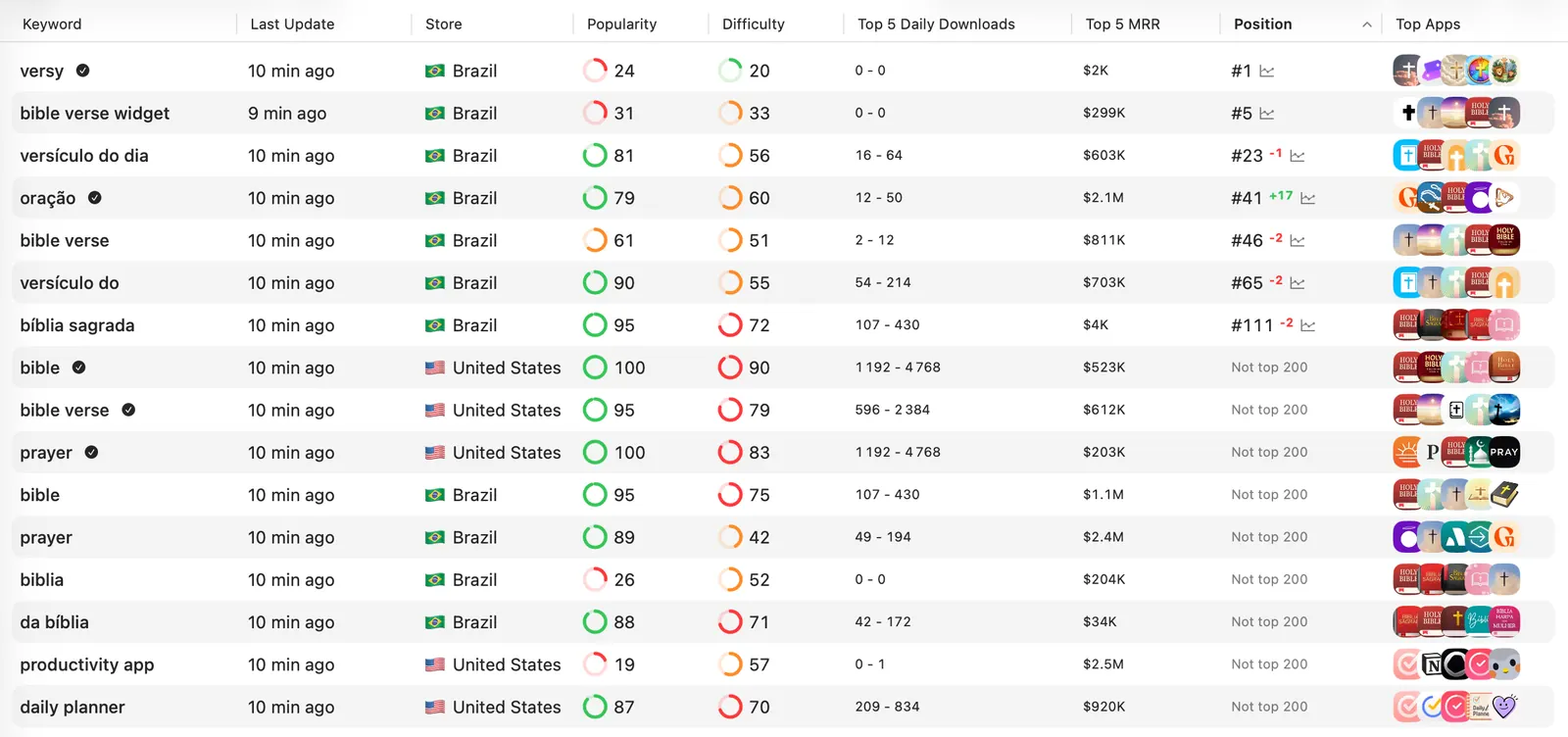
In this saved view, "bible verse widget" in Brazil has popularity 31, difficulty 33 and position 5. "bible verse" in the US has popularity 95, difficulty 79 and no position in the top 200.
That doesn't establish which term is better for your app. It gives you different questions to investigate:
- Does your app actually offer a widget? If it doesn't, the more specific phrase fails the relevance check.
- Can you support the Brazilian storefront and the people searching there?
- Is there an existing position worth protecting before you replace metadata?
- What would make your app competitive for the broader US phrase?
Keep scores in their original units. A popularity value of 95 isn't 95 monthly searches. Download and revenue estimates are separate fields, and this screenshot doesn't prove a keyword caused either outcome.
Use competitors to find gaps, not copies
A competing app's name and subtitle are visible. Its private keyword field isn't exposed in the public listing. Use the searches where it appears to build candidates rather than assuming you know the exact metadata behind its ranking.
Pick a category leader and an app closer to your stage. Inspect the same searches in the same country. Note which terms fit your app, where you already rank, and where the competing results leave a useful product difference you can explain.
The competitor keyword walkthrough covers this part in detail. Keep the resulting candidates in your research table so you can compare them with the phrases you found elsewhere.
Put keywords in the right fields
Your app name and subtitle each allow up to 30 characters, as described in Apple's product-page guidance. Use that visible space to explain the app clearly. A phrase that technically fits but makes the name hard to read is a poor trade.
Apple's keyword rules allow 100 characters in the keyword field. Separate terms with commas, without spaces after them; spaces within a phrase are allowed. Avoid repeating the name, subtitle or category, duplicate plural forms, generic filler, irrelevant terms and competing app names. Protected names require authorization. Promotional text doesn't affect search ranking.
Here's a hypothetical allocation for an instrument-practice app. It's a formatting example, not a researched keyword recommendation:
| Field | Example | Characters |
|---|---|---|
| App name | Cadence: Practice Log | 21 |
| Subtitle | Music timer and progress | 24 |
| Keyword field | instrument,metronome,routine,session | 36 |
The example keeps "practice" and "log" out of the keyword field because they're already in the name. It also leaves space unused. Fill the field only with terms you can justify from the research and features the app actually provides.
Before submitting, save the previous metadata in the worksheet. You'll want it if a useful ranking disappears.
Choose a small test
Suppose your app does track instrument practice, but doesn't contain a metronome. Remove "metronome" from the example immediately. A related feature is still an inaccurate keyword when the app doesn't offer it.
Then choose a coherent change. You might test a more specific subtitle while keeping the screenshots and pricing stable. Write down the intended search, the current position and what would count as useful progress.
Avoid promising yourself a top-ten result by a particular date. A better review note is: "Check whether these terms gain sustained visibility in the US, while the searches that already bring downloads remain stable."
The worksheet includes room for rejected candidates. Keep them there with a reason; otherwise it's easy to rediscover the same tempting but unsuitable keyword next month.
Track keywords after every change
Record the release date and confirm the new listing is visible before assessing it. Compare the same keywords in the same countries and keep a few unchanged terms as context.
Use App Store Connect Analytics to review impressions, product page views and downloads alongside rankings. A position change alone doesn't tell you whether more people found and installed the app.
If ranks improve but downloads don't, check the demand and listing conversion before replacing every keyword. If a term stays outside the checked range, revisit its relevance and competition. One quiet day is weak evidence for another metadata change.
The post-update rank-tracking guide explains the measurement step. For another country, use the localizations reference and research local phrasing before translating your entire list.
Questions that come up during research
How many keywords should I track?
Try 10 to 20 terms in your main country if you need a manageable starting point. This is a suggested workload, not a ranking rule. Include terms you want to gain and existing positions you want to protect.
Should I target the highest-popularity term?
Only if the intent fits and you have a credible reason someone would choose your app among the results. Keep broader terms on the research list, but don't let their scores crowd out more specific use cases.
Can I do the first pass for free?
You can collect candidates from public listings and search hints, then inspect them with the free keyword checker. Save what you observed, including the country and date, so the next comparison has a baseline.
Sources
Research, analyze, optimize
Find the right keywords, study the competitors already earning attention, and turn that into a stronger App Store page.
Available for macOS 14.6 and above


Loved by 544 users
Related articles
See all posts →Free App Store Keyword Tool: What to Check First
Use a free App Store keyword tool to check demand, difficulty, country fit, and competitors before editing your title, subtitle, or keyword field.

Best ASO APIs for Custom Dashboards: 7 Providers
Compare 7 ASO API providers for keyword ranks, store search results, metadata, reviews, estimates, cost controls, and custom dashboard architecture.

App Store Rank Tracking After a Metadata Update
Track keyword rankings before and after an App Store metadata update, separate visibility from conversion, and decide what to keep or change next.