Apple Ads and ASO: A Paid-to-Organic Workflow
Use Apple Ads search terms, conversion, and downstream value to choose better ASO metadata and product-page tests without confusing paid and organic results.

Apple Ads can improve ASO decisions. It does not provide a documented shortcut to higher organic rankings.
The useful connection is an evidence loop:
- Observe the search terms people used before seeing or tapping an ad.
- Check whether those people downloaded and reached meaningful product value.
- Decide whether the lesson belongs in metadata, screenshots, a custom product page, onboarding, or nowhere.
- Make one controlled ASO change.
- Measure paid and organic behavior without treating them as the same channel.
This turns ad spend into market research while keeping the conclusion honest.
Keep the paid and organic systems separate
Apple Ads search-results campaigns and organic App Store search share the same customer searches, but they do different jobs.
For ads, Apple considers the app's relevance to the query and the bid when deciding whether the ad enters and wins an auction. Organic search uses factors that include text relevance—matches to the title, subtitle, keyword metadata, and primary category—and customer behavior such as downloads, ratings, and reviews.
An ad impression does not prove that the app can rank organically. A paid install does not prove that a phrase belongs in metadata. A strong paid cohort does tell you that the search job may be worth investigating.
Use each signal for the question it can answer:
| Signal | What it can tell you | What it cannot prove |
|---|---|---|
| Ad impressions | Apple found enough paid relevance and auction opportunity to show the ad | Exact organic search volume or ranking potential |
| Tap-through rate | The result earned attention for that paid audience | Full product-page conversion or product value |
| Tap-through installs and new downloads | People who tapped went on to download | Retention, paid conversion, or organic rank |
| Search popularity | Relative demand in Apple's keyword tools | An exact search count or a profitable market |
| Trial, purchase, revenue, or retention | The acquired user reached deeper value | That metadata alone caused the outcome |
| Organic rank by query and storefront | Whether visibility changed after an ASO edit | Incremental downloads from that query by itself |
The App Store ranking guide owns the organic ranking workflow. This guide owns the handoff from paid query evidence to the next ASO experiment.
1. Export search terms, not only keywords
A keyword is the targeting input. A search term is what the customer typed.
The distinction matters because broad match can reach related searches and Apple's exact match can include close variants such as spelling changes, reordered words, and translations. Search Match can find terms without a manually added keyword.
Apple's Search Terms tab provides the comprehensive campaign or ad-group view, including Search Match performance. Export it at a consistent cadence and keep these fields when available:
- Date range and App Store country or region.
- Search term and match source.
- Targeted keyword and match type, when one exists.
- Campaign, ad group, and ad or custom product page.
- Impressions, taps, and tap-through rate.
- Tap-through installs, new downloads, and conversion rate.
- Spend, average cost per tap, and tap-through cost per acquisition.
- Activation, trial, purchase, proceeds, revenue, or retention from your product data.
Choose one attribution view and stay consistent. Apple's reporting distinguishes tap-through, view-through, and total installs. Mixing total installs in one week with tap-through new downloads in the next makes the ASO candidate list look more precise than it is.
The match-types guide explains why the targeted keyword and the actual search term can differ.
2. Remove terms that should not influence ASO
Do not promote a query into metadata because it produced a tap or one cheap install.
Remove or quarantine terms that are:
- Irrelevant to the product's actual function.
- A competitor name or protected term that cannot be used in metadata.
- Driven by an offer, event, or feature that is no longer available.
- Specific to a country or language that the product does not support.
- Mostly redownloads when the goal is new-user acquisition.
- Too immature to judge because trials, refunds, or renewals are still unresolved.
- Attached to broken attribution, a temporary price change, or a product incident.
Apple's current search guidance says the keyword field should contain accurate, relevant terms. It warns against competing app names, unauthorized protected terms, and irrelevant keywords. Paid targeting support is not permission to place the same term in App Store metadata.
For irrelevant paid searches, use a negative keyword or stop targeting them. ASO is not a way to rescue a search job the product does not satisfy.
3. Score the remaining search jobs
Evaluate the search term as a customer job rather than as a string.
For each candidate, answer six questions:
- Intent: Can you state what the searcher wants in one sentence?
- Product fit: Does the app deliver that outcome today?
- Acquisition quality: Do downloads reach activation, trial, purchase, or retained value?
- Organic gap: Is the app weak or absent for that query in the target storefront?
- Metadata fit: Can the phrase fit naturally in the name, subtitle, keyword field, category, or localized positioning?
- Evidence quality: Is the sample mature enough to act on, without a tracking or campaign confounder?
Do not create a universal minimum such as “ten installs means proven.” A high-priced subscription and a free utility mature differently. Set the evidence rule before reading the winner, cap spend while the cohort matures, and record uncertainty.
4. Diagnose the funnel before changing metadata
The paid pattern tells you where to investigate next.
| Paid pattern | Likely question | First action |
|---|---|---|
| Impressions, few taps | Does the visible result match the search job? | Review name, subtitle, icon, first screenshots, rating, and ad variation |
| Taps, weak installs | Does the product page prove the promise? | Improve the page or build an intent-specific custom product page |
| Installs, weak activation | Does onboarding deliver the advertised outcome? | Fix the first session before seeking more organic reach |
| Activation or trials, weak paid conversion | Is the offer, price, or paywall aligned? | Repair monetization or wait for cohort maturity |
| Mature downstream value, weak organic rank | Is there a genuine metadata relevance gap? | Prepare a controlled ASO metadata test |
| Mature value, strong organic rank | Is paid coverage incremental and efficient? | Defend deliberately or test a nearby search job |
This prevents a common mistake: changing keywords when the problem is the product page or onboarding.
The screenshot optimization guide covers the visual-conversion layer. The custom product page guide covers intent-specific Apple Ads creative and activation.
5. Choose the right ASO surface
A valuable paid query can influence several surfaces. Pick the one that matches the diagnosis.
Name, subtitle, or keyword field
Use metadata when the term describes a durable, central product job and the app has an organic relevance gap.
Apple currently limits the keyword field to 100 characters and advises against repeating terms already used in the name, subtitle, or category. Promotional text does not affect search ranking. Treat every character as a portfolio decision: adding one term means removing or deprioritizing another.
Do not rewrite the entire metadata set around one paid winner. Group close terms into a coherent intent and preserve the phrases already producing valuable organic visibility.
Screenshots or app preview
Use visual assets when people tap but do not download, or when the result does not make the intended outcome believable. Up to three screenshots or an app preview can appear in search depending on the platform and orientation.
Screenshot captions help recognition and conversion. They are not a substitute for indexed metadata.
Custom product page
Use a custom product page when the search job is valuable but too narrow for the default page. Apple Ads can route an ad variation to a page with tailored screenshots, previews, promotional text, and a deep link where supported.
This lets you validate the promise before making it the default story for every visitor.
Product or onboarding
Use product work when installs fail to reach the first useful event. More metadata visibility will amplify the same expectation gap.
No ASO action
Some profitable paid terms should stay paid. They may be too competitive organically, too seasonal, too narrow, or incompatible with the metadata portfolio. “No edit” is a valid decision.
6. Write one controlled hypothesis
Turn the candidate into a statement that can fail:
For [storefront and localization], adding [term or concept] to [surface] should improve [organic visibility or conversion measure] because paid search-term cohorts reached [qualified outcome]. We will hold [important confounders] stable and review after [date].
Example:
For US English, adding “5K training plan” to the subtitle should improve organic visibility for the 5K-plan cluster because exact and close-variant paid cohorts produced mature trial starts and paid subscriptions. We will keep the default screenshots, price, and campaign budget stable and review rank plus App Store search acquisition after 28 days.
Before shipping, save:
- Organic rank for the candidate cluster in the exact storefront.
- Current title, subtitle, keyword field, category, and screenshots.
- App Store Connect acquisition metrics by territory and device.
- Apple Ads search-term metrics for the same market and date window.
- Downstream activation, subscription, revenue, or retention at a fixed cohort age.
- Other releases, price changes, featuring, or campaigns that may affect the result.
Metadata availability depends on the property's current App Store Connect state and release workflow. Apple notes that app-information changes can take up to 24 hours to appear, so record when the live storefront actually changes rather than starting the test clock at the moment you click Save.
7. Do not call combined App Store search traffic organic
This is the measurement trap that breaks most paid-to-organic reports.
Apple defines the App Store search source in App Store Connect Analytics as views and downloads from search—and explicitly says it includes ads shown in App Store search results. A rise in that source while an Apple Ads campaign is growing does not prove the ASO update worked.
Use four coordinated views:
- Apple Ads: paid impressions, search terms, taps, attributed installs or new downloads, spend, and the chosen attribution view.
- Organic visibility: query rank and result-page appearance by storefront, captured at a consistent time and device context.
- App Store Connect: combined App Store search impressions, product page views, downloads, conversion, and downstream acquisition quality.
- Product analytics: activation, trials, purchases, revenue, refunds, and retention tied to the most reliable source detail available.
Do not simply subtract Apple Ads installs from App Store Connect search downloads. The products use different definitions, attribution windows, privacy thresholds, and dimensions. Use the paid report to explain paid movement, then read rank and combined search trends with the limitations written beside them.
If the decision is valuable enough, use a stable campaign window or a carefully chosen market holdout. Do not pause a profitable campaign merely to make a cleaner chart unless the expected learning justifies the business cost.
A worked decision example
Suppose a running app tests the search job “5K training plan” in one storefront. The following numbers are hypothetical, not benchmarks:
| Metric | Result |
|---|---|
| Ad impressions | 6,000 |
| Taps | 360 |
| Tap-through new downloads | 90 |
| Mature trial starts | 24 |
| Paid subscriptions | 9 |
| Current organic rank | 38 |
The calculated TTR is 6%, the tap-to-new-download rate is 25%, the tap-to-trial rate is 6.7%, and the tap-to-paid rate is 2.5%.
Those ratios do not automatically approve the metadata edit. The operator still checks allowable acquisition cost, refund and renewal behavior, exact query-to-product fit, current keyword-field coverage, and whether the evidence comes from the intended country.
If the economics work and the phrase describes the product honestly, the query is a credible ASO candidate. If installs are healthy but trials are not, the same data points to onboarding—not metadata.
Run a weekly paid-to-organic review
Use a small decision log rather than a dashboard full of unowned metrics.
| Search job | Paid evidence | Organic state | Bottleneck | Decision | Review date |
|---|---|---|---|---|---|
| 5K training plan | Mature paid subscribers | Rank 38 in US | Metadata relevance | Test subtitle cluster | September 6 |
| Running tracker | Taps, weak installs | Rank 12 in US | Product-page proof | Test first screenshot | September 6 |
| Marathon coach | Installs, no activation | Rank 54 in US | Product fit | No ASO expansion | After onboarding fix |
End each row with one owner and one action:
- Test metadata.
- Test the first screenshot.
- Build a custom product page.
- Fix onboarding or the offer.
- Add a negative keyword.
- Keep the term paid only.
- Wait for maturity.
- Take no action.
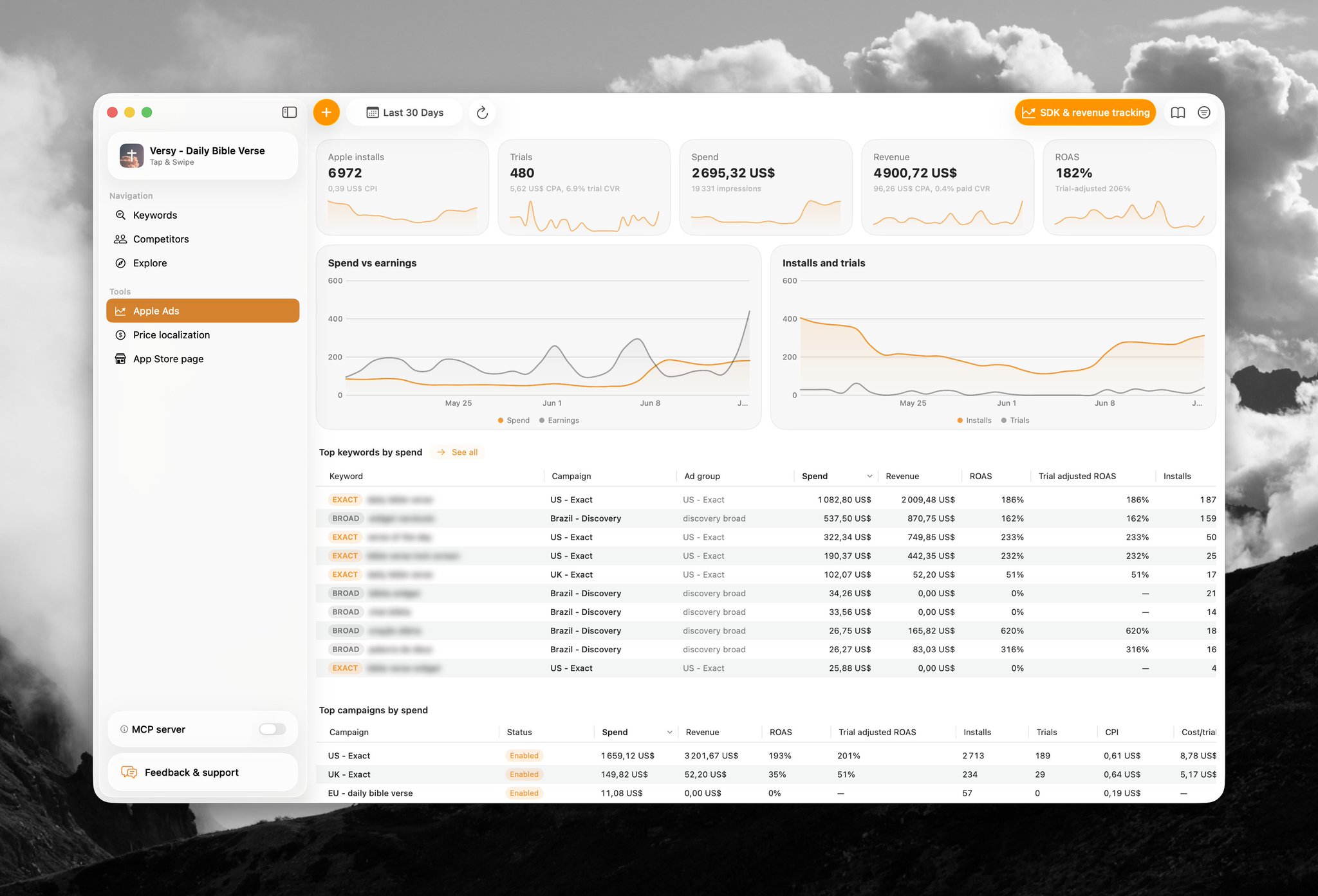
Use AppSprint Apple Ads analytics to review keyword spend, installs, trials, revenue, ROAS, popularity, impression share, and organic ranking context without collapsing the paid and organic systems into one metric.
Sources
- Apple Ads: Understand dashboards and settings - Current Search Terms tab scope, including keyword and Search Match performance
- Apple Ads: Reporting options and definitions - Current search-term, match-source, popularity, TTR, conversion, install, and new-download definitions
- Apple Ads: Understand match types - Current broad, exact, close-variant, and Search Terms behavior
- Apple Ads: Search results - Current relevance and bid role in search-results ad delivery
- Apple: App Store search - Current organic search inputs, keyword-field guidance, prohibited keyword uses, and visible result-page elements
- Apple: Creating your product page - Current metadata, screenshot, keyword, and product-page guidance
- Apple: Custom product pages - Current custom-page assets, URLs, deep links, and Apple Ads support
- Apple: App Store Connect acquisition - Current acquisition funnel and the combined paid-and-organic App Store search source definition
- Apple: View and edit app information - Current property-editing workflow and storefront update timing
Research, analyze, optimize
Find the right keywords, study the competitors already earning attention, and turn that into a stronger App Store page.
Available for macOS 14.6 and above


Loved by 544 users
Related articles
See all posts →
When to Pause an Apple Search Ads Keyword
Pause Apple Search Ads keywords when mature spend, weak funnel signal, and poor ROAS show the search intent is not paying back.

How to Track Apple Search Ads Revenue With Superwall
Use Superwall subscription events with Apple Search Ads attribution and spend to measure trials, paid conversions, revenue, and keyword ROAS.

How to Track Apple Search Ads Revenue With RevenueCat
Use RevenueCat revenue events with Apple Search Ads spend to see which campaigns and keywords create trials, subscriptions, renewals, and ROAS.