Apple Search Ads Bidding Rules: Raise, Hold, Lower, Pause
Set Apple Ads max CPT bids from unit economics, then use impression share, conversion, maturity, and policy checks to raise, hold, lower, or pause.

For an Apple Ads Manage Bids search-results campaign, raise a max CPT bid only when a relevant keyword has mature economics you want more of. Hold while the result is still maturing. Lower the bid when the outcome remains useful but costs too much. Pause when the traffic is irrelevant or a meaningful test has produced no credible downstream value.
That is the short version. The harder part is deciding whether the bid caused the problem. Often it did not.
Apple now calls the product Apple Ads, while many advertisers still search for Apple Search Ads. This guide uses both names for the same App Store advertising system.
The bidding decision table
Start here before changing anything.
| What you see | First decision | Why |
|---|---|---|
| Profitable, mature keyword; low share on a popular term | Raise in a small step | There may be useful volume left to win |
| Profitable, mature keyword; already high share | Hold | A higher ceiling may mostly buy pricier auctions |
| Valuable outcomes, but CPA or ROAS misses the target | Lower | Keep access to cheaper auctions while protecting margin |
| No impressions on a relevant, popular term | Diagnose, then consider raising | Relevance, status, targeting, budget, or the bid may be limiting delivery |
| Impressions but weak TTR | Fix relevance or creative | Paying more does not make the ad more persuasive |
| Taps but weak install conversion | Fix the product page or intent match | The leak occurs after the tap |
| Installs but weak activation, trials, or revenue | Fix targeting or the product funnel | Install CPA can hide low-value acquisition |
| Trials or purchases are still maturing | Hold with a review date | An early pause can discard a keyword that has not finished converting |
| Mature spend with no useful downstream signal | Pause | More of the same traffic is not a bidding strategy |
| Irrelevant search term from broad match or Search Match | Add a negative | Stop the query instead of merely making it cheaper |
A bid change should follow a diagnosis. It should not be the diagnosis.
First, check which bid strategy you use
Max CPT rules apply to Manage Bids campaigns. The max cost-per-tap bid is the most you are willing to pay for a tap. Apple says the actual price can be lower because its dynamic pricing considers relevance, your bid, other bids, user experience, reserve prices, and other auction factors.
Maximize Conversions campaigns use Apple's auto-bidder. You set and review a target CPA rather than manually changing keyword max CPT bids. If a campaign uses Maximize Conversions, do not translate every rule below into a manual keyword edit; assess the target CPA, budget, conversion quality, and campaign learning instead.
This distinction prevents a surprisingly common mistake: trying to optimize a control that the selected strategy does not expose.
Calculate an affordable max CPT ceiling
Apple's starting formula is straightforward:
Maximum affordable CPT = allowable cost per customer or action × estimated tap-to-action conversion rate
If you can afford $4 for an install and 30% of taps become installs, the starting ceiling is:
$4 × 0.30 = $1.20 max CPT
For a subscription app, install conversion is rarely the final answer. If a paid customer is worth a $30 acquisition cost and 4% of taps eventually become paid customers, the same calculation gives:
$30 × 0.04 = $1.20 max CPT
The second calculation connects the auction to the business outcome, but it needs a stable cohort and consistent attribution. A trial that converts seven days later cannot be judged like an immediate install.
Treat the result as a ceiling for a test, not an instruction to bid exactly that amount. Your estimate can be wrong, actual CPT can sit below the max, and conversion can change as a higher bid reaches different auctions.
Apple also provides a suggested max CPT when you create a campaign or ad group. Apple describes it as a reference based on the app and what advertisers with similar apps are willing to pay. It is an auction input, not your unit economics. If the suggestion exceeds your affordable ceiling, the auction does not become affordable because the interface recommended it.
One mechanical constraint matters too: Apple requires a new bid to be lower than the campaign's daily budget.
Use the right evidence before raising
A strong raise decision combines five signals:
- Relevance: The search term accurately describes a job the app can perform.
- Maturity: Delayed trials, purchases, and renewals have had time to arrive.
- Economics: CPA, proceeds, or ROAS meets the threshold you actually manage.
- Demand: Search popularity indicates the term can produce useful volume.
- Headroom: Impression share and rank suggest you are not already capturing most of the opportunity.
Apple's bid recommendations can add context. For exact-match keywords, the Recommendations page can show current impression share, rank, popularity, installs, spend, average CPA, average CPT, impressions, and TTR. Its estimates project installs, spend, and average CPA over seven days if the recommendation is applied.
Those estimates are not guarantees. They help form a test, while your allowable acquisition cost decides whether the test is acceptable.
If you were looking for a single bid strength score, use this evidence instead. Apple documents bid suggestions, bid recommendations, impression share, rank, and popularity as separate inputs. Collapsing them into one strong-or-weak label would hide the reason a keyword is not delivering.
The impression-share guide explains the percentage ranges and rank. The keyword-popularity guide shows how to read demand beside share.
When to raise a keyword bid
Raise when the keyword is producing the right outcome within your target and the auction appears to have useful headroom.
Apple's own bidding guidance names three practical cases:
- Search Match has found a relevant term that converts, and you want to test more delivery.
- A keyword converts below your CPA cap, leaving room to gain impressions while staying within target.
- A relevant, popular keyword has few impressions and may be losing auctions to other advertisers.
Use incremental changes. A small increase answers whether extra visibility can remain efficient. A large jump changes the auction mix so much that you learn less about where the margin disappeared.
Write the hypothesis before the edit:
running plan, US, exact match. Mature paid CAC is $22 against a $30 ceiling. Popularity is 4, impression share is 11–20%, and rank is greater than 5. Raise max CPT from $1.10 to $1.25, then review mature paid CAC and added revenue on August 23.
That note contains the keyword, market, match type, economics, auction evidence, old and new bids, and review date. It can be evaluated later without reconstructing your memory.
When to hold
Hold is an active decision, not indecision.
Hold when:
- The keyword has open trials or delayed purchase events that have not matured.
- The bid changed recently and the new delivery mix has too little evidence.
- Performance is healthy and impression share is already high.
- Demand is so small that a higher bid is unlikely to add meaningful volume.
- A product-page, price, onboarding, or tracking change would contaminate the comparison.
- The current result is close to the threshold and normal variation could explain the movement.
Every hold needs a date or condition. “Wait until the current trial cohort reaches its normal conversion window” is useful. “Check later” is how bad keywords stay live for three months.
There is no universal number of taps or dollars that makes a keyword mature. A low-price app with immediate purchase behavior and a high-price subscription with a long free trial need different windows. Define maturity from the outcome you value and the delay you actually observe.
When to lower
Lower a max CPT bid when the traffic has value but the price is wrong.
The clean case is a keyword producing installs or paid outcomes at a CPA above your cap. Apple notes that a lower bid can reduce CPA while also reducing impressions. That trade is the point: you remain eligible for cheaper auctions instead of paying the current price for all available volume.
Lowering also makes sense when:
- ROAS is positive but below the margin you require.
- A higher bid increased volume and pushed the added cohort outside target.
- The keyword matters strategically, but only at a smaller acquisition cost.
- Broad-match or discovery traffic is useful but should bid below proven exact-match traffic.
Apple recommends a tiered approach: the strongest bids for important exact-match keywords, less aggressive bids for broad match, and more moderate discovery bids. The match-types guide explains why those traffic pools deserve different ceilings.
Do not lower a relevant keyword merely because it had a quiet day. Compare consistent windows, account for cohort delay, and separate market and match type before deciding the price is structurally wrong.
When to pause or add a negative keyword
Pause the keyword when the test is mature and its expected value no longer justifies another tap.
Good pause candidates include:
- The search intent does not fit the product.
- The keyword repeatedly spends without installs or the downstream action that matters.
- Installs arrive, but activation, trials, purchases, or retained revenue remain materially weaker than the account target.
- The keyword already owns substantial impression share and still misses the economic threshold.
- A cheaper bid removed most delivery without revealing a viable auction range.
If the problem is a specific irrelevant search term produced by broad match or Search Match, add it as a negative keyword. Pausing the source keyword may also remove relevant queries. The campaign-structure guide shows how discovery, negatives, and exact-match promotion fit together.
Before pausing, record the reason and the maturity window. This makes reactivation deliberate if pricing, product positioning, or conversion later changes.
Diagnose the funnel before touching the bid
Apple's dashboards expose impressions, taps, TTR, installs, conversion rate, spend, average CPT, and CPA at different account levels. Use them to locate the leak.
| Funnel symptom | Likely question | Better first move |
|---|---|---|
| No impressions | Is the app relevant and eligible? Is demand present? Is targeting too narrow? Is budget or bid limiting delivery? | Check status, country, audience, relevance, popularity, budget, and recommendations |
| Impressions, low TTR | Does the listing look like the answer to this search? | Improve keyword fit, first screenshots, subtitle, or custom product page |
| Healthy TTR, low install conversion | Does the product page continue the ad promise? | Fix message continuity and proof |
| Installs, weak activation | Does onboarding deliver the searched job quickly? | Fix the first-use path or narrow targeting |
| Trials, weak paid conversion | Does the paywall and product value match the acquisition promise? | Improve monetization or lower the affordable bid |
| Paid users, weak revenue or retention | Is this cohort genuinely valuable? | Lower, pause, or use a stricter value signal |
Raising a bid only addresses limited auction access. It does not repair the other five rows.
The custom-product-page guide covers intent-specific creative when the leak is between the search and the listing.
Use keyword revenue, not install CPA alone
Apple reports the ad-side funnel. A subscription business also needs its own trial, purchase, proceeds, and revenue events attached to the acquired cohort.
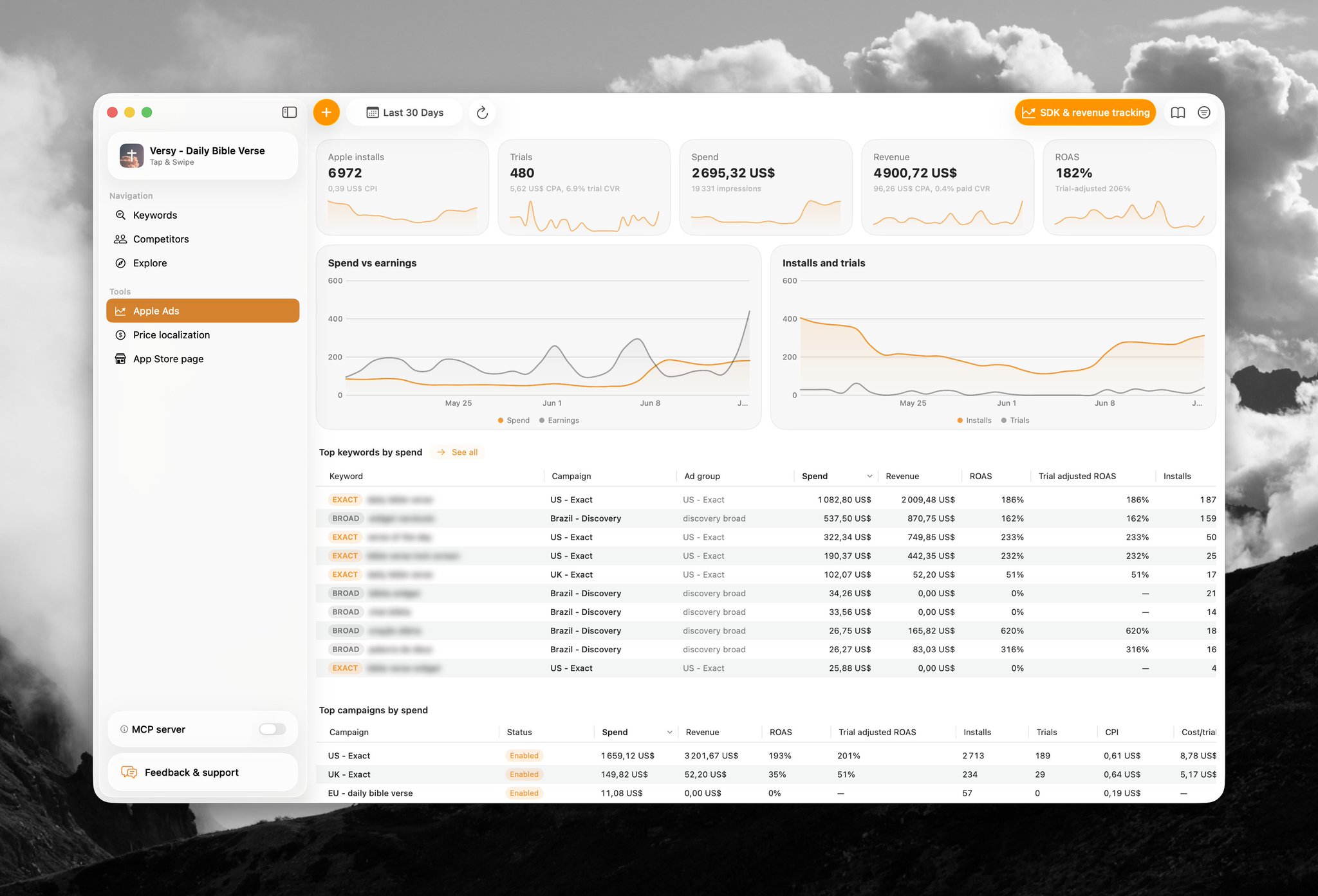
An install can be cheap and still be a poor purchase. Conversely, a keyword with a higher install CPA can be worth scaling if its users start trials, pay, and retain at a higher rate.
The keyword ROAS playbook covers the cohort and payback calculation in detail. AppSprint's role is to keep spend, trials, revenue, ROAS, popularity, and impression share close enough that the bid rule is based on one coherent result.
Competitor and trademark keywords: platform support is not legal clearance
Apple explicitly documents competitor keywords as a campaign category. Its keyword guidance says competitor terms can help an ad appear for queries focused on similar apps, and its campaign-structure guidance recommends separating competitor exact-match traffic for control.
That answers the platform question: Apple Ads supports adding competitor keywords.
It does not answer every legal or trademark question. Apple's advertising policies prohibit use that violates third-party intellectual-property rights and require compliance with the laws of each country or region where the ad runs. Apple's current terms also place responsibility for keyword selections and other targeting decisions on the advertiser.
Use this practical boundary:
- Keep the targeted term relevant to what the app actually provides.
- Do not put another party's logo, artwork, or other protected material into the product page or ad assets without the required rights.
- Do not imply affiliation, endorsement, or a product capability that is not true.
- Review the countries where the campaign runs; legal requirements can differ by jurisdiction.
- For a material trademark risk, get advice from qualified counsel rather than treating platform acceptance as approval.
This section is operational guidance, not legal advice. Apple's allowing a keyword into the interface does not waive the advertiser's obligations.
If an ad says “on hold,” a higher bid is not the fix
Apple documents an On Hold status for custom-product-page ad variations. It can occur when page assets are incompatible with the ad group's country, region, or device; when the custom product page is disabled; or, for mainland China, when required creative authorization documentation is rejected.
Resolve the page, compatibility, or documentation issue first. Apple says an updated or reenabled page can leave the ad paused until you activate it again. A max CPT increase will not clear that status.
Keep a bid-change log
Use one row per decision:
| Field | Example |
|---|---|
| Date | 2026-08-09 |
| Campaign / ad group | US Category / Training Plans |
| Keyword / match | running plan / exact |
| Old → new max CPT | $1.10 → $1.25 |
| Reason | Paid CAC within target; popularity 4; share 11–20% |
| Other controls | Budget, creative, audience unchanged |
| Review condition | Paid cohort mature through 2026-08-23 |
| Result | Added spend, paid customers, revenue, marginal ROAS |
Judge the increment, not only the new blended average. If spend rose by $100 and mature revenue rose by $120, the marginal result may be weaker than a previously excellent blended ROAS suggests.
Change one meaningful control at a time when possible. If you raise the bid, replace the product page, broaden the audience, and increase the budget on the same day, the dashboard can show improvement without telling you why.
A weekly bidding routine
- Separate Manage Bids from Maximize Conversions campaigns.
- Review status and tracking before reading performance.
- Split results by country, keyword, match type, and search term.
- Mark cohorts that are mature enough for the desired action.
- Add negatives for irrelevant discovery terms.
- Diagnose TTR, install conversion, activation, and revenue before blaming the auction.
- Compare the max CPT with your affordable ceiling.
- Read popularity, impression share, rank, and recommendations for proven exact-match terms.
- Assign one action: raise, hold with a date, lower, pause, or fix another part of the funnel.
- Log the change and review its marginal result after maturity.
The routine is intentionally boring. Good bidding is a sequence of small, attributable decisions—not a weekly ritual of applying every recommendation.
Review Apple Ads bidding decisions in AppSprint with keyword spend, trials, revenue, ROAS, popularity, and impression share in one workflow.
Sources
- Apple Ads: Set and adjust bids - Max CPT definition, affordability calculation, dynamic pricing, suggested-bid context, editing, and budget constraint
- Apple Ads: Considerations for keyword bids - Current raise, lower, and tiered-bidding guidance
- Apple Ads: Review recommendations - Exact-match bid recommendations, current metrics, seven-day estimates, impression share, rank, popularity, and no-guarantee language
- Apple Ads: Add and manage keywords - Manage Bids, Maximize Conversions, competitor keywords, match types, and keyword-management guidance
- Apple Ads: Set and adjust a CPA cap - Optional CPA-cap behavior and its interaction with bid ceilings
- Apple Ads: Campaigns dashboard metrics - Current ad-side funnel metrics and reporting levels
- Apple Ads advertising policies - Advertiser responsibility, applicable law, intellectual property, substantiation, and misleading-content rules
- Apple Advertising Services Terms of Service - Current responsibility for targeting, keyword choices, legal compliance, and third-party rights
- Apple Ads: Ad variations troubleshooting - Current custom-product-page ad On Hold causes and next states
Research, analyze, optimize
Find the right keywords, study the competitors already earning attention, and turn that into a stronger App Store page.
Available for macOS 14.6 and above


Loved by 544 users
Related articles
See all posts →
When to Pause an Apple Search Ads Keyword
Pause Apple Search Ads keywords when mature spend, weak funnel signal, and poor ROAS show the search intent is not paying back.

How to Track Apple Search Ads Revenue With Superwall
Use Superwall subscription events with Apple Search Ads attribution and spend to measure trials, paid conversions, revenue, and keyword ROAS.

How to Track Apple Search Ads Revenue With RevenueCat
Use RevenueCat revenue events with Apple Search Ads spend to see which campaigns and keywords create trials, subscriptions, renewals, and ROAS.