Apple Search Ads Campaign Structure: A Practical Setup
Build an Apple Search Ads campaign structure with brand, category, competitor, and discovery campaigns, clean budgets, bids, negatives, and naming.

For a manually managed Apple Search Ads account, give four separate jobs to your search results traffic: brand, category, competitor, and discovery.
Brand, category, and competitor campaigns hold the terms you already understand. Their keywords use exact match, and Search Match stays off. Discovery finds new searches through one broad-match ad group and one separate Search Match ad group.
That is the full structure. The hard part is deciding which layer owns the budget, bid, market, keyword, and creative. Once those boundaries are clear, the account becomes much easier to read.
First, know which “campaign type” you mean
Apple uses campaign structure in two different ways.
The first is ad placement. A campaign can run on the Today tab, Search tab, in search results, or across product pages. This guide is about search results, because that is the placement where keywords, match types, and Search Match shape the account.
The second is the job of a manually managed search results campaign. Apple's current structure guidance recommends four keyword themes:
| Campaign job | What belongs in it | Default matching approach |
|---|---|---|
| Brand | Your app, company, and brand terms | Exact match, Search Match off |
| Category | Nonbrand searches that describe the app or its job | Exact match, Search Match off |
| Competitor | Relevant app and company names in the same or a related category | Exact match, Search Match off |
| Discovery | Searches you have not promoted into a controlled campaign yet | Broad match plus a separate Search Match ad group |
These are jobs, not labels you must copy blindly. A new app may have almost no brand demand. A sensitive category may decide competitor traffic is not worth testing. Keep the boundaries even if one campaign starts paused or empty.
Map each decision to the right layer
Apple's editable hierarchy is account, campaign, ad group, then keyword. The search term sits beside that hierarchy as the reporting truth: it is the query that actually triggered the ad.
| Level or report row | What it controls or reveals | The question it should answer |
|---|---|---|
| Campaign | Placement, bid strategy, countries or regions, daily budget, schedule | Where can this traffic run, and how much can this job spend? |
| Ad group | Keyword theme, default max CPT bid, Search Match, audience refinements, negatives, ad variation | Which intent and setup produced this result? |
| Keyword | Search target, exact or broad match, optional bid override | Which known term deserves control? |
| Search term | The query that actually triggered the ad | What did the customer search for? |
Apple's ad group documentation confirms that search results ad groups can contain bids, audience settings, keywords, negative keywords, and ad variations. A keyword-level max CPT overrides the ad group's default bid for that keyword.
This hierarchy prevents a common reporting mess. If one ad group contains photo cleaner, AI portrait editor, and collage maker, the ad group average does not describe one intent. It describes three different promises sharing a row.
The four-campaign setup
Here is the structure I would use for a US photo-cleanup app with manual keyword bids.
| Campaign | Example ad group | Keywords or setting | Purpose |
|---|---|---|---|
| `US | Search results | Brand` | `Brand |
| `US | Search results | Category` | `Photo cleanup |
| `US | Search results | Competitor` | `Competitors |
| `US | Search results | Discovery` | `All terms |
| `US | Search results | Discovery` | `Search Match |
The campaign names expose market, placement, and job. The ad group names expose theme and matching behavior. You can understand a downloaded report without opening the account to decode Campaign 7.
If the app has two genuinely different category intents, such as duplicate-photo cleanup and video compression, give them separate ad groups. Split them into separate campaigns only when they also need separate budgets or market decisions.
Build discovery without letting it swallow the account
Discovery needs two ad groups because broad match and Search Match learn in different ways.
Broad-match ad group
Copy the useful terms from brand, category, and competitor into this ad group as broad-match keywords. Keep Search Match off. This lets you see which bidded keyword led Apple toward a wider search.
Search Match ad group
Do not add bidded keywords. Turn Search Match on. Apple uses information such as the app's product-page metadata, similar apps, and other search data to match the ad with relevant queries.
Exact-match negatives
Add the exact keywords already controlled by brand, category, and competitor as exact-match negatives in discovery. Apple recommends this setup so discovery can explore related demand without being the main home for terms you already manage elsewhere.
When a discovery search term produces a result you trust:
- Add it as an exact-match keyword to brand, category, or competitor.
- Add the same term as an exact-match negative in discovery.
- Give it a bid based on its own conversion and revenue evidence.
- Keep watching the actual Search Terms report for close variants and new queries.
One cheap tap is not enough evidence to promote a term. For a subscription app, I want to see the downstream event the campaign is meant to buy, such as a mature trial, paid conversion, or acceptable ROAS.
The match-type guide covers exact, broad, Search Match, and negative behavior in detail. This page owns the account layout.
Decide whether countries need separate campaigns
One country per campaign is useful when each market needs a dedicated budget, has a distinct goal, or produces meaningfully different customer value. It also makes a small experiment easier to diagnose because spend and conversion are not blended across storefronts.
It is not an Apple requirement. Apple's country and region guidance also supports grouping markets when management simplicity matters or the countries share attributes such as language, customer value, region, or financial ownership.
My small-budget default is one market for the first category test. That gives the keyword, product page, price, and subscription funnel one shared context. After the app has a baseline, I group markets only when I can explain why they should share a budget.
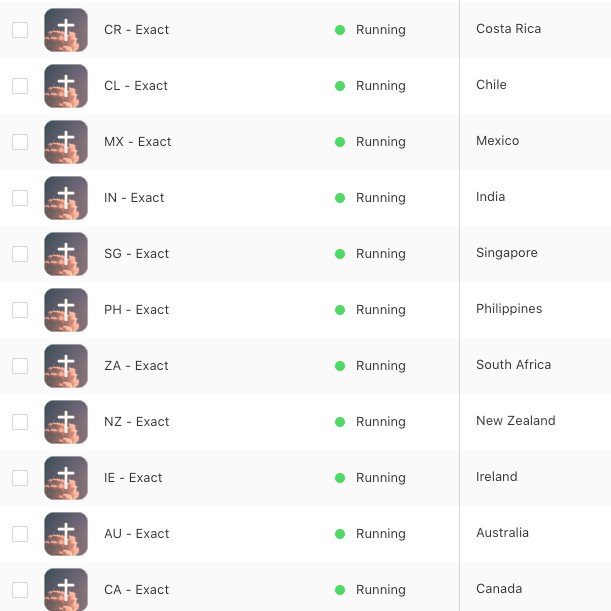
Avoid copying the same bid into every country. Search demand, competition, price localization, product fit, and paid conversion can change by storefront.
Put budgets and bids in different mental boxes
The campaign's daily budget limits how much that campaign job can spend over time. The ad group's default max CPT bid, and any keyword override, controls how much you are willing to pay for a tap.
Apple describes the daily budget as an average over a month. Spend can exceed the daily amount on a day with more opportunity, but monthly spend will not exceed the daily budget multiplied by 30.4.
That detail matters for a small account. A $20 daily budget is not a hard $20 ceiling every calendar day. It represents a monthly maximum of $608 while the campaign remains active for the full month.
If you are cleaning up an older account, note one recent platform change: Apple says campaigns that used only lifetime budgets were paused in June 2026, while campaigns that combined lifetime and daily budgets were moved to daily budgets only.
I do not use a universal percentage split between brand, category, competitor, and discovery. The allocation depends on demand and what the app can measure. The useful rules are simpler:
- Give proven exact terms enough budget to deliver.
- Keep discovery on a budget that can teach without consuming the whole account.
- Do not create so many campaigns that each one receives too little evidence.
- Separate a traffic job into its own campaign when it needs its own spending decision.
Use the Apple Ads bidding guide after structure has made the results readable.
Use Manage Bids when keyword control is the point
When creating a search results campaign, Apple currently offers two operating models.
Manage Bids gives you manually managed keywords, match types, ad groups, and max CPT bids. The four-job structure in this guide is built for that model.
Maximize Conversions uses automated bidding and Search Match to pursue a target cost per acquisition. Apple creates its ad group automatically, so it does not use the same manual brand, category, competitor, and two-part discovery layout.
Choose the model from the decision you need to make. Manage Bids fits an operator who needs keyword-level control or who judges traffic by downstream subscription revenue. Maximize Conversions fits an install-focused campaign that can give Apple more control over matching and bids.
Do not mix the two operating models in one performance comparison without defining the conversion goal, budget, market, and observation window first.
Match ad variations to the ad-group intent
A focused ad group creates a natural place for focused creative. If the category ad group targets duplicate photo remover, its screenshots should show duplicate detection and cleanup rather than a generic photo utility dashboard.
Current Apple Ads ad variations use approved custom product pages from App Store Connect. Apple says an ad group can have one active custom ad, and the selected custom product page also becomes the destination after the tap.
Creative Sets are not the current solution. Apple's troubleshooting page says Creative Sets ad variations are no longer supported in search results campaigns.
Build the keyword structure first, then give the strongest intent a matching custom product page. The custom product page guide covers that workflow.
A lean launch sequence for a small app
You do not need to fund four campaigns equally on day one. Preserve the boundaries, then add complexity when it answers a real question.
- Connect measurement. Decide whether the account is optimizing for downloads, trials, paid users, or mature ROAS.
- Choose one market. Start where the listing, pricing, and onboarding are ready.
- Launch one category intent. Use a short exact-match list and keep Search Match off in that controlled ad group.
- Add brand if demand exists. Keep it separate so branded conversion does not flatter category performance.
- Delay competitor testing if the budget is thin. A paused boundary is cleaner than a campaign that cannot gather evidence.
- Open discovery after the baseline is readable. Create the broad and Search Match ad groups, then add controlled terms as negatives.
- Add an intent-matched product page. Start with the category that has enough traffic to make a creative test useful.
Use the first-keyword guide to choose the initial exact terms. It owns keyword selection, while this guide owns where those terms live.
Common structure mistakes
One campaign contains every traffic job
Brand conversion can hide weak category traffic. Discovery can take budget from exact terms. Competitor performance becomes a blended footnote. Give each job a clean report and, when needed, its own budget.
Every keyword becomes its own ad group
This creates administrative detail without adding insight. Group close keywords that share the same user intent, bid logic, and product-page promise.
Discovery has no negatives
Known exact terms can keep appearing in the place meant to find unknown demand. Add the controlled list as exact-match negatives and repeat the step when you promote a winner.
Countries are split or grouped by habit
Use separate campaigns when the market needs a separate budget or decision. Group countries when their shared attributes and management needs justify it. Write the reason down.
The naming system hides the decision
Include market, placement, job, and strategy at the campaign level. Include intent, match behavior, and creative version at the ad-group level. Keep dates in experiment notes rather than renaming stable campaigns every week.
Structure changes before measurement matures
Moving keywords, budgets, creative, and bids at once makes the next report difficult to interpret. Change the smallest layer that can answer the question.
The account audit I would run today
Open the account and check these six things:
- Can every search results campaign be identified as brand, category, competitor, or discovery?
- Does each ad group represent one intent or discovery method?
- Are controlled keywords on exact match with Search Match off?
- Does discovery have separate broad and Search Match ad groups plus exact negatives?
- Can each country grouping and daily budget be explained in one sentence?
- Does the strongest intent have a relevant product page and a measurable downstream outcome?
Fix the first broken boundary before adding more keywords. A useful campaign structure does not make the account look sophisticated. It makes the next decision obvious.
Manage Apple Search Ads in AppSprint with keyword research, campaign data, trials, revenue, ROAS, popularity, and impression share in one workflow.
Sources
- Apple Ads campaign structure best practices for the campaign hierarchy, four keyword themes, discovery setup, negatives, and country choices
- Apple Ads campaign structure help for single-market and multi-market structures
- Apple Ads campaign creation for placements, bid strategies, campaign settings, and default ad-group behavior
- Apple Ads ad groups for bids, audience settings, Search Match, keywords, negatives, and ad variations
- Apple Ads negative keywords for negative-keyword scope and exact-match defaults
- Apple Ads keyword best practices for Search Match inputs and discovery workflow
- Apple Ads budgets for daily-budget pacing and the monthly maximum
- Apple Ads ad variations for current custom product page behavior
- Apple Ads ad variation troubleshooting for the end of Creative Sets support
Research, analyze, optimize
Find the right keywords, study the competitors already earning attention, and turn that into a stronger App Store page.
Available for macOS 14.6 and above


Loved by 544 users
Related articles
See all posts →
When to Pause an Apple Search Ads Keyword
Pause Apple Search Ads keywords when mature spend, weak funnel signal, and poor ROAS show the search intent is not paying back.

How to Track Apple Search Ads Revenue With Superwall
Use Superwall subscription events with Apple Search Ads attribution and spend to measure trials, paid conversions, revenue, and keyword ROAS.

How to Track Apple Search Ads Revenue With RevenueCat
Use RevenueCat revenue events with Apple Search Ads spend to see which campaigns and keywords create trials, subscriptions, renewals, and ROAS.