Apple Ads Keyword Research: First Campaign Terms
Pick Apple Ads keywords for a first search-results campaign using relevance, Apple suggestions, search popularity, competitor context, and a clean test.

For a first Apple Ads search-results campaign, start with searches that describe the job your app does. Build a short candidate list from that job, your brand, your category, and relevant competitors. Then check each term against Apple's suggestions, search popularity, the live App Store result page, and the promise on your product page.
The result should be a small list you can explain, not every phrase a tool can generate.
Apple Ads is the current product name, although many people still call it Apple Search Ads. This guide is about choosing keywords for App Store ads, from seed research through the first manual test.
The short workflow
| Step | Question | Output |
|---|---|---|
| Define the job | What does the user want to accomplish now? | One clear search intent |
| Build seeds | Which words describe the brand, job, category, use case, or competitor? | 15 to 30 candidates |
| Expand | What does Apple suggest for those seeds? | Related App Store searches |
| Screen | Is the term relevant, searched, winnable, and supported by the page? | Keep, hold, or reject |
| Launch | Which terms deserve the first controlled spend? | Five to ten exact terms |
| Learn | Which actual searches install and create value? | Promote, refine, or exclude |
The numbers are practical starting ranges, not Apple rules. A focused list is useful because it makes the first result easier to diagnose.
Write an intent card before opening the keyword tool
Keyword research gets noisy when the app's promise is vague. Write these five lines first:
- User: who is searching?
- Job: what are they trying to do?
- Moment: why are they looking now?
- Proof: what in the app or product page shows you can help?
- Value: what outcome would make this user worth acquiring?
For a beginner running app, the card might read: "A new runner wants a week-by-week 5K plan today. The app generates the plan during onboarding and the first screenshots show the schedule. A useful acquisition reaches the plan and starts a trial."
That card gives you a testable intent. "Fitness audience" does not.
Build seeds from five useful buckets
Start with words you already understand. Do not ask a tool to invent the strategy.
Brand
Include the app name and common brand variants. Brand searches are usually the clearest intent, but keep them in their own campaign or ad group so they do not make generic acquisition look stronger than it is.
Core job
Write the plain phrase a customer would use for the main outcome. Examples include "5k training plan," "budget planner," or "duplicate photo remover."
Category and generic terms
Add the accepted category language, but flag terms that describe a market rather than a job. "Finance" may be relevant to a budgeting app without being a sensible first paid keyword.
Use cases and constraints
Add narrower versions shaped by audience, format, or moment: "beginner 5k plan," "shared family budget," or "delete duplicate photos."
Relevant competitors
Apple's own keyword guidance suggests considering popular brands that provide similar services. Treat those terms as a separate competitor test. They have a different intent, auction, and product-page challenge from category terms.
At this stage, duplicates and rough wording are fine. The goal is to expose the vocabulary around one job. Evaluation comes next.
Use Apple's tools as expansion signals
Apple does not currently document a separate Google Ads-style product called Keyword Planner. Its closest built-in research tools are the keyword suggestion flow and campaign Recommendations.
When you add keywords to a Manage Bids search-results ad group, Apple provides recommendations based on the app and genre. Entering your own seed can produce more related suggestions. Apple's interface also displays keyword popularity based on App Store searches.
Once campaigns have run, the Recommendations page adds another layer. Apple says it updates recommendations daily and can show estimated installs, spend, average CPA, and search popularity from 1 to 5 for suggested keywords.
Use those tools for three jobs:
- Find the phrasing customers may use.
- Compare relative demand inside the App Store.
- Discover adjacent terms after real campaign activity exists.
Do not treat a suggestion as approval. A popular phrase can still be wrong for the app, too broad for the page, or uneconomic after the install.
Score every candidate with evidence you can inspect
Use this worksheet before spending:
| Check | Keep when | Hold or reject when |
|---|---|---|
| Relevance | The app directly completes the searched job | The relationship needs a long explanation |
| Specificity | You can describe one likely customer and outcome | The term names an entire industry |
| Search popularity | Apple shows enough relative demand for the test | Demand is absent or too small for the goal |
| Result-page reality | Comparable apps appear and your offer has a credible angle | Results reveal a different intent or an unwinnable mismatch |
| Product-page fit | The icon, title, subtitle, and first screenshots support the promise | The page sells something else |
| Downstream value | The intent can plausibly reach activation and revenue | It is likely to create curiosity installs only |
| Storefront | Language, competitors, pricing, and product fit make sense locally | The term means something different in that market |
Relevance is the veto. High popularity does not rescue a term the app cannot satisfy.
The live result page matters because the phrase in your head may not match the market's interpretation. Search the intended country's App Store, inspect the apps that appear, and read their titles and first screenshots. If the page is full of meal planners when you meant project planning, change the seed before paying to learn the same lesson.
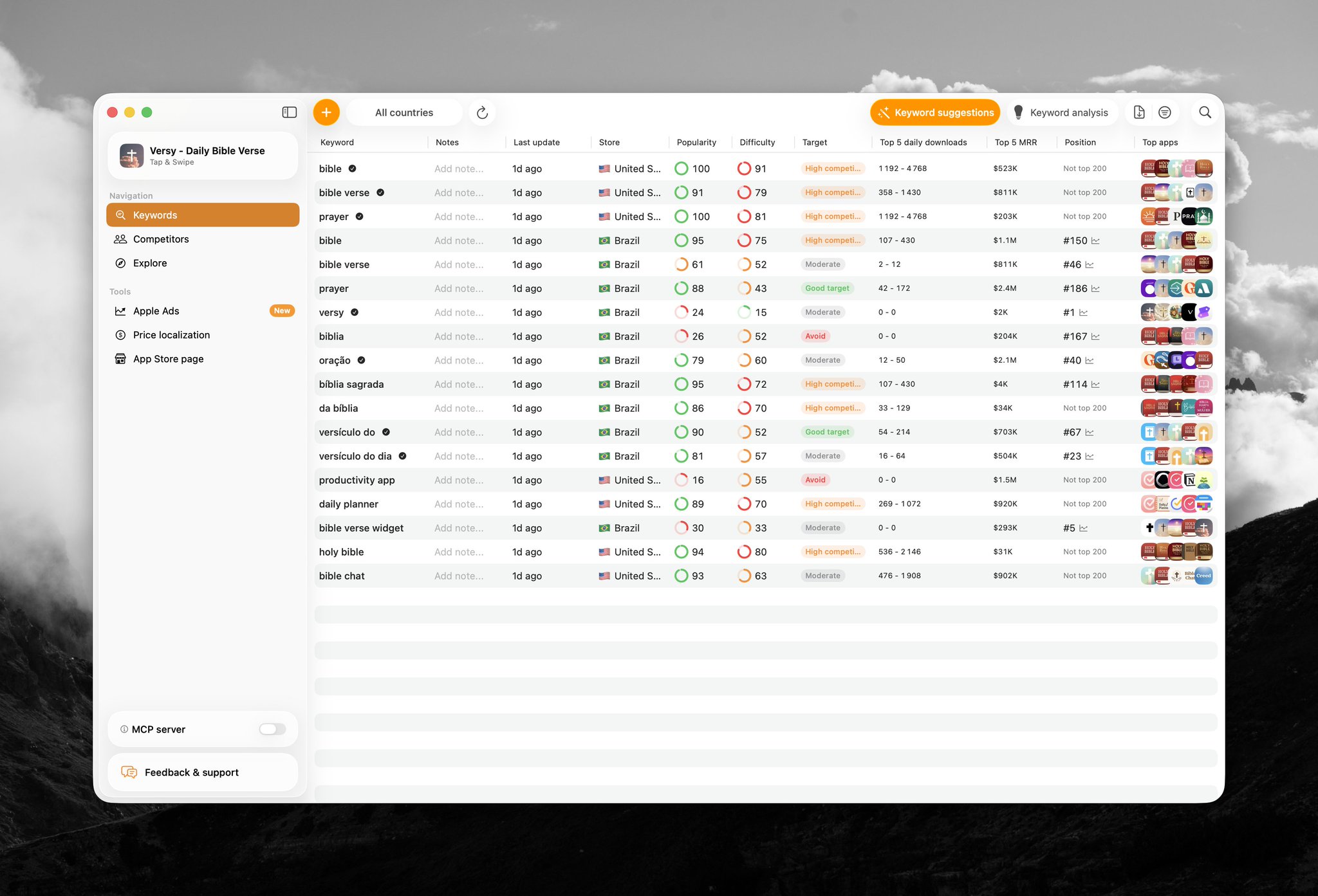
The free App Store keyword checker can help with the same preflight: compare popularity, organic difficulty, and the current competitors before the term receives ad spend.
A worked example: a beginner 5K app
Suppose the product creates personalized beginner 5K schedules. Its first screenshot shows the weekly plan, and onboarding asks for a race date and current ability.
The raw list might look like this:
| Candidate | What the result-page check tells you | Decision |
|---|---|---|
5k training plan | Direct match to the product and page | First exact test |
beginner 5k plan | Narrower version of the same job | First exact test |
5k running plan | Same outcome with different wording | First exact test |
couch to 5k plan | Keep only if the program truly supports beginners from zero | Test or reject on product fit |
running plan | Relevant but wider than the first promise | Hold for a separate test |
running coach | Could imply live coaching rather than a generated plan | Hold until the result page is checked |
fitness | Broad category with no clear job | Reject |
marathon training plan | Valuable intent, but unsupported by this version of the product | Reject until the product and page support it |
| Competitor brand | Different comparison intent | Separate competitor test |
Notice what the list does not contain: invented volume estimates, fifty synonyms, or terms kept only because they are popular.
The first three terms test one claim: people searching for a 5K plan will recognize this product as the answer. If that claim fails, the team can inspect the keyword, result-page creative, product page, onboarding, and downstream conversion without five other intents muddying the result.
Pick five to ten terms for a small first test
Five to ten tightly related terms is AppSprint's practical default for a small starting budget. It is not a platform maximum and it is not the right size for every account.
The list is ready when:
- Every term belongs to the same intent or a clearly labeled brand or competitor bucket.
- You know why a customer would search it.
- The intended storefront has enough relative demand to learn something.
- The product page can prove the promise quickly.
- You can afford enough taps to evaluate the chosen outcome.
If fifteen terms all meet those conditions, split them by intent instead of placing them in one blended group.
Use exact match for a controlled first answer
Apple supports broad match and exact match keywords. New keywords default to broad match. Apple also notes that a saved keyword's match type cannot be changed; you pause it and add it again with the other type.
For a small first test, choose exact match before saving. Exact match still includes close variants that Apple considers equivalent, but it gives a tighter starting boundary than broad match.
This is a testing recommendation, not a claim that broad match is bad. Broad match is useful for discovering nearby searches. Search Match can discover relevant searches without bidded keywords. Both belong in a separate discovery campaign or ad group where their search terms and budget remain readable.
The Apple Ads match-types guide covers close variants, broad discovery, Search Match, and negative keywords. The campaign-structure guide shows where brand, category, competitor, and discovery groups belong.
Make the product page pass the keyword test
A keyword is a promise before it is a bid target.
Search the term and look at your likely ad next to the organic results. Then ask:
- Does the app name or subtitle make the fit understandable?
- Does the first screenshot prove the searched outcome?
- Does the first product experience deliver the same job?
- Can the paywall explain why this outcome is worth paying for?
If a term is strategically valuable but the default page is too generic, consider a custom product page for the Apple Ads intent. Do not create custom creative to disguise a product mismatch. The experience after install still has to keep the promise.
Know the difference between a keyword and a search term
The keyword is the term you bid on. The search term is what the customer actually typed.
They are not always identical. Exact match can include close variants, broad match covers wider related searches, and Search Match does not require a bidded keyword at all.
After launch, review the Search Terms report. For each meaningful query:
- Promote a relevant discovery winner into a controlled exact group.
- Add it as a negative in discovery when you want to reduce overlap.
- Exclude an irrelevant or consistently weak query.
- Keep waiting when a subscription cohort has not matured enough to judge.
This is how the first hand-built list becomes evidence instead of a permanent opinion.
Judge the term beyond the install
Popularity tells you whether searches exist. It does not tell you whether those users become customers.
Read the first campaign through a small funnel:
| Signal | What it helps diagnose |
|---|---|
| Impressions | Relevance, demand, and auction access |
| Tap-through rate | Search-result promise and creative fit |
| Install conversion | Product-page persuasion |
| Activation or trial | Whether the app delivers the searched job |
| Paid conversion and revenue | Whether the acquired intent creates business value |
For a subscription app, do not label a fresh active trial as a failed keyword. Define the maturity window before launch. The keyword ROAS playbook covers the longer measurement and scaling loop.
Common first-list mistakes
Copying the organic ASO list into ads
Organic metadata and paid keywords can inform each other, but they are not the same decision. An organic term may be useful for discoverability without deserving a paid bid. Use the App Store keyword research guide for name, subtitle, keyword-field, and rank-tracking work.
Starting with the biggest category word
Broad category terms often hide several jobs. Start with the phrase that describes the outcome your app can prove.
Accepting every Apple suggestion
Suggestions reveal language and demand. They do not know your activation quality, subscription economics, or whether a specific product page is ready.
Mixing brand, category, and competitor intent
These buckets behave differently. Separate them before their averages blur the decision.
Ignoring the storefront
Popularity, competitors, language, and conversion can change by country or region. Research and test in the market where the campaign will actually run.
Expanding before the first claim is readable
Broad match and Search Match can find useful queries, but opening discovery immediately can make a small test harder to interpret. Prove or disprove the known intent, then fund discovery separately.
Your first-keyword checklist
Before publishing the campaign:
- Write the user, job, moment, proof, and value.
- Build seeds across brand, core job, category, use case, and competitor buckets.
- Expand them with Apple's keyword suggestions.
- Check search popularity in the intended storefront.
- Inspect the live App Store results and competing pages.
- Reject every term the product or page cannot honestly satisfy.
- Choose five to ten terms for one small controlled intent.
- Select exact match before saving if control is the goal.
- Set a budget and outcome you can evaluate.
- Review actual search terms and downstream value after launch.
Research Apple Ads keywords in AppSprint with storefront popularity, difficulty, rankings, competitors, spend, trials, revenue, and ROAS in the same workflow.
Sources
- Apple Ads keyword best practices - Current guidance on seed thinking, general and specific terms, popularity, suggestions, exact match, broad match, and Search Match
- Add and manage Apple Ads keywords - Current keyword recommendations, defaults, editing behavior, campaign buckets, and keyword management
- Apple Ads keyword match types - Current exact-match, broad-match, close-variant, and match-type-change behavior
- Apple Ads Recommendations - Current daily recommendations, estimated outcomes, and 1-to-5 search-popularity signal
Research, analyze, optimize
Find the right keywords, study the competitors already earning attention, and turn that into a stronger App Store page.
Available for macOS 14.6 and above


Loved by 544 users
Related articles
See all posts →
When to Pause an Apple Search Ads Keyword
Pause Apple Search Ads keywords when mature spend, weak funnel signal, and poor ROAS show the search intent is not paying back.

How to Track Apple Search Ads Revenue With Superwall
Use Superwall subscription events with Apple Search Ads attribution and spend to measure trials, paid conversions, revenue, and keyword ROAS.

How to Track Apple Search Ads Revenue With RevenueCat
Use RevenueCat revenue events with Apple Search Ads spend to see which campaigns and keywords create trials, subscriptions, renewals, and ROAS.