Best ASO Tools in 2026: 9 Options Compared by Use Case
Compare 9 ASO tools for iOS, Google Play, keyword research, rank tracking, reviews, listing operations, analytics, and market intelligence.

There is no single best ASO tool. The right choice depends on the decision you need to make every week.
For a solo iOS developer, the useful shortlist may be Astro and AppSprint. Astro keeps keyword research and rank tracking compact. AppSprint continues from research into competitors, App Store Connect metadata, country opportunities, rank history, and Apple Ads. App Radar is a better fit when the hard part is operating listings across stores. AppFollow stands out when reviews are the bottleneck. AppTweak and MobileAction suit broader ASO programs, while Sensor Tower is built for market and portfolio intelligence.
That is the short answer. The rest of this guide explains the tradeoffs without pretending one feature count can pick a winner.
Disclosure: AppSprint publishes this comparison and competes with several tools on this list. We identify where AppSprint fits, where it does not, and link each vendor's current documentation so you can check our assessment.
How we compared these ASO tools
We reviewed each product's official product pages or help documentation on August 9, 2026. We checked the jobs the vendor currently supports, its store coverage, and how far the workflow goes after research.
We did not run every paid plan, so this is not a disguised hands-on test. Features, limits, and access can differ by plan. “Best for” is our assessment of the documented workflow, not a vendor award or a claim that one dataset is universally more accurate.
We used five practical questions:
- What decision does the tool help you make?
- Does it cover the App Store, Google Play, or both?
- Does the work stop at research, or continue into execution and measurement?
- Is it designed for one developer, an operating team, or market analysts?
- Which important job still needs another tool?
ASO tools compared
| Tool | Best when | Store scope | Verified core workflow | Main tradeoff |
|---|---|---|---|---|
| AppSprint | A small Apple team wants research connected to action | Apple App Store | Keywords, competitors, metadata editing, country analysis, rank history, Apple Ads, pricing | Apple-only macOS product |
| Astro | A solo developer wants a compact native keyword tracker | Apple App Store | Popularity, difficulty, daily ranks, competitor keywords, translations, reviews | Narrower than a listing or team-operations platform |
| Appfigures | ASO should sit beside app analytics | App Store and Google Play | Keyword discovery, hourly rank tracking, competitor analysis, store analytics | Test the exact execution workflow you need, not only the analytics breadth |
| App Radar | Listings and localizations need an operating system | App Store and Google Play | Keywords, competitors, bulk listing work, reviews, performance tracking | More workflow than a one-app keyword project may need |
| AppTweak | A portfolio team needs deep ASO analysis and reporting | App Store and Google Play | Keyword, creative and metadata intelligence, monitoring, paid-organic context, reporting | Advanced capabilities and limits vary by plan |
| AppFollow | Reviews and support operations are central | App Store and Google Play | Review workflows, automation, integrations, keyword research, competitor analysis | Review-first breadth may be unnecessary for a small keyword project |
| ASOdesk | ASO and review management should share a web platform | App Store and Google Play | Keywords, rank tracking, competitors, ASO reporting, review workflows | Check current plan limits against your apps, countries, and review volume |
| MobileAction | Organic and paid acquisition teams work together | App Store and Google Play | Metadata, creatives, localization, keywords, visibility, paid intelligence | The wider acquisition suite can exceed a solo developer's needs |
| Sensor Tower | Market sizing and competitive intelligence drive the decision | App Store and Google Play | Download and revenue estimates, market trends, benchmarks, rankings, keywords | Often more market intelligence than hands-on metadata workflow |
The table is a map, not a league table. Start with your bottleneck, then test two plausible tools on the same real task.
Best for a focused Apple workflow: AppSprint
AppSprint's feature set is built for indie developers and small teams working on the Apple App Store from a Mac. It connects keyword research, competitor analysis, country opportunities, App Store Connect metadata editing, rank tracking, Apple Ads, and localized subscription pricing.
The useful distinction is what happens after you find a promising keyword. You can inspect the apps that rank for it, compare the term by country, place it in a metadata draft, and watch the ranking after the release. The product is meant to keep that loop together.
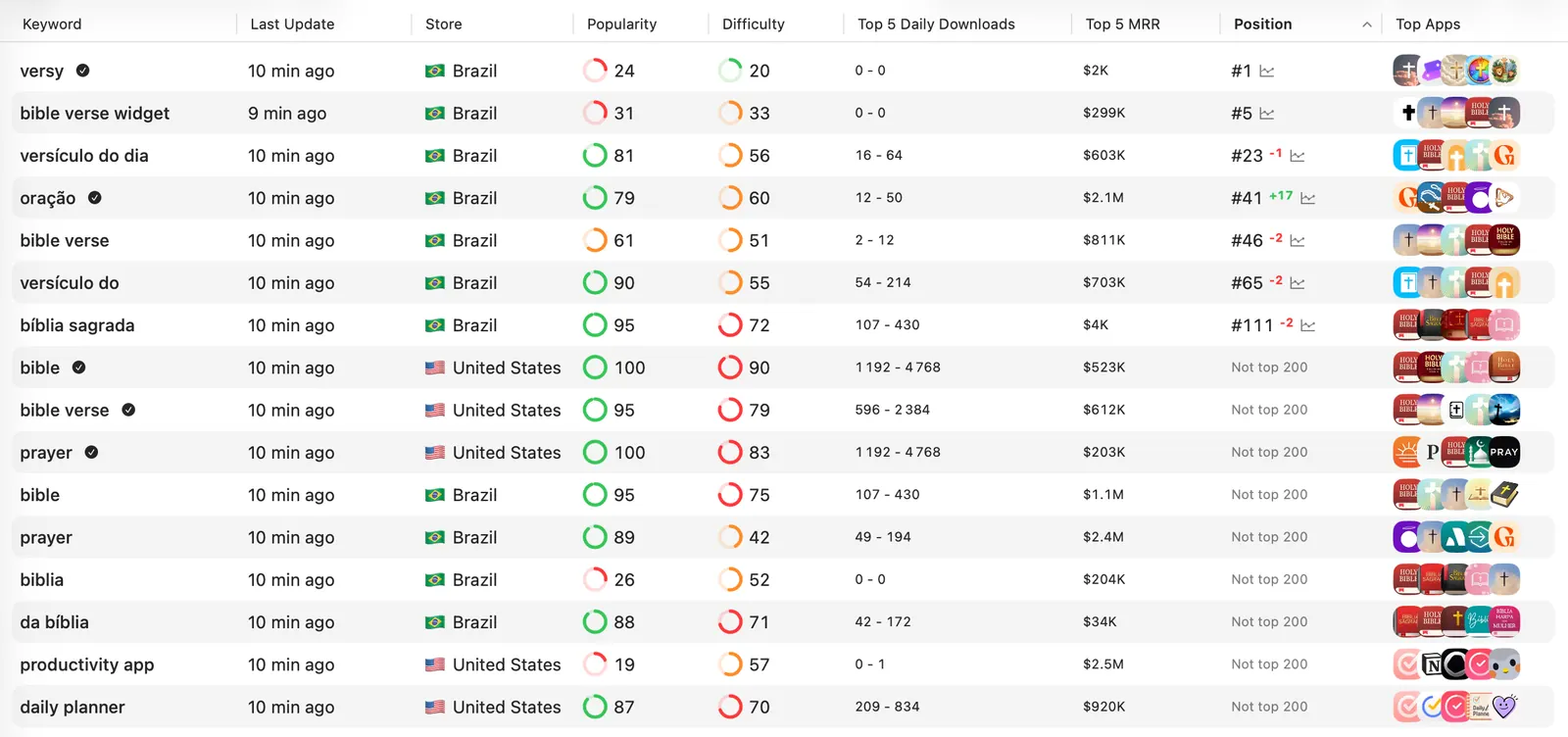
Choose AppSprint when research is being lost between spreadsheets, browser tabs, and App Store Connect. Skip it if you need Google Play, a large shared review queue, or broad mobile-market estimates. Those are deliberate boundaries, not hidden omissions.
For a public first pass, use the free App Store keyword checker. For the complete workflow, see the keyword research guide.
Best for a compact native keyword tracker: Astro
Astro is a native macOS tool focused on Apple's stores. Its current product page documents unlimited app and keyword tracking, popularity and difficulty data, daily ranking updates, competitor keyword discovery, translations, ratings analysis, and coverage across more than 60 Apple storefronts.
That focus is the reason to consider it. If your weekly job is “find and monitor better iOS keywords,” a small native tool may be more pleasant than a broad web platform.
The boundary is execution. Test what happens when a keyword earns a place in your title, subtitle, or keyword field. If you are comfortable moving the result into App Store Connect yourself, Astro may be enough. If you want competitor, metadata, pricing, and Apple Ads work in the same loop, compare it directly with AppSprint.
Best for ASO beside app analytics: Appfigures
Appfigures' current ASO product covers keyword discovery, competitor keyword analysis, and ranking monitoring across stores and countries. Its documentation says rank data can update hourly, which is useful when frequent movement matters.
Appfigures belongs on the shortlist when ASO is one part of a wider developer analytics routine. A team that already studies downloads, revenue, reviews, and competitors there may prefer not to open a separate keyword-only product.
Do not choose it from the data menu alone. Use a trial or current free entry plan to complete the exact task that causes friction: build a keyword set, compare three competitors, inspect a ranking change, and export the result. The tool should shorten that job, not merely add another dashboard.
Best for multi-store listing operations: App Radar
App Radar combines keyword and competitor intelligence with centralized listing management, localization work, review handling, and performance tracking for the App Store and Google Play. Its public product page also describes bulk editing for store listings.
That makes it relevant when ASO is an operating process. If several people update multiple apps and languages, the expensive part is often coordination: knowing what changed, keeping listings consistent, and getting approved copy into the stores.
Test the bulk workflow with one real localization. Confirm permissions, approval steps, preview quality, and what happens when a store rejects or delays an update. Those details matter more than the number of keyword metrics on the pricing page.
Best for a deep cross-store ASO program: AppTweak
AppTweak's ASO suite documents keyword research and monitoring, competitor metadata and creative tracking, paid and organic benchmarking, market estimates, reporting, and AI-assisted analysis. Its current help center also shows that some advanced reports are limited to enterprise plans.
This breadth makes sense for teams managing several apps, countries, and stakeholders. It can support research, conversion work, competitive monitoring, Apple Ads context, and reporting without reducing ASO to a keyword list.
Before buying, map each must-have capability to the actual plan. Ask about tracked-keyword limits, history, countries, seats, exports, API access, and which reports require an enterprise contract. A mature platform is valuable only when the plan includes the workflow you expect.
Best when reviews are the bottleneck: AppFollow
AppFollow's ASO documentation covers market comparison, competitor updates, keyword research, rank monitoring, and organic-performance analysis. Its larger point of difference is review and reply operations: filtering, tagging, bulk actions, reply workflows, automation, analysis, exports, and help-desk integrations.
That mix is useful when app-store growth and customer support overlap. A portfolio receiving thousands of reviews across languages has a different bottleneck from an indie app receiving five reviews a week.
Shortlist AppFollow when reply speed, routing, sentiment, and support integrations are central. If you only need to pick ten iOS keywords, start smaller.
Best for ASO and reviews in one web platform: ASOdesk
ASOdesk currently presents a combined platform for App Store and Google Play optimization, competitor research, rank tracking, ASO reporting, localization tools, and review management. It also documents integrations with App Store Connect and Google Play Console.
It is a plausible middle ground for a team that wants traditional keyword work and reputation management together. The product covers more operational ground than a keyword tracker without positioning itself only as a market-intelligence suite.
Check the current limits carefully. Apps, competitor slots, countries, keyword tracking, report history, replies, API credits, and team access are the units that determine whether a plan fits in practice.
Best when organic and paid acquisition share a plan: MobileAction
MobileAction's ASO tools cover metadata and creative analysis, localization, keyword and competitor tracking, visibility reporting, and organic download-share signals. The wider platform extends into Apple Ads and advertising intelligence.
That combination is useful when the ASO and user-acquisition teams use the same search terms, competitors, creatives, and markets. Paid signals can help prioritize organic tests, while organic gaps can inform paid exploration.
For a small app, be strict about the job you are buying. If all you need is a better subtitle and a weekly rank check, the extra acquisition layers may never earn their keep.
Best for enterprise market intelligence: Sensor Tower
Sensor Tower App Performance Insights is built around market research, competitor benchmarking, download and revenue estimates, engagement and retention signals, store rankings, and keyword opportunities across the App Store and Google Play.
This is the strongest fit on the list when the question is strategic: Which category is growing? How large is a competitor? Which country or portfolio deserves investment? Sensor Tower states that downloads and revenue are modeled estimates, so treat them as directional competitive evidence, not as another publisher's private ledger.
It is less obvious as the first purchase for a developer deciding what to put in a 30-character subtitle. Buy the scope that matches the decision.
The native consoles are still mandatory
No ASO platform replaces the stores' own consoles.
App Store Connect Analytics shows Apple's first-party acquisition funnel, including unique impressions, product page views, downloads, conversion rate, and discovery source. Apple also provides product page optimization for testing creative treatments.
Google Play Console's store performance report shows visitors, clicks, click-through rate, source, listing, country, and language. Google changed these reports in July 2026 to emphasize unique clicks, so older guides that describe the report only in terms of acquisitions are stale.
Use native data to judge your own results. Use an ASO tool for the missing context: keyword ranks, competitor visibility, cross-country research, estimates, repeated workflows, and alerts.
How to choose an ASO tool for your team
Start with one sentence: “Every week, we need to decide ___, but we cannot because ___.”
Then use this shortlist:
- Apple-only indie app: Compare Astro for a compact keyword workflow, AppSprint for a research-to-metadata loop, and Appfigures if app analytics should sit beside ASO.
- iOS and Android listing team: Start with App Radar when publishing and localization are the operational bottleneck.
- High review volume: Compare AppFollow and ASOdesk using your real routing, languages, reply rules, and support integrations.
- Cross-store ASO specialists: Compare AppTweak and MobileAction on the same app, country, keyword set, and reporting requirement.
- Enterprise strategy or portfolio team: Use Sensor Tower when market sizing, modeled competitor performance, and category trends matter most. Use AppTweak or MobileAction when the primary work is hands-on ASO and acquisition operations.
- No repeated bottleneck yet: Stay with the native consoles and free research until a paid tool can remove a measurable weekly cost.
This also answers a common enterprise question: the biggest platform is not automatically the best enterprise choice. An enterprise support team, ASO team, and corporate strategy team have different jobs even when all three say they need “an ASO tool.”
Run this test before you buy
Do not compare tools with a demo app. Give each shortlisted product the same real task and a 45-minute limit.
| Test | What a useful result looks like |
|---|---|
| Find an opportunity | A defensible keyword, country, creative, review theme, or competitor gap |
| Explain the evidence | You can see which data is first-party, store-collected, or estimated |
| Turn it into action | A metadata draft, localization task, review workflow, alert, or decision-ready export |
| Measure the result | Rank history, store conversion, review outcome, or a clearly defined follow-up |
| Share or preserve it | Another person can review the work without rebuilding it from screenshots |
Record the time, missing steps, and plan limits. A tool that answers the real question in 15 minutes is more valuable than a platform that exposes 50 reports but leaves the decision unresolved.
Before entering payment details, also check:
- keyword, app, country, seat, and history limits;
- whether rankings are collected by country and device;
- which numbers are estimates and which come from your connected console;
- export and API access on the plan you will actually buy;
- metadata publishing permissions and approval controls;
- credential storage, data retention, and account deletion;
- renewal terms and the current cancellation process.
Can free ASO tools be enough?
Yes, while the workflow is still small.
Start with App Store Connect or Google Play Console for your own performance. Use store search and autocomplete to learn the wording customers encounter, but do not mistake autocomplete for an exact volume report. Use a free keyword checker for a rough shortlist, then inspect the actual result page and competitors.
Appfigures currently advertises a free Starter plan, and several vendors offer trials or limited entry points. Offers change, so use the current vendor page rather than a comparison article's old price table.
Pay when you can name the repeated cost: rank checks take hours, metadata gets lost, localizations drift, reviews pile up, competitors are hard to monitor, or the team cannot connect a change to an outcome.
Bottom line
The best ASO tool is the smallest system that closes your real loop.
For some developers, that is a native console and a simple keyword tracker. For others, it is a listing-operations platform, a review desk, a cross-store intelligence suite, or an enterprise market dataset.
Pick the bottleneck first. Test two tools on the same task. Keep the one that produces a decision you can act on and measure.
If your workflow is Apple-only and you want keyword research to continue into competitors, metadata, countries, rank tracking, Apple Ads, and pricing, try AppSprint.
FAQ
What is the best ASO tool?
There is no single best ASO tool. The right choice depends on the job: AppSprint or Astro for a focused Apple workflow, App Radar for multi-store listing operations, AppFollow for review management, AppTweak or MobileAction for broader ASO programs, and Sensor Tower for enterprise market intelligence.
What is the best ASO tool for an indie iOS developer?
An indie iOS developer should usually compare a focused keyword tool with an end-to-end Apple workflow. Astro is a compact native keyword and rank tracker. AppSprint adds competitor research, App Store Connect metadata editing, country analysis, rank history, and Apple Ads context.
Can I do ASO for free?
Yes, at first. App Store Connect or Google Play Console provides first-party performance data, store search reveals the language people encounter, and free keyword checkers can help build a shortlist. A paid tool becomes useful when repeated research, rank history, competitor monitoring, localization, or team workflows start taking real time.
Do ASO tools replace App Store Connect or Google Play Console?
No. The native consoles remain the source for your listing, releases, and first-party performance data. Third-party ASO tools add keyword rankings, competitor context, estimates, workflow, and cross-market analysis that the native consoles do not provide in one place.
Sources
- Astro product and pricing
- Appfigures ASO tools
- Appfigures app analytics
- App Radar platform
- AppTweak ASO tools
- AppFollow keyword and ASO workflow
- AppFollow reviews and replies
- ASOdesk platform
- MobileAction ASO tools
- Sensor Tower App Performance Insights
- Apple App Store Connect acquisition analytics
- Google Play store performance reporting
Research, analyze, optimize
Find the right keywords, study the competitors already earning attention, and turn that into a stronger App Store page.
Available for macOS 14.6 and above


Loved by 544 users
Related articles
See all posts →
Best ASO APIs for Custom Dashboards: 7 Providers
Compare 7 ASO API providers for keyword ranks, store search results, metadata, reviews, estimates, cost controls, and custom dashboard architecture.

5 ASO Metrics You Should Track Every Week
The ASO metrics that help indie developers make better decisions: keyword rankings, impressions, product page views, conversion, and search downloads.

App Store Rank Tracking After a Metadata Update
Track keyword rankings before and after an App Store metadata update, separate visibility from conversion, and decide what to keep or change next.