Best ASO APIs for Custom Dashboards: 7 Providers
Compare 7 ASO API providers for keyword ranks, store search results, metadata, reviews, estimates, cost controls, and custom dashboard architecture.

The best ASO API depends on what your dashboard must decide.
Choose AppTweak, MobileAction, or ASOdesk when the main job is keyword research and rank tracking. Choose Appfigures when public store data needs to sit beside analytics for apps you own. Choose DataForSEO when you want public App Store and Google Play search results, listings, and reviews without buying a full ASO platform. AppFollow is the more natural fit for review operations. Sensor Tower belongs in an enterprise market-intelligence or warehouse conversation.
That is a shortlist, not a universal ranking. The seven providers expose different kinds of data, price different units, and grant different usage rights.
Disclosure: AppSprint publishes this comparison. AppSprint does not sell a public ASO data API, so it is not ranked as a provider. Its local MCP server lets an AI assistant work with data already available inside the macOS app; that is a different job from supplying a shared data warehouse or public dashboard.
ASO API providers compared
We reviewed current vendor documentation on August 9, 2026. We did not run paid production integrations, so this comparison covers documented datasets, access models, and implementation constraints—not a claim that one provider has the most accurate estimates.
| Provider | Strongest documented fit | Store scope | Access and cost signal | Important constraint to test |
|---|---|---|---|---|
| AppTweak | ASO-specific keyword, app, metadata, review, and estimate data | App Store and Google Play | API plans plus credits priced by requested data point | Credits multiply across apps, keywords, metrics, and history |
| Appfigures | Public store intelligence beside owned-app analytics | App Store, Google Play, and additional stores | Account API plus prepaid Public Data credits | Public-data usage and redistribution rights need review |
| DataForSEO | Public search-result, listing, app-info, and review collection | App Store and Google Play | Pay as you go by task or result, with normal and priority queues | Standard collection is asynchronous and history is your responsibility |
| MobileAction | Enterprise ASO keyword and dashboard integrations | App Store and Google Play | Enterprise access with endpoint-specific credits | History windows and costs vary by endpoint |
| ASOdesk | Explicitly priced keyword, rank, metadata, and suggestion requests | App Store and Google Play | API subscription plus published credit costs per request | Root-account access, short-lived tokens, and historical multipliers |
| AppFollow | Reviews, replies, ratings, keywords, and store operations | App Store and Google Play workflows | Subscription-dependent methods and monthly API credits | Some application errors arrive inside an HTTP 200 response |
| Sensor Tower | Large-scale market intelligence delivered to BI systems | Broad mobile and digital datasets | Sales-led API, scheduled feed, and data-delivery options | Validate endpoints, fields, rights, history, and price in the contract |
The general best ASO tools comparison answers which product a team should use directly. This page answers a narrower engineering question: which provider can supply a custom data product.
Start with two data lanes, not one vendor
An ASO dashboard usually needs two kinds of truth.
The first lane is first-party performance from the stores. Apple's Analytics Reports API exports granular App Store Connect data for your apps as compressed tab-delimited reports. The broader App Store Connect API automates listing and distribution work. Google's Play Developer API manages releases, localized listings, products, subscriptions, and reviews for apps you control.
The second lane is observed or modeled market data: keyword result positions, competitor metadata, public reviews, category ranks, keyword-demand scores, and download or revenue estimates. That is where the seven providers differ.
Do not ask a third-party estimate to replace your private install or revenue ledger. Do not ask a native publisher API to supply a competitor's keyword history when that resource is not in its documented surface. Join the lanes in your warehouse by app, store, country, device, and date.
1. AppTweak: best documented ASO metric surface
AppTweak's API is the clearest starting point when the dashboard itself is an ASO product. The current documentation covers app metadata, keyword metrics, current and historical keyword ranks, suggestions, reviews, category ranks, and estimated downloads and revenue. Its API changelog also documents advertising-intelligence and custom-product-page additions.
Its pricing table is unusually useful during architecture work because it names the credit cost of individual data points. That makes a workload estimate possible before integration. It also reveals the trap: a request that looks small can become apps × countries × keywords × metrics × dates.
There is a timely schema issue to plan for. AppTweak's keyword metric documentation says that on August 11, 2026, the existing volume field will change to AppTweak's own volume estimate, while search_popularity will expose Apple's raw Search Popularity score. Store the metric definition and source beside the number. A stable column called volume is not proof of stable semantics.
Shortlist AppTweak when you need derived ASO KPIs rather than only a snapshot of store search results. In the proof of concept, calculate credits for a normal weekly refresh and for a full historical backfill.
2. Appfigures: best mix of public and owned-app data
Appfigures exposes a REST API for account data and a Public Data add-on for other apps. Its public-data documentation lists metadata, daily and hourly ranks, top charts, reviews, ratings, and store-feature history. The supported-store matrix adds keyword ranks and estimated downloads and revenue for App Store and Google Play apps, along with actual performance datasets for connected apps you own.
That combination is attractive when one internal dashboard covers ASO, revenue, subscriptions, ads, reviews, and competitors. It can reduce the number of identity mappings between separate systems.
Read the usage terms before building a customer-facing product. Appfigures says its standard Public Data access is for internal mining and that direct resale or public use requires a separate conversation. A technically valid API key does not automatically grant the product rights you need.
Also test which routes require the Public Data add-on, which metrics require select plans, daily limits, and how credits are charged when pages or date ranges expand.
3. DataForSEO: best for raw public store collection
DataForSEO's App Data API focuses on public App Store and Google Play surfaces: search results for a keyword, app profiles, listings, charts, ratings, and reviews. The App Data overview documents location- and language-specific collection. Its public product and pricing page uses a pay-as-you-go model with different speed tiers.
This is a good fit when your first requirement is, “Give me the current top results for this term in this market,” and you are prepared to calculate higher-level ASO metrics yourself. It is also easier to isolate the cost of a small experiment because the public pricing unit is tied to tasks or returned results.
The tradeoff is data engineering. Standard requests follow a task pattern: create the job, wait or receive a callback, then fetch the result. If you need rank history, schedule and retain each snapshot yourself. If you need a difficulty score or a stable demand estimate, define your own method or add another source instead of quietly treating result count as difficulty.
4. MobileAction: best for an existing enterprise dashboard account
MobileAction publishes separate App Store, Google Play, dashboard, advertising, and custom-product-page API sections. Its App Store keyword endpoints include current ranks, up to 30 days of rank history per request, top keywords, keyword metadata, popularity, app lists, and category shares. Its Google Play keyword endpoints provide the parallel Android workflow. Dashboard services can read tracked apps and keywords and add or remove terms.
The documentation exposes credit costs per request, which helps with a realistic estimate. Access itself is described as an enterprise feature, so this is most compelling for a team that already uses MobileAction or wants its wider organic and paid-acquisition stack.
Test history depth, device behavior, country coverage, unranked values, and whether dashboard state is a prerequisite for the routes you need. A 30-day maximum per history request is workable, but a multi-year backfill changes the call count considerably.
5. ASOdesk: best for visible request-level credit math
ASOdesk documents REST and JSON access for metadata, ratings, reviews, competitors, keyword rank movement, keyword history, search results, suggestions, Search Ads suggestions, category ranks, and estimated installs. Its API overview lists both the dataset and the credit cost for many calls.
This makes it straightforward to price a small keyword dashboard on paper. The same documentation says historical requests that use a timestamp cost three times the standard request. It also says the API works through the root account and uses an access token valid for 24 hours.
Those details belong in the design, not in a late integration ticket. Add token refresh, central credential ownership, credit monitoring, and separate backfill budgets before the first scheduled job.
6. AppFollow: best when reviews are part of the product
AppFollow API v2 covers keyword research, search, rankings, ASO reports, app-version changes, reviews, replies, tags, summaries, rating history, and public charts. The documented rate limits are 1,000 requests per hour per token and 10,000 per hour per account, while method access and credit cost depend on the subscription.
It is the natural shortlist choice when the dashboard is expected to become a review-operation console: routing feedback, tracking reply speed, tagging issues, or connecting support workflows to store and version changes. It is less obvious as a pure market-estimate feed.
One implementation detail deserves a test on day one: the overview says most errors are returned as JSON with HTTP status 200. Your client must inspect the response body and provider error fields, not mark every 200 response as a successful observation.
7. Sensor Tower: best for enterprise intelligence delivery
Sensor Tower Connect is designed to move broad market intelligence into internal systems. The current page describes APIs for programmatic access and scheduled CSV or Parquet delivery to cloud storage. That is a better fit for a warehouse or BI team than a small script checking ten keywords.
The public page does not provide the same endpoint-by-endpoint field and credit table as several providers above. Treat coverage as contract work. Bring a written data contract to the demo and ask the vendor to map every required field, country, store, refresh interval, historical range, export right, and retention rule.
Shortlist Sensor Tower when the dashboard also needs category, market, publisher, advertising, gaming, web, or audience intelligence. For a focused keyword rank tracker, prove that the extra scope earns its cost.
Define your output before you call an API
Provider responses should land unchanged in raw storage. A separate normalization step should create your dashboard record.
{
  "observed_at": "2026-08-09T08:00:00Z",
  "store": "apple",
  "country": "US",
  "device": "iphone",
  "keyword": "habit tracker",
  "app_id": "123456789",
  "rank": 14,
  "rank_status": "ranked",
  "demand": {
    "value": 42,
    "metric": "provider_volume_estimate",
    "is_estimate": true
  },
  "provider": "example-provider",
  "provider_request_id": "req_123",
  "provider_cost_units": 10,
  "response_schema_version": "2026-08"
}
Do not normalize null, zero, “not ranked,” “not collected,” and “outside the top 100” into the same value. Do not combine Apple's Search Popularity, a vendor's volume estimate, and Google Play search volume under one unlabeled axis.
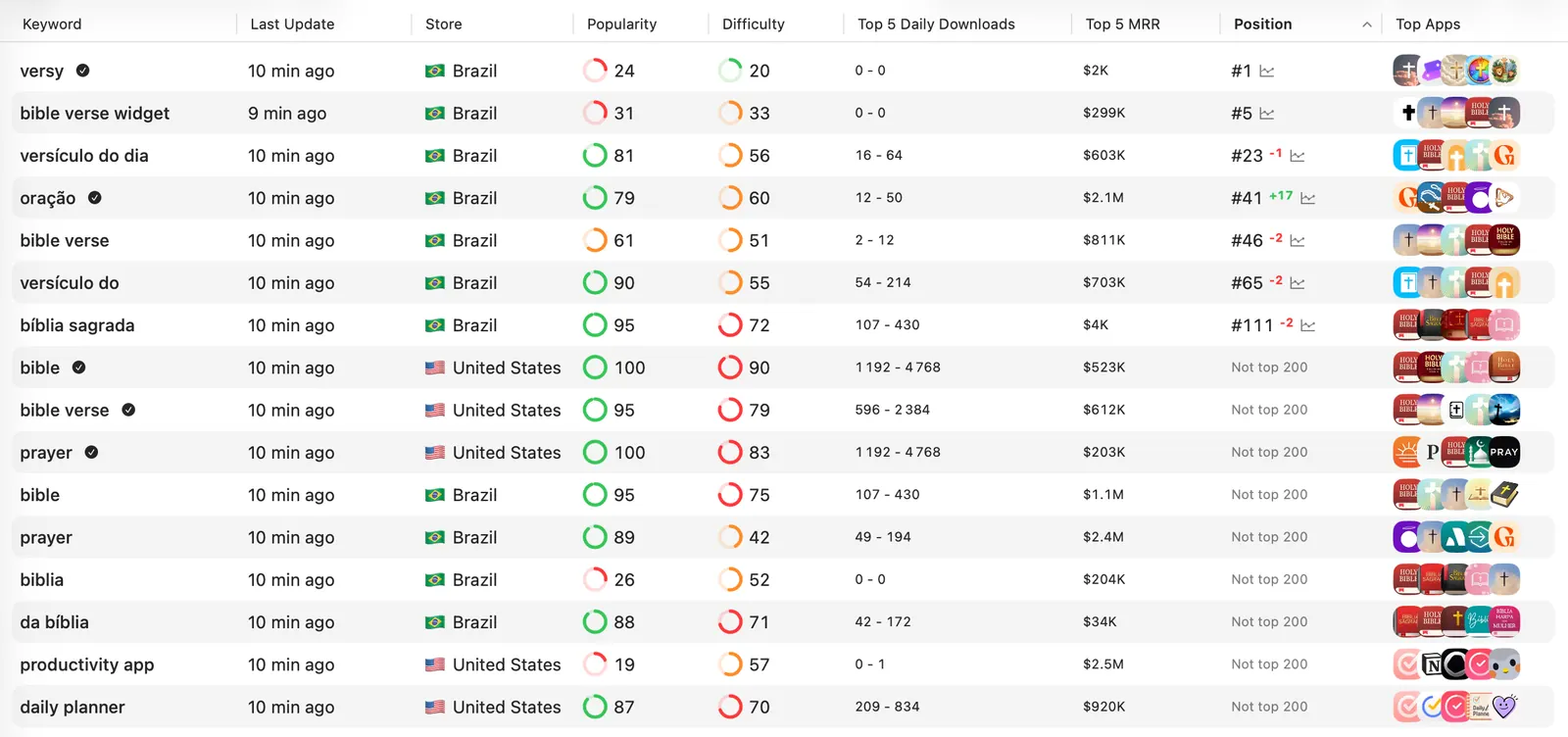
The same principle applies to the rank-tracking workflow: record the metadata change and release date separately from the observed ranking, then test whether movement follows the change.
Run a 24-record bake-off
Do not compare providers using their demo screenshots. Give each one the same small workload.
Choose:
- one branded, one broad, and one specific long-tail keyword;
- two countries with different language or competition conditions;
- your app and one known competitor;
- one device per store;
- two observations 24 hours apart.
That produces 24 app-keyword-country observations per provider. For every response, record:
- Whether the app and keyword were available.
- Rank, rank depth, device, country, language, and collection time.
- The exact definition and scale of every demand or difficulty metric.
- Whether a download or revenue number is owned, observed, or modeled.
- Pagination, missing-value behavior, retries, and response latency.
- Credits or money consumed, including failed and repeated calls.
- The license for internal dashboards, client reports, and derived products.
Compare rank snapshots with the live store result when practical, but expect personalization, device state, experiments, and collection timing to create differences. The goal is not to crown one provider from 24 rows. It is to expose incompatible definitions and operational surprises before you commit your schema.
Calculate cost from the workload
Use the provider's billable unit in this formula:
monthly usage = apps × countries × keywords × metrics × refreshes
              + history backfills + pagination + expected retries
Then model three cases:
| Case | What to include |
|---|---|
| Normal month | Scheduled refreshes, current metadata, and expected dashboard use |
| Launch or migration | Historical backfill, more competitors, and temporary validation calls |
| Failure month | Retries, partial responses, token failures, and jobs repeated after schema changes |
A cheap current-rank endpoint can become expensive when it is called across 50 countries every hour. A larger subscription can be cheaper when it includes the history, rights, and batch routes you would otherwise rebuild. Ask for a costed response to your exact payload, not a generic “one million calls” quote.
The dashboard architecture that survives provider changes
Keep five layers separate:
- Raw responses: immutable payloads, request parameters, headers, timestamps, and request IDs.
- Normalized observations: stable app, keyword, storefront, device, rank, metric-definition, estimate, and provenance fields.
- Owned store facts: App Store Connect and Google Play listing, analytics, reviews, release, and performance data.
- Decision models: difficulty, opportunity, anomaly, or competitor scores that your team defines and versions.
- Presentation: the dashboard, alert, report, or AI interface.
This separation lets you replace a provider without rewriting every chart. It also prevents a vendor's renamed field from silently changing your historical trend.
For an AI workflow, AppSprint's MCP documentation shows the adjacent pattern: tools read structured local ASO data and expose guarded actions. MCP can sit on top of the warehouse, but it does not remove the need for provenance, permissions, and stable data contracts underneath it.
Which ASO API should you shortlist?
- ASO-specific keyword research: Start with AppTweak, MobileAction, and ASOdesk. Compare the meaning of volume, difficulty, chance, popularity, and estimated installs—not only field availability.
- Public store search snapshots: Start with DataForSEO. Confirm the queue latency and build your own history.
- Owned analytics plus public app intelligence: Start with Appfigures. Review add-ons and usage rights before productizing the output.
- Reviews and support operations: Start with AppFollow. Test reply, tagging, error, and credit behavior in addition to keyword routes.
- Enterprise market and BI delivery: Start with Sensor Tower and request a field-level contract and sample feed.
- Only your own listing and performance: Begin with Apple and Google APIs. Add a paid ASO source only when you can name the missing market or search signal.
If you are not ready to build, use the free App Store keyword checker to validate the decision surface first. A custom dashboard is worthwhile when it joins data your team repeatedly uses; it is not automatically better than a well-chosen ASO tool.
Sources
- AppTweak API overview
- AppTweak API data pricing
- AppTweak keyword metrics and the August 2026 field change
- AppTweak API changelog
- Appfigures API overview
- Appfigures Public Data access and usage notes
- Appfigures supported stores and datasets
- DataForSEO App Data API overview
- DataForSEO App Data product and pricing
- MobileAction API introduction
- MobileAction App Store keyword endpoints
- MobileAction Google Play keyword endpoints
- ASOdesk API overview and credit costs
- AppFollow API v2 overview
- Sensor Tower Connect data delivery
- Apple Analytics Reports API
- Apple App Store Connect API
- Google Play Developer API
Research, analyze, optimize
Find the right keywords, study the competitors already earning attention, and turn that into a stronger App Store page.
Available for macOS 14.6 and above


Loved by 544 users
Related articles
See all posts →
Best ASO Tools in 2026: 9 Options Compared by Use Case
Compare 9 ASO tools for iOS, Google Play, keyword research, rank tracking, reviews, listing operations, analytics, and market intelligence.

5 ASO Metrics You Should Track Every Week
The ASO metrics that help indie developers make better decisions: keyword rankings, impressions, product page views, conversion, and search downloads.

App Store Rank Tracking After a Metadata Update
Track keyword rankings before and after an App Store metadata update, separate visibility from conversion, and decide what to keep or change next.