App Store price localization: choose subscription prices by country
Choose App Store subscription prices by country. Compare PPP and Netflix reference models, review Apple price points, and measure whether a lower price pays back.

By Arthur
Indie developer, creator of AppSprint and founder of Tap & Swipe SAS. Shares his app development and App Store research workflows on YouTube.

App Store price localization means choosing subscription prices for individual countries or regions. Local purchasing power, competing offers and the users your app attracts all belong in that decision.
Start with the price customers currently see, calculate a candidate, match it to an available Apple price point, then measure the revenue those customers actually produce. A country where people download your app but rarely pay is a useful place to investigate.
This guide walks through that decision using AppSprint's price-localization workflow, a reproducible country comparison and a simple calculation for judging a price cut. You can keep your own numbers in the price localization review worksheet.
Currency conversion gives you a starting point
Apple lets you price auto-renewable subscriptions by storefront. When you set an initial price, App Store Connect suggests comparable prices using taxes and foreign exchange rates.
Those suggestions answer a currency question. You still need to investigate what your particular audience will pay for your app in that market.
There's a maintenance detail worth knowing: Apple excludes auto-renewable subscriptions from its automatic retail price adjustments. An exchange-rate or tax change can affect your proceeds while the subscription's retail price stays the same.
Keep the product and billing period visible when comparing prices. A monthly plan, an annual plan and an introductory offer are different purchases.
Choose a country you can learn from
Start with a storefront where your app already gets enough activity to observe the subscription funnel. If you have few visitors, a weak paid-conversion rate may be a noisy result.
Before proposing a change, save:
| Field | What to record |
|---|---|
| Product | Subscription ID and billing period |
| Market | Storefront and the currency used for that product |
| Offer | Current price, trial and introductory terms |
| Funnel | Eligible paywall views, trial starts and first paid conversions |
| Revenue | Proceeds, refunds and renewals at a stated cohort age |
| Context | Acquisition source, paywall version and any recent changes |
Compare competing products with similar jobs and plan lengths. A streaming service, a specialist business tool and a casual consumer app can have different customers and costs in the same country.
The broader App Store localization guide covers choosing markets and adapting the listing. Here, keep the pricing question narrow enough to test.
Use PPP and Netflix references to propose a price
AppSprint's price localization tool has two reference models: PPP and Netflix. You enter a base USD price and compare the calculated prices across territories.
Purchasing power parity helps compare price levels across economies. The World Bank explains that PPP figures describe broad expenditure baskets, with limits on what they tell you about particular populations and products. Treat a PPP-based app price as a starting hypothesis.
The Netflix option uses a different set of subscription-price reference factors. Comparing both can show how much your proposed price depends on the reference you chose. Neither model measures your app's demand or guarantees a profitable price.
A $9.99 monthly plan across four countries
The following calculation uses the reference factors bundled with AppSprint when this guide was prepared on October 13, 2026. The base price is hypothetical. These are model candidates, shown to two decimal places before matching to Apple price points.
Candidate price = base USD price × target factor / US factor
The US factor is 1.00 in both models for this example.
| Storefront | Pricing currency | PPP factor | PPP candidate | Netflix factor | Netflix candidate |
|---|---|---|---|---|---|
| France | EUR | 0.67 | €6.69 | 0.75 | €7.49 |
| India | INR | 20.42 | ₹204.00 | 24.96 | ₹249.35 |
| Brazil | BRL | 2.49 | R$24.88 | 2.25 | R$22.48 |
| Japan | JPY | 95.00 | ¥949.05 | 79.54 | ¥794.60 |
Each factor converts the USD base into the listed pricing currency. India's 20.42 factor doesn't mean charging 20 times the US price in dollars.
These are a dated snapshot of AppSprint's model inputs, not current Apple prices, current Netflix quotes or researched recommendations for those countries. Bundled references can include fallback estimates. Check the actual storefront price points and your market evidence before choosing a price.
The difference between the two columns gives you a question to investigate. For India, would the lower candidate bring enough additional paying users to offset the lower receipts? Your funnel and proceeds should decide that.
Compare current and proposed prices in AppSprint
With App Store Connect connected and your app selected:
- Open Price localization and choose Subscriptions.
- Open the subscription you want to review. Check its current and scheduled prices.
- Choose Start price change, then the recommended start date or Choose a date.
- Enter the base USD price and switch between PPP and Netflix.
- Compare current prices with the proposed country prices. AppSprint matches candidates to the nearest Apple price point when those points are available.
- Review the complete proposal, the start date and the treatment of existing subscribers before scheduling.
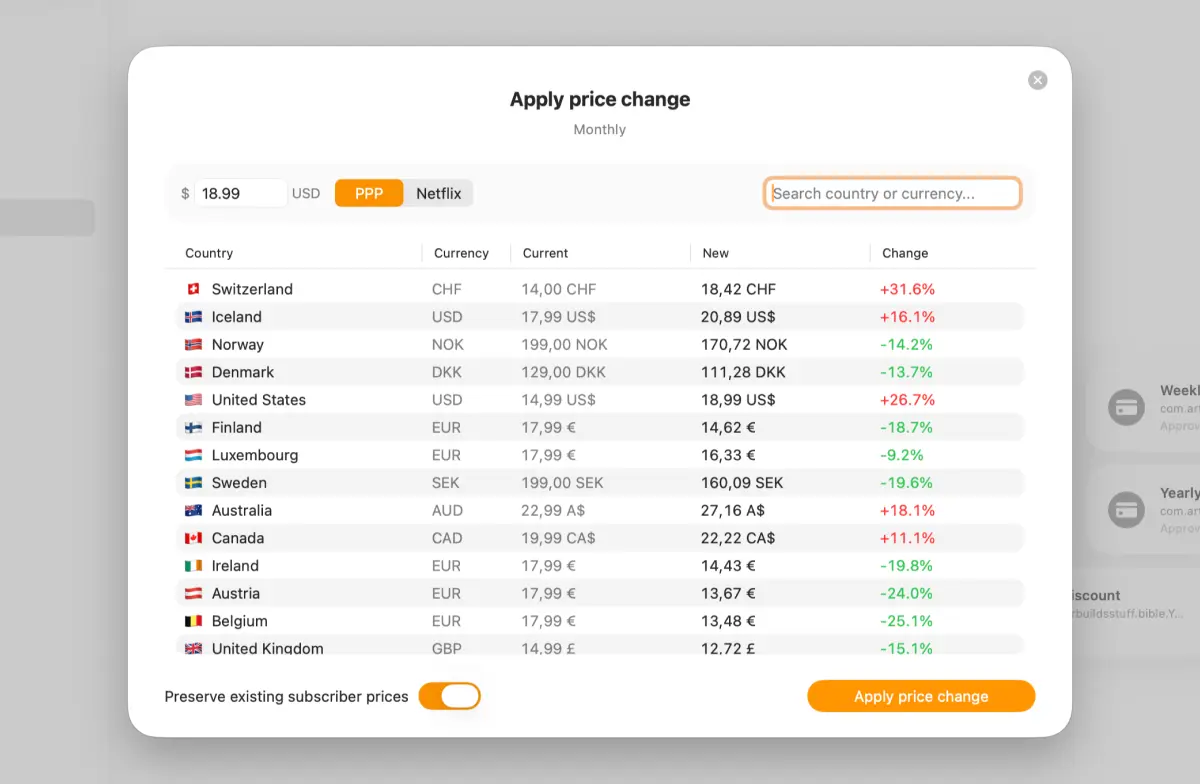
Searching for a country narrows the table you see. It doesn't select that country as the only territory to update. Review the complete proposed change. For a test confined to one storefront, use App Store Connect's territory selection.
You can also work directly in App Store Connect: open your app's Subscriptions, select the group and product, then use Subscription Prices to choose the storefronts, start date and price points. Review the final schedule before confirming.
Account for existing subscribers before changing the price
Apple's subscription pricing rules distinguish increases from decreases:
- A decrease applies to existing subscribers at renewal. You can't preserve their higher price.
- For an increase, you can preserve existing subscriber prices. Applying an increase to existing subscribers can require notification or consent, depending on the circumstances.
- A second future change can overwrite a change already scheduled for the same storefront and billing plan type.
Save the previous prices and check upcoming changes before submitting a new schedule. Existing subscribers and newly acquired users may then belong to different pricing cohorts.
Calculate what a lower price needs to earn back
A lower price needs more paying customers to maintain the same first-period revenue.
Suppose a hypothetical monthly plan costs $10. Out of 10,000 eligible paywall visitors, 400 pay: a 4% paid-conversion rate and $4,000 in gross first-period revenue.
| Scenario | Monthly price | Paying customers | Paid conversion | Gross first-period revenue |
|---|---|---|---|---|
| Baseline | $10 | 400 | 4.0% | $4,000 |
| Lower price, same revenue | $8 | 500 | 5.0% | $4,000 |
| Lower price, higher revenue | $8 | 550 | 5.5% | $4,400 |
All three rows use the same hypothetical 10,000 visitors and a single currency. They exclude fees, refunds, renewals and service costs. They aren't AppSprint customer results.
Required new paying customers
  = old paying customers × old price / new price
  = 400 × 10 / 8
  = 500
A 20% price cut therefore needs 25% more paying customers just to preserve gross first-period revenue. A conversion improvement from 4% to 4.5% would still fall short in this example.
For your actual decision, compare proceeds after refunds and the relevant service costs. If serving each new subscriber costs money, matching gross revenue can still leave you worse off.
Measure the result at the same cohort age
Define your revenue window before changing anything. A user who started a trial yesterday has had less time to pay than a user acquired last month.
Keep the storefront, product, acquisition source and observation window consistent. Record any paywall or campaign changes that could explain the result. A before-and-after comparison alone doesn't isolate the effect of price.
Track paid conversion, proceeds per eligible paywall visitor, refunds and retention. Include existing-subscriber effects when calculating the total impact of a decrease. Use the ROAS guide's cohort definitions if you're comparing customers acquired through Apple Ads.
In your review worksheet, set a review date, a minimum observation window and a decision condition. Higher paid conversion is useful evidence; the revenue and costs determine whether to keep the new price.
Display the price your customer can actually buy
The country table helps you plan. Your paywall should display the product's actual store price. Apple's StoreKit displayPrice provides the localized price string for that purpose.
Start by reviewing one subscription's current prices, a market with observable traffic, and the difference between the two reference models. Open AppSprint's price localization feature to compare the proposed changes before choosing a schedule.
Research, analyze, optimize
Find the right keywords, study the competitors already earning attention, and turn that into a stronger App Store page.
Available for macOS 14.6 and above


Loved by 544 users
Related articles
See all posts →
App Store Rank Tracking After a Metadata Update
Track keyword rankings before and after an App Store metadata update, separate visibility from conversion, and decide what to keep or change next.

How to Find Your Competitors' App Store Keywords
Find competitors' App Store keywords from public rankings, metadata, result pages, and country gaps, then turn the evidence into a focused ASO test.
How to Recover From an App Store Ranking Drop
Diagnose an App Store keyword ranking drop, separate metadata problems from market movement, and choose the safest recovery action.