ASOdesk vs AppSprint ASO: ASO Tool Comparison
ASOdesk vs AppSprint ASO for indie developers. Comparing keyword research, tracking, competitor analysis, pricing, and ease of use.
March 23, 2026
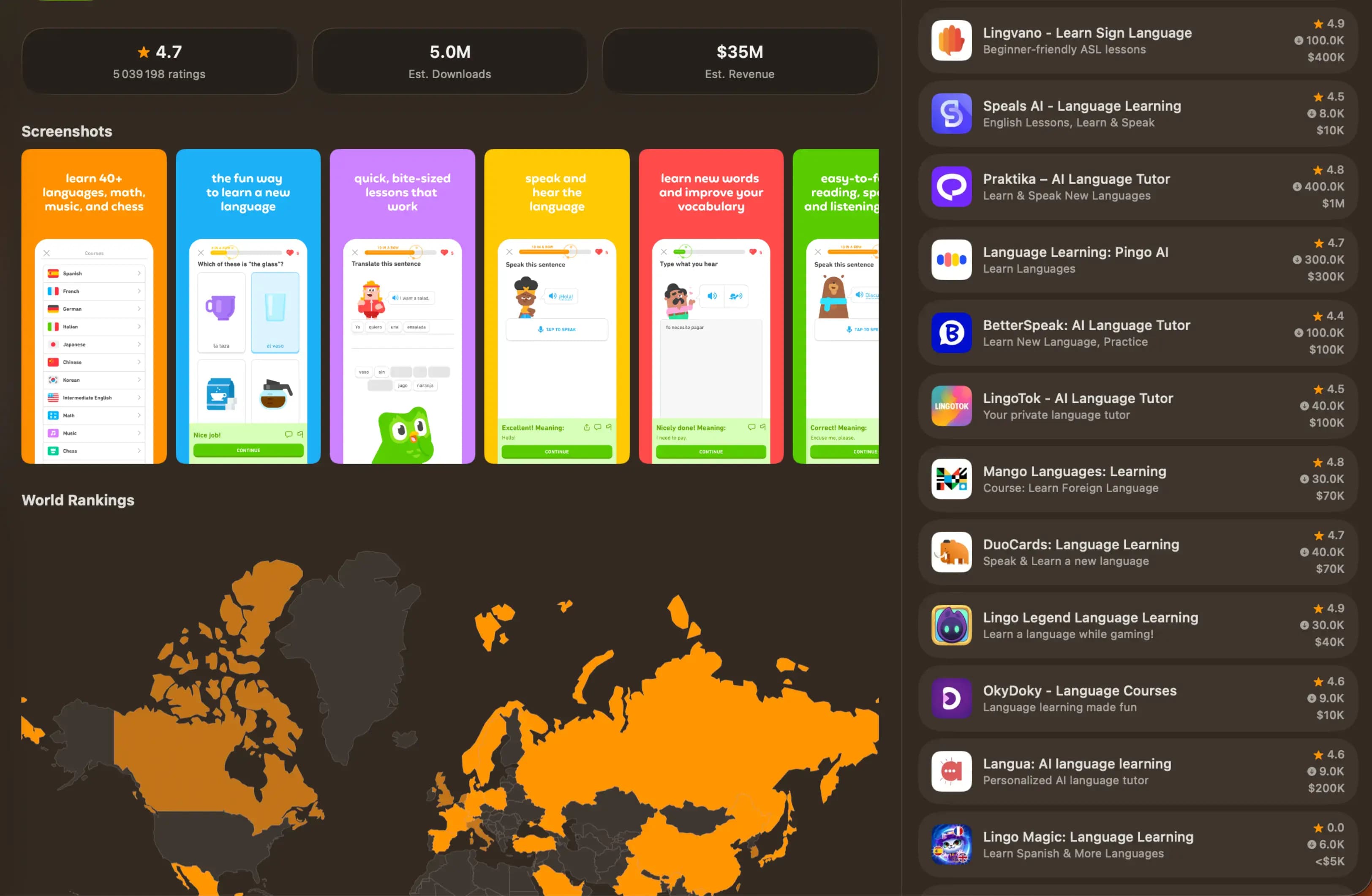
ASOdesk and AppSprint ASO are both ASO tools that cover keyword research, tracking, and competitor analysis. They're closer in scope than comparing against enterprise tools like Sensor Tower, which makes this a more relevant comparison for indie developers choosing between mid-range options. Here's where each tool is stronger, where it's weaker, and which one fits better whether you're a solo developer, a freelancer, or someone building side projects on weekends.
Quick comparison
| Feature | ASOdesk | AppSprint ASO |
|---|---|---|
| Keyword research | Yes, popularity, traffic scores, competition | Yes, popularity, difficulty, targeting labels, download/MRR estimates |
| Competitor analysis | Yes, keyword overlap, competitor tracking | Yes, actual App Store ranking data across 66 countries |
| Keyword tracking | Yes, daily tracking | Yes, daily tracking with trends |
| Keyword suggestions | Yes, auto-suggestions and topic explorer | Yes, AI-powered (popularity ≥15 filter, opportunity scoring) |
| Keyword grouping | Yes (higher tiers) | Not yet |
| Targeting labels | No | Yes — Sweet Spot, Hidden Gem, Quick Win, High Potential, Competitive, Very Competitive |
| Platform coverage | App Store + Google Play | App Store, 66 countries (Google Play planned) |
| Free access | Limited free tools | Full-featured 3-day trial |
| Starter pricing | ~$29.99/mo | €19/mo Solo, €39/mo Pro (yearly saves 3 months) |
| Interface complexity | Moderate to high | Minimal |
| Built for indie devs | Broad audience | Yes, purpose-built |
What ASOdesk does well
ASOdesk has been in the ASO space for years and has built a comprehensive keyword research platform. Their keyword explorer is one of their strongest features, showing search popularity, organic traffic estimates, and competition data for terms across both the App Store and Google Play. If you need to optimize for both platforms, ASOdesk covers that out of the box.
Their auto-suggestion feature is genuinely useful. It surfaces related keywords based on the terms you search, pulling from App Store autocomplete data and their own database. The topic explorer feature goes further, grouping related keywords into themes so you can see clusters of related terms rather than individual keywords in isolation.
On higher-tier plans, ASOdesk offers keyword grouping and organization tools that help you manage large keyword lists. If you're tracking dozens of keywords across multiple categories, these organizational features reduce the cognitive load of managing your strategy.
ASOdesk also provides ASO timeline features that show how your metadata changes correlate with ranking movements. This cause-and-effect view is useful for understanding whether specific changes are working.
Where ASOdesk falls short for indie developers
Interface density. ASOdesk packs a lot of data onto every screen. Tables with multiple columns, multiple scoring metrics per keyword, tabbed sub-views within each section — it takes time to learn where everything is and what each metric means. For someone who checks ASO data twice a month, the learning curve is a real cost. You spend time understanding the tool instead of optimizing your app.
Pricing structure. The basic plan at ~$29.99/month covers keyword research and basic tracking, but locks competitor keyword analysis and keyword grouping behind higher tiers ($59-149/month). The features most valuable for keyword strategy — seeing what competitors rank for and organizing keywords into groups — cost more than the entry-level price suggests. For a solo developer, the plan that actually includes everything useful runs $59+/month.
Feature sprawl. ASOdesk keeps adding features (review analysis, description optimizer, visual assets analysis) that expand the tool's scope but don't necessarily make the core keyword workflow better. Each new feature adds another menu item, another dashboard section, and another thing to ignore if you only care about keywords.
Data accuracy variance. Like most tools that cover multiple markets, ASOdesk's data accuracy varies by region and platform. For the US App Store, the data is generally solid. For smaller markets or Google Play in less common languages, the accuracy can be inconsistent.
What AppSprint ASO does differently
AppSprint ASO was built by an indie developer who tried the full range of ASO tools and found them either too expensive, too complex, or too inaccurate. The design philosophy is "the minimum viable ASO tool" in the best sense — everything you need, nothing you don't.
Keyword research shows popularity, difficulty, targeting labels, and competitor data for any App Store keyword. Every keyword gets one of six targeting labels — Sweet Spot, Hidden Gem, Quick Win, High Potential, Competitive, or Very Competitive — so you can prioritize at a glance instead of interpreting raw numbers. You also see estimated daily downloads by position tier and top-10 MRR data. One view, one set of metrics, no sub-tabs to navigate.
Competitor analysis uses actual App Store ranking data across 66 countries, not modeled estimates. When you look up a competitor, you see the keywords they genuinely rank for, along with their download and MRR estimates. An interactive world ranking map shows their presence globally. This is a real advantage over tools that use statistical inference to estimate competitor keywords — the accuracy difference changes your keyword decisions.
AI-powered suggestions surface keywords you wouldn't find through manual research, filtered to a minimum popularity of 15 and ranked by opportunity score. Every suggestion includes real popularity, difficulty, targeting label, and download data so you can evaluate it the same way you'd evaluate any other keyword.
Metadata editor connects your keyword research directly to your App Store listing. Pull metadata from App Store Connect, edit with real-time character counts, push changes back. No copy-pasting between tools.
The interface is minimal by design. You add your app, you research keywords, you track rankings, you check competitors. Every screen has one purpose, and the data is visible without clicking through layers of sub-navigation.
Pricing breakdown
| ASOdesk Basic | ASOdesk Startup | ASOdesk Pro | AppSprint ASO Trial | AppSprint ASO Solo | AppSprint ASO Pro | |
|---|---|---|---|---|---|---|
| Monthly price | ~$29.99/mo | ~$59/mo | ~$149/mo | €0 (3 days) | €19/mo (€76/yr) | €39/mo (€156/yr) |
| Keyword research | Yes | Yes | Yes | Full | Full | Full |
| Competitor keywords | Limited | Yes | Yes | Full | Full | Full |
| Targeting labels | No | No | No | Yes | Yes | Yes |
| Download/MRR estimates | No | Basic | Yes | Yes | Yes | Yes |
| Keyword grouping | No | Yes | Yes | No | No | No |
| Tracking keywords | Limited | More | Extensive | Full during trial | 50 | 500 |
| Multi-country | Yes (both platforms) | Yes | Yes | 66 countries | 66 countries | 66 countries |
| Google Play | Yes | Yes | Yes | No | No | No |
| ASO timeline | Basic | Yes | Yes | No | No | No |
The gap between ASOdesk's basic plan and the plan that includes useful competitor analysis ($29.99 vs $59/month) is significant. AppSprint ASO includes competitor analysis, targeting labels, and download/MRR estimates at every tier — including the free trial. Yearly plans save 3 months: €76/year for Solo, €156/year for Pro.
Head-to-head: keyword research
Both tools show you keyword popularity and competition data. ASOdesk includes a "traffic score" estimate alongside popularity, which attempts to quantify how many downloads a keyword drives. AppSprint ASO shows difficulty alongside popularity, plus a targeting label that translates those numbers into an actionable recommendation.
For practical keyword selection, targeting labels are arguably more useful than traffic estimates. Knowing that a keyword has "high traffic" doesn't help if the top 10 is dominated by apps with millions of ratings. Seeing a keyword labeled "Sweet Spot" tells you it has solid popularity with manageable difficulty — a keyword worth targeting now. "Hidden Gem" means lower competition with decent potential — an opportunity most developers overlook.
ASOdesk's auto-suggestions cast a wider net, which means more keywords to sift through. AppSprint ASO's AI suggestions are more targeted, pre-filtered to popularity ≥15 and prioritized by an opportunity score that balances relevance, popularity, and achievability. Fewer suggestions, but higher signal-to-noise ratio.
Head-to-head: competitor analysis
This is where the tools diverge most. ASOdesk offers keyword overlap analysis and competitor tracking with visual charts showing competitive positioning. The data visualization is polished and good for identifying broad competitive patterns.
AppSprint ASO's advantage is data accuracy and depth. Because it pulls actual ranking data rather than modeled estimates, the competitor keywords you see are verifiably real. You also get download and MRR estimates per competitor, plus a world ranking map showing their presence across 66 countries. This matters most for niche apps where modeled data tends to be least accurate. If your app is in a specialized category, the difference between real and estimated competitor data can significantly change your keyword strategy.
Who should use which tool
ASOdesk makes sense if:
- You need to optimize for both App Store and Google Play
- You manage multiple apps and need keyword grouping and organization
- You want ASO timeline features to correlate changes with results
- You're comfortable with a denser interface and steeper learning curve
- Your budget accommodates $59+/month for the tier with full competitor analysis
AppSprint ASO makes sense if:
- You're a solo developer, freelancer, or bootstrapped founder focused on the Apple App Store
- You want accurate competitor data based on actual rankings across 66 countries
- Targeting labels and download/MRR estimates help you make faster keyword decisions
- You prefer a minimal interface that doesn't require training
- Your budget favors €19-39/month with yearly discounts available
- You want to get started immediately with a full-featured trial
- AI keyword suggestions interest you as a discovery tool
The bottom line
ASOdesk is a solid mid-range ASO tool with broad platform coverage and a deep feature set. It's a good choice for developers who need Google Play support and don't mind investing time in learning a more complex tool. Just know that the features most indie developers want — especially competitor analysis — require the $59/month tier, not the $30 entry price.
AppSprint ASO trades platform breadth for depth and accuracy on the Apple App Store. If App Store is your focus, AppSprint ASO gives you cleaner data, targeting labels that simplify keyword decisions, download and MRR estimates for every keyword, coverage across 66 countries, and pricing at €19-39/month. The free trial lets you compare the data quality directly — look up the same competitor in both tools and see which results match reality.
If you're evaluating multiple tools, our AppTweak comparison and affordable ASO tools guide cover the broader landscape.
Frequently Asked Questions
- Is ASOdesk or AppSprint ASO better for indie developers?
- AppSprint ASO is purpose-built for indie developers with simpler workflows and lower pricing (€19/mo Solo, €39/mo Pro). ASOdesk offers more features but targets a broader audience and costs more.
- How much does ASOdesk cost?
- ASOdesk's paid plans start around $29.99/month for the basic tier. Higher tiers with advanced competitor analysis and keyword grouping run $59-149/month.
- Does ASOdesk have better keyword data than AppSprint ASO?
- ASOdesk has a large keyword database covering both App Store and Google Play. AppSprint ASO focuses on the App Store with actual ranking data across 66 countries, plus targeting labels and download/MRR estimates. For App Store accuracy, AppSprint ASO has an edge.
- Can I use ASOdesk's free tools instead of paying?
- ASOdesk offers limited free tools for basic keyword research. They're useful for quick lookups but don't include tracking, competitor analysis, or advanced features.
Research, optimize, grow
Don't waste time guessing keywords or overpaying for enterprise tools you'll never fully use.


Trusted by 200+ developers