App Store Competitor Analysis Tool
See which keywords your competitors actually rank for. AppSprint ASO shows real competitor data — not guesses — so you can find gaps and win downloads.
March 23, 2026
What is ASO competitor analysis? Competitor analysis for App Store Optimization means identifying which keywords rival apps rank for, how they position their metadata, and where gaps exist that your app can exploit to win more downloads.
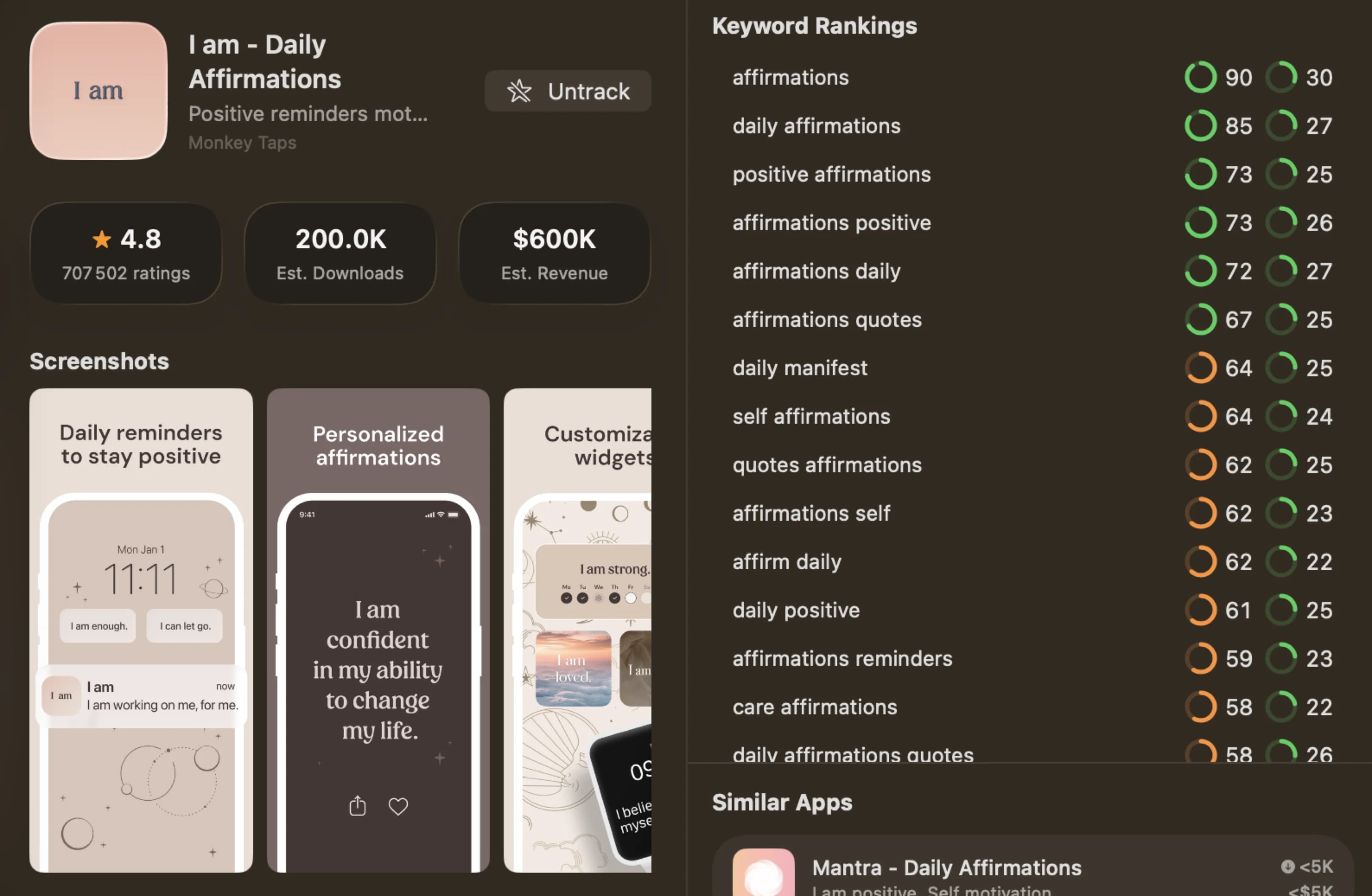
Stop guessing what your competitors are doing
You know your app's competitors. You see them in the search results every day. But unless you know which keywords they're targeting and ranking for, you're flying blind when you write your own metadata. You might be fighting for keywords they already dominate, while ignoring terms where they're weak and you could win.
AppSprint ASO's competitor analysis lets you look up any app on the App Store and see its real keyword rankings. Not estimates. Not modeled data. The actual keywords the app ranks for, with position numbers. You can find the gaps in their strategy, spot keywords they're missing, and target terms where you have a realistic shot at outranking them.
This is how developers find keyword opportunities that don't show up in basic keyword research. Whether you're a full-time indie developer, a freelancer managing client apps, or building a side project on weekends — you start with the data, not with guesswork.
How it works
Competitor analysis in AppSprint ASO follows a straightforward workflow. Look up an app, see its data, and use that data to make better keyword decisions.
-
Search for a competitor. Type the name of any app or paste its App Store URL. AppSprint ASO pulls up the app's listing along with its keyword data, download estimates, and MRR.
-
See their keyword rankings. You get a list of keywords the competitor currently ranks for, along with their position for each one. Every keyword shows a targeting label — Sweet Spot, Hidden Gem, Quick Win, High Potential, Competitive, or Very Competitive — so you can instantly see which terms are worth chasing.
-
Identify keyword gaps. Compare your competitor's keywords against your own. You'll quickly see terms they rank for that you don't target at all — these are your gap opportunities. You'll also see terms where you both rank but they're ahead, showing you where better metadata could close the distance.
-
Check keyword quality. For each competitor keyword, you can see the popularity and difficulty scores, targeting label, estimated daily downloads by position tier, and top-10 MRR data. Not every keyword your competitor ranks for is worth chasing. Some have low search volume, and some are too competitive for your app's current strength. The targeting labels help you prioritize at a glance.
-
Explore across countries. AppSprint ASO covers 66 countries. See how a competitor ranks in the US, then check Germany, Japan, or Brazil. The world ranking map gives you a visual overview of their presence across every supported market — color-coded by ranking tier (top 10, top 50, top 100).
-
Add the best keywords to tracking. Once you've found terms worth targeting, add them to your tracked keywords. AppSprint ASO monitors your position daily so you can see whether your metadata changes are actually helping you gain ground.
Why accuracy matters
Here's the thing about competitor analysis tools: the data is only useful if it's accurate. And in the ASO tool market, accuracy varies wildly.
Some tools use estimated or modeled data to populate their competitor keyword databases. Instead of showing you the keywords an app actually ranks for, they show you keywords they think the app might be associated with. The difference sounds subtle, but in practice it's the difference between actionable intelligence and noise.
The problem with bad data
Let's say you're building an "I am" affirmation app. You want to see what keywords your closest competitor ranks for so you can find opportunities. You open an ASO tool, look up a competing affirmation app, and the tool tells you their top keywords include "free app," "instagram," and "facebook."
That's not useful. That's garbage. No one finds an affirmation app by searching "instagram." These are generic high-volume terms that the tool's algorithm associated with the app, probably because the app is popular and those terms are popular. There's zero actionable insight in that data.
This is a real problem with tools that rely on modeled keyword data instead of actual ranking data. When you can't trust the competitor keywords a tool shows you, the entire competitor analysis workflow breaks down. You end up targeting keywords based on bad intelligence, wasting your 100-character keyword field on terms that either don't apply or where the competitive landscape is completely different from what the tool suggested.
If you can't trust the data, you can't make decisions. And if you can't make decisions, you're back to guessing — which is the problem you were trying to solve by using a tool in the first place.
How AppSprint ASO handles this differently
AppSprint ASO pulls actual ranking data from the App Store. When you look up that same affirmation app in AppSprint ASO, you see the keywords it actually ranks for: terms like "daily affirmations," "positive mindset," "self love app," and "morning affirmation." Real keywords that real users search for when looking for that type of app.
That's data you can act on. You can see that your competitor ranks #3 for "daily affirmations" (popularity 51, difficulty 34), and you can decide whether to target that term or look for a less competitive variation. You can spot that they don't rank at all for "bedtime affirmations" (popularity 28, difficulty 15) — a gap you can fill.
The difference isn't fancy algorithms or a bigger database. It's that the data comes from actual App Store rankings instead of statistical models. For a detailed comparison of how this plays out across tools, see our Astro vs AppSprint ASO comparison.
What you learn from competitor analysis
Looking at competitor data reveals patterns that you'd never spot by staring at your own keywords alone.
- Keyword gaps you didn't consider. Your competitor ranks for "gratitude journal app" and you never thought to target it. Now you have a new keyword candidate with real search volume behind it.
- Over-targeted keywords. You and three competitors are all fighting for the same term. Maybe it's time to find a variation with less competition, like switching from "meditation app" to "meditation timer daily."
- Competitor weaknesses. Your competitor ranks #40 for a keyword with high popularity. They're technically visible but not competitive. If you can crack the top 10 for that term, you win traffic they're leaving on the table.
- Revenue signals. AppSprint ASO shows estimated MRR and downloads for each competitor. If you see an app with modest downloads making solid revenue on a keyword you're targeting, that's a signal the keyword attracts users who pay.
- Metadata strategy insights. By looking at which keywords a competitor ranks for, you can reverse-engineer what they're putting in their title, subtitle, and keyword field. This helps you understand their ASO strategy without seeing their actual metadata.
From the trenches
One developer came to AppSprint ASO with a meditation app that was stuck at around 15 downloads per day. He'd been optimizing keywords based on his own brainstorming, picking terms like "meditation" and "mindfulness" — obvious choices, but insanely competitive.
He looked up the top three apps in his category using competitor analysis. Within 20 minutes, he'd found something interesting: two of his competitors ranked well for "breathing exercise timer" and "stress relief sounds," but none of them ranked for "sleep meditation stories." The term had a popularity of 39 and difficulty of 21 — labeled as a Hidden Gem. He also found "5 minute meditation" at popularity 44, difficulty 26 — a Sweet Spot keyword that was achievable for his app.
He rewrote his metadata to include these terms, shifting away from the generic "meditation" and "mindfulness" keywords he'd been targeting. Three weeks later, he was ranking #7 for "sleep meditation stories" and #12 for "5 minute meditation." Downloads went from 15 to 35 per day. Not life-changing money, but more than double — from a 20-minute competitor analysis session.
The keywords were there all along. He just needed to look at what his competitors were doing instead of guessing on his own.
Competitor analysis + keyword research
Competitor analysis works best when you combine it with keyword research. Here's the workflow that gets the best results:
- Start with competitor analysis to find terms you hadn't considered.
- Run those terms through keyword research to check popularity, difficulty, and targeting labels.
- Pick the terms labeled Sweet Spot or Hidden Gem — the best popularity-to-difficulty ratio.
- Add them to tracking and update your metadata.
- Check back in two weeks to see what's working.
This loop takes less than 30 minutes, and it's the difference between a keyword strategy based on data and one based on hunches. Whether you're a solo developer with one app or a freelancer managing several client listings, the process is the same. If you're coming from a more expensive tool and wondering whether you're losing features, our AppTweak comparison breaks down the trade-offs honestly.
Start analyzing your competitors today
Your competitors are ranking for keywords you haven't thought of yet. The only question is whether you want to find out which ones, or keep guessing.
Start your free trial — €0.00 due today, full access for 3 days. Look up your top competitor and see what keywords they're actually ranking for, across any of 66 supported countries. You'll have a better keyword list in 20 minutes than you'd build in a week of brainstorming.
Frequently Asked Questions
- How does AppSprint ASO find competitor keywords?
- AppSprint ASO pulls real ranking data from the App Store. When you look up a competitor, you see the actual keywords they rank for and their positions — not estimated or modeled data.
- How many competitors can I track?
- You can track up to 5 competitors per app. Each competitor shows full keyword rankings, download estimates, and MRR data across 66 countries.
- How is this different from other ASO tools' competitor data?
- Many ASO tools rely on estimated or modeled keyword data, which can return irrelevant results. AppSprint ASO shows real ranking data pulled directly from the App Store, so you see the keywords competitors actually rank for.
- Can I see competitor keyword changes over time?
- Yes. When you track a competitor, AppSprint ASO monitors their keyword rankings so you can spot when they add new keywords or lose positions.
- What countries does competitor analysis cover?
- AppSprint ASO covers 66 countries including the US, UK, Germany, France, Japan, Australia, Brazil, and more. You can see per-country rankings on an interactive world map.
Research, optimize, grow
Don't waste time guessing keywords or overpaying for enterprise tools you'll never fully use.


Trusted by 200+ developers