AI Keyword Suggestions for App Store Optimization
Get smart keyword suggestions powered by AI. AppSprint ASO analyzes your app, category, and competitors to surface keywords you'd never find manually.
March 23, 2026
What are AI-powered keyword suggestions? AI-powered keyword suggestions use machine learning to analyze your app's category, metadata, and competitors to surface relevant search terms you would not discover through manual brainstorming alone.
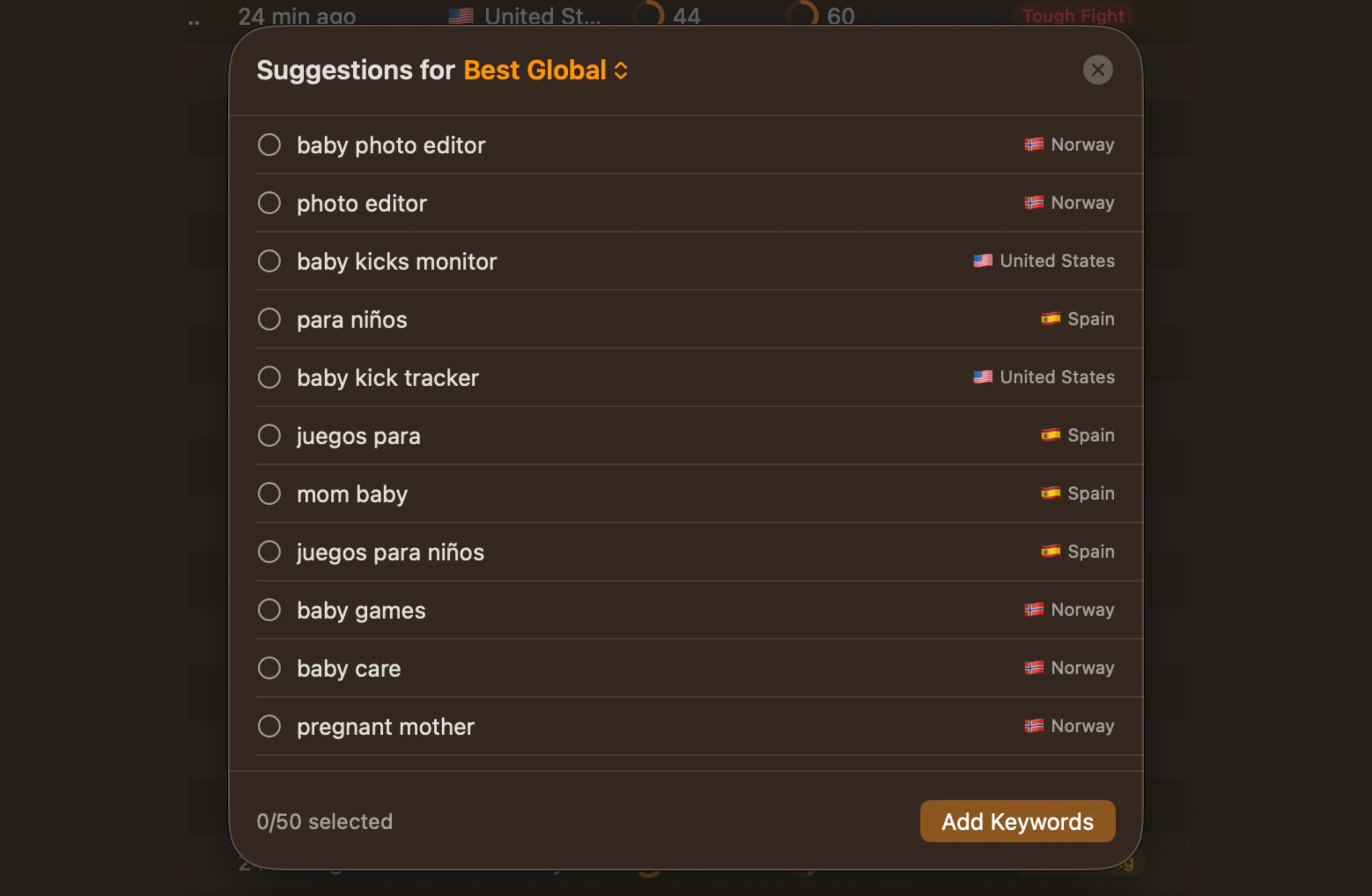
The keywords you're missing are the ones you never thought to search
Keyword research has a fundamental blind spot: you can only research terms you think of. If you're building a sleep tracking app, you'll search for "sleep tracker," "sleep monitor," "sleep cycle," and the obvious variations. But would you think to search for "snoring detector," "sleep debt calculator," or "wind down routine"? Probably not, because those terms don't come from the same mental model, even though real users search for them every day.
AppSprint ASO's AI suggestions solve this by analyzing your app, your category, and your competitors to surface keywords that are relevant to what you do but outside your normal brainstorming radius. Every suggestion comes with real popularity and difficulty data plus a targeting label, so you're not just getting ideas — you're getting vetted opportunities.
How it works
AI suggestions integrate into your existing keyword research workflow. You don't need to learn a new tool or change how you work.
-
Add your app. When you set up your app in AppSprint ASO, the AI starts analyzing your category, your current metadata, and the competitive landscape. It looks at what keywords similar apps rank for, what terms are trending in your category, and where there are gaps.
-
Get personalized suggestions. Your suggestion feed shows keywords ranked by opportunity score — a combination of relevance to your app, search popularity, and achievable difficulty. All suggestions are pre-filtered to a minimum popularity of 15, cutting out low-value noise. A keyword with high popularity but insane difficulty ranks lower than a keyword with moderate popularity and low difficulty, because the second one is actually achievable.
-
Review with real data. Every suggested keyword shows the same data you'd get from manual research: popularity score, difficulty score, targeting label (Sweet Spot, Hidden Gem, Quick Win, High Potential, Competitive, or Very Competitive), estimated daily downloads by position tier, and top-10 MRR data. The AI finds the keywords; the data helps you decide.
-
Track or dismiss. Like any keyword in AppSprint ASO, you can add suggestions to your tracked keywords or drop them directly into your metadata editor. If a suggestion isn't relevant, dismiss it and the AI learns from your preference. The workflow is the same whether a keyword came from your own research or an AI suggestion.
Why this matters
Enterprise ASO teams have people whose entire job is keyword discovery. They have analysts running competitive intelligence across hundreds of apps, tracking category trends, and testing keyword variations at scale. If you're a solo developer, a freelancer juggling client apps, or someone building a side project on weekends, you're doing keyword research in the gaps between coding, support, and everything else.
AI suggestions give you a research shortcut that doesn't sacrifice quality. Instead of spending 45 minutes brainstorming and searching variations, you start with a list of vetted suggestions and spend your time evaluating and selecting. The research that takes an ASO specialist an hour takes you 15 minutes.
Finding lateral keywords. These are the hardest keywords to discover manually. Your meditation app might benefit from targeting "anxiety relief" or "focus music" — terms that describe outcomes rather than features. The AI finds these connections by analyzing what keywords similar apps rank for across the entire category, not just your direct competitors.
Catching trending terms. The App Store isn't static. New search terms emerge as user behavior changes, new app categories form, and cultural moments create spikes. AI suggestions pick up on terms that are gaining popularity in your category before they become obvious to everyone.
Avoiding keyword fatigue. After a few rounds of manual keyword research, you start recycling the same terms. Your brainstorming well runs dry. AI suggestions inject fresh ideas into your keyword strategy so you're not just rearranging the same 30 keywords every month.
From the trenches
A developer building a recipe app had done thorough keyword research and was ranking for solid terms: "recipe organizer," "meal planner," "cooking app." Downloads were steady at about 30 per day, but growth had stalled. She'd been through multiple rounds of keyword research and felt like she'd found every relevant term.
She enabled AI suggestions and immediately saw terms she hadn't considered: "what to cook tonight," "dinner ideas easy," "leftover recipes," and "grocery list from recipe." These were query-style keywords — things people actually type into the App Store when they don't know the name of the app they want.
The term "what to cook tonight" had a popularity of 42 and difficulty of 19 — labeled as a Hidden Gem. She'd never have found it through her normal research process because it doesn't sound like a "keyword" — it sounds like a question. But that's exactly what made it valuable. People searching that phrase are ready to download an app that answers it.
She swapped three underperforming keywords for AI-suggested terms, focusing on the question-style queries. Within three weeks, "what to cook tonight" was driving 8-10 downloads per day on its own. Her overall daily downloads went from 30 to 47 — a 56% increase from keywords she would never have found through manual research.
Smart suggestions, not black boxes
Some tools give you AI suggestions with no transparency — just a list of keywords with no explanation of why they were selected. That makes it hard to evaluate whether a suggestion is genuinely good or just algorithmically plausible.
AppSprint ASO's suggestions come with full data so you can make your own judgment:
- Popularity and difficulty scores — same as any keyword you'd research manually.
- Targeting label — Sweet Spot, Hidden Gem, Quick Win, High Potential, Competitive, or Very Competitive. See at a glance whether a keyword is worth pursuing.
- Download estimates — estimated daily downloads for top 5, positions 6-10, and 11-20. Know the potential volume before committing a keyword slot.
- Top-10 MRR data — best, average, and worst monthly revenue among top-ranking apps. Understand whether a keyword attracts users who pay.
- Opportunity score — a combined metric that balances all factors. High opportunity means the keyword is relevant, popular enough to matter, and achievable enough to rank for.
You're never taking the AI's word for it. The suggestion gets you to the keyword; the data helps you decide whether to use it.
Combining AI suggestions with your workflow
AI suggestions work best as one input in a complete ASO strategy:
- Run competitor analysis to see what terms your rivals rank for.
- Check AI suggestions for keywords outside your competitors' orbit.
- Use keyword research to evaluate any terms that catch your eye.
- Update your metadata through the metadata editor with the best finds.
- Track everything and review AI suggestions again in two weeks for fresh ideas.
The developers who grow their downloads consistently are the ones who keep finding new keywords. AI suggestions make sure you never run out of options to explore — whether you're a full-time developer, a freelancer managing client apps, or building a side project after work. If you're just getting started with ASO, our keyword research guide covers the fundamentals before you layer in AI-powered discovery.
Start getting smarter suggestions today
Your next best keyword is one you haven't thought of yet. AI suggestions surface the terms that manual research misses — filtered to popularity ≥15, ranked by opportunity, and backed by the same real App Store data you use for everything else in AppSprint ASO.
Start your free trial and see what keywords the AI finds for your app. The suggestions start generating as soon as you add your app — no setup required.
Frequently Asked Questions
- How do AppSprint ASO's AI suggestions work?
- AppSprint ASO analyzes your app's category, description, current keywords, and competitor data to suggest keywords you're not targeting yet. Suggestions are filtered to popularity ≥15 and ranked by opportunity score — a combination of relevance, popularity, and achievable difficulty.
- Are AI suggestions better than manual keyword research?
- They complement each other. Manual research is great for exploring specific terms you already have in mind. AI suggestions surface keywords you wouldn't think to search for — the blind spots in your strategy.
- How often do suggestions update?
- Suggestions refresh based on changes in your category, competitor movements, and App Store trends. You'll see new suggestions as the competitive landscape shifts.
- Can I trust AI-generated keyword suggestions?
- Every suggestion comes with real popularity and difficulty data from the App Store, plus a targeting label (Sweet Spot, Hidden Gem, etc.) and download estimates. You're not taking the AI's word for it — you can verify each keyword's potential before adding it to your strategy.
Research, optimize, grow
Don't waste time guessing keywords or overpaying for enterprise tools you'll never fully use.


Trusted by 200+ developers