Apple Search Ads Management for App Developers
Manage Apple Search Ads campaigns without the complexity. AppSprint ASO helps you pick keywords, set bids, and track spend — built for indie budgets.
March 23, 2026
What is Apple Search Ads management? Apple Search Ads management is the process of creating, bidding on, and optimizing paid keyword campaigns within the App Store so your app appears at the top of search results for targeted terms.
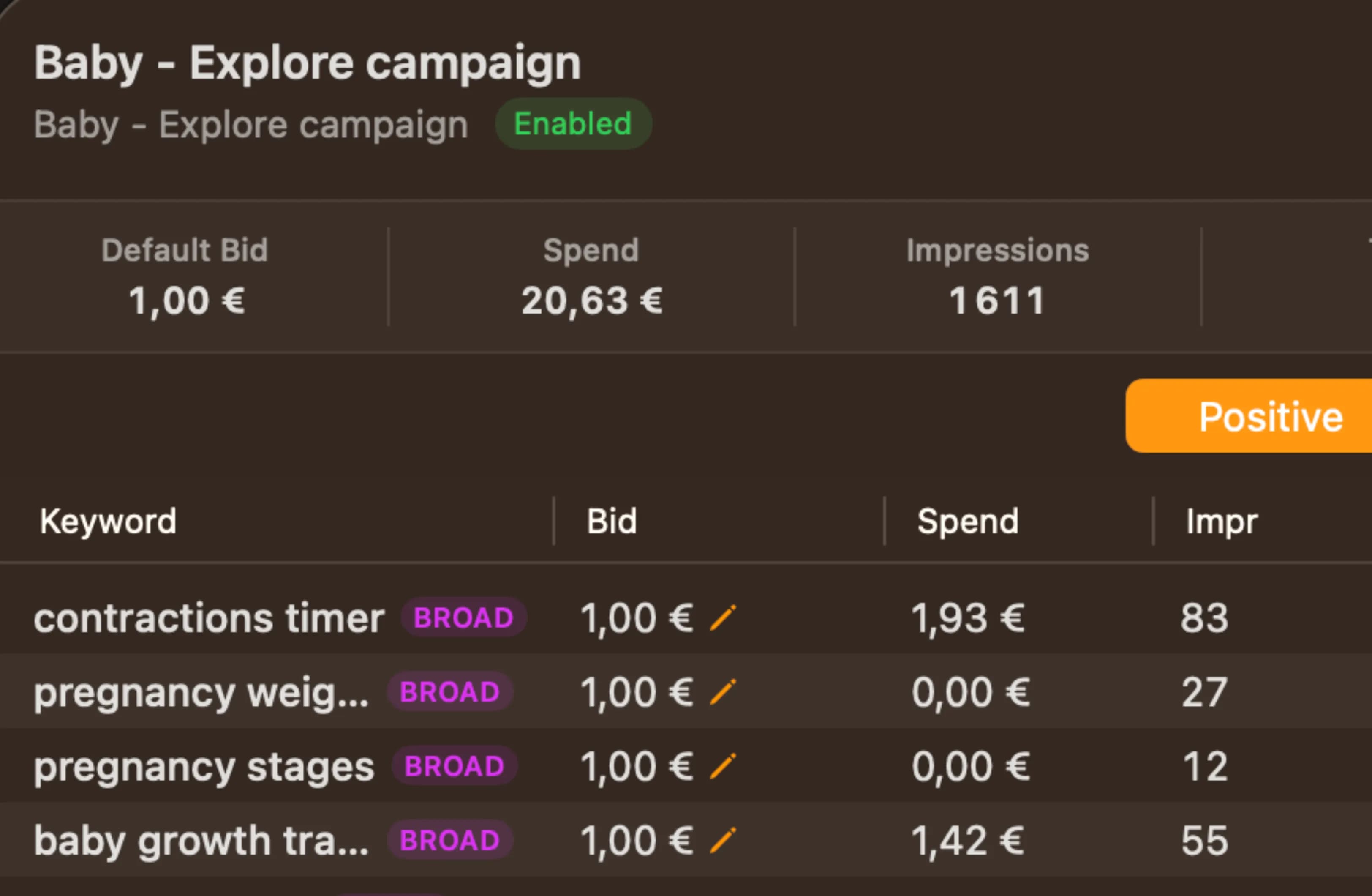
Paid keywords without the enterprise complexity
Apple Search Ads is one of the most effective ways to get your app in front of people who are actively searching for what you built. The problem isn't the ad platform itself — it's that Apple's Search Ads interface is designed for marketers managing six-figure budgets across dozens of campaigns.
Whether you're a solo developer, a freelancer running client campaigns, or a bootstrapped founder watching every euro — you don't need campaign groups, audience refinements, and creative sets. You need to pick good keywords, set a reasonable bid, and know whether you're wasting money. AppSprint ASO brings Apple Search Ads management into the same workflow where you do your keyword research, so your paid and organic strategies work from the same data.
For a deeper dive on whether Search Ads make sense for your situation, our Apple Search Ads guide for indie developers covers the strategy end to end.
How it works
AppSprint ASO connects your Apple Search Ads to your keyword research, so you're making bid decisions based on data you already have.
-
Start from your keyword research. You've already found keywords with good popularity and manageable difficulty. AppSprint ASO shows you which of these keywords are also good candidates for Search Ads — terms where organic ranking is tough but paid visibility could be worth the investment. Keywords labeled Competitive or High Potential are often ideal Search Ads candidates: worth targeting, but hard to win organically right away.
-
See bid estimates. For each keyword, AppSprint ASO shows you the estimated cost-per-tap range based on current competition. A keyword like "habit tracker" might cost $1.50-3.00 per tap because it's highly competitive. A long-tail term like "habit tracker simple" might cost $0.30-0.80. This helps you focus your budget where it'll go furthest.
-
Set up campaigns. Create Search Ads campaigns directly from AppSprint ASO. Pick your keywords, set your maximum bid for each one, set a daily budget, and launch. No need to navigate Apple's multi-step campaign creation wizard.
-
Track performance alongside organic. This is where the integration really pays off. You can see your paid keyword performance (impressions, taps, installs, cost-per-install) right next to your organic keyword rankings and targeting labels. If a keyword is performing well on paid and your organic ranking is climbing, you might scale back the ad spend and let organic take over. If organic ranking is stalled, keep the paid visibility going.
-
Detect cannibalization. AppSprint ASO flags keywords where your ads might be eating into your organic traffic — so you're not paying for taps you'd get for free. One click to add those terms as negatives and stop wasting budget.
Why developers should care about Search Ads
There's a common misconception that Apple Search Ads are only for apps with big marketing budgets. In reality, Search Ads are one of the few paid channels where anyone building apps can compete effectively, because you're reaching people who are already searching for your type of app.
Immediate visibility while organic builds. You updated your metadata with better keywords last week, but organic ranking changes take time. Search Ads put you at the top of results for those terms today while you wait for organic to catch up.
Test keywords before committing organically. Not sure if "meditation timer" or "breathing exercise app" will drive more installs? Run both as Search Ads for a week with a small budget. The one that gets more installs at a lower cost is probably the better organic target too.
Defend your brand terms. If competitors are bidding on your app name or close variations, Search Ads let you defend those terms and make sure people searching for you actually find you.
Compound with organic. Apps that rank both organically and through Search Ads for the same keyword get more total taps than either channel alone. Apple has confirmed this — the paid and organic listings don't cannibalize each other.
Budgeting for indie developers
You don't need hundreds of dollars per day. Most developers using AppSprint ASO's Search Ads features start with $5-10 per day and focus on a handful of keywords.
The strategy that works best for small budgets:
- Target long-tail keywords. Instead of bidding on "fitness app" ($2-5 per tap), bid on "bodyweight workout timer" ($0.40-1.00 per tap). The search volume is lower, but the intent is higher and the cost is a fraction.
- Use targeting labels. Keywords labeled Quick Win or Sweet Spot in AppSprint ASO are often great Search Ads candidates — enough popularity to be worth bidding on, without the brutal competition that drives up costs.
- Use your organic data. Keywords where you're already ranking #15-30 organically are great Search Ads candidates. You're close enough that the organic and paid signals reinforce each other.
- Set tight daily budgets. $5/day means $150/month. If your cost-per-install is $1.50, that's 100 new users per month from a single channel. For many apps, that's meaningful growth.
- Kill what doesn't work. Check your keyword performance weekly. If a keyword costs more than $3 per install and your app monetizes at $2 per user, that keyword isn't profitable. Pause it and redirect the budget.
From the trenches
A developer with a journaling app had been doing solid ASO work — good keyword research, regular metadata updates, steady organic growth from 20 to 40 downloads per day over three months. But he hit a plateau. The keywords he was ranking for were competitive, and breaking into the top 5 organically was slow.
He started Apple Search Ads through AppSprint ASO with a $7/day budget. He picked five keywords where he was ranking organically between #12 and #25 — terms like "daily journal prompts" and "gratitude journal app." His average cost-per-tap was $0.65, and his install rate from taps was about 40%, giving him a cost-per-install of around $1.60.
Within the first month, he was getting 25 additional installs per day from Search Ads, bringing his total to about 65 per day. But the interesting part came three weeks later: his organic rankings for those same keywords started climbing. The additional installs from Search Ads were boosting his app's overall download velocity, which Apple's algorithm factors into organic rankings. By month two, he was ranking #6-8 organically for those terms and scaled back his Search Ads spend to $3/day for maintenance.
The $210 he spent on Search Ads in that first month bought him a permanent improvement in organic rankings that now drives free downloads every day.
Search Ads + ASO: the combined playbook
The developers getting the best results use Search Ads and ASO as a single strategy, not two separate efforts.
- Do your keyword research and find your best targets — prioritize Sweet Spot and Hidden Gem keywords.
- Update your metadata through the metadata editor.
- Run Search Ads on the same keywords to get immediate visibility.
- Use competitor analysis to find keywords competitors are weak on — these often have lower ad costs too.
- Monitor both organic and paid performance. As organic rankings improve, shift ad budget to new keywords.
This cycle is how small apps punch above their weight. You're not outspending the competition; you're out-strategizing them with better data and a tighter feedback loop.
Start running smarter Search Ads today
Apple Search Ads don't have to be complicated or expensive. With AppSprint ASO, you're making bid decisions from the same keyword data that drives your organic strategy — complete with targeting labels, download estimates, and MRR data — and you can start with a budget that fits your reality.
Start your free trial and see which of your keywords are worth bidding on. Your first campaign is 10 minutes away.
Frequently Asked Questions
- Does AppSprint ASO manage Apple Search Ads campaigns?
- AppSprint ASO helps you plan and manage Apple Search Ads campaigns from the same place you do keyword research. You can see which keywords are worth bidding on based on organic difficulty, popularity, and targeting labels.
- How much do Apple Search Ads cost?
- Apple Search Ads uses a cost-per-tap model. You set a maximum bid per keyword and a daily budget. Actual costs depend on competition — indie-targeted keywords typically cost $0.30-2.00 per tap.
- Should I use Apple Search Ads if I'm already doing ASO?
- Yes. ASO and Search Ads work together. Organic rankings take time; Search Ads give you immediate visibility while your organic strategy builds momentum. Many developers use both.
- Can I start Apple Search Ads with a small budget?
- Absolutely. Many developers start with $5-10 per day. AppSprint ASO helps you focus that budget on keywords labeled Sweet Spot or Quick Win — terms most likely to convert without breaking the bank.
Research, optimize, grow
Don't waste time guessing keywords or overpaying for enterprise tools you'll never fully use.


Trusted by 200+ developers