
Golden rules
Use this as the ASO playbook. Start with the simple AppSprint ASO workflow, then come back here when you need to decide what to change, what to ignore, and what to test next.
Start with the tool
Add one app and one country
Pick one country where the app can actually make money. Add the app, choose the country, then add 10-20 seed keywords.
Read the market before editing
Sort the keyword table by estimated downloads, difficulty, position, top-5 downloads, and top-5 MRR. Open competitors before touching metadata.
Change one thing with a reason
Rewrite metadata, improve screenshots, adjust a local price, or run Apple Ads only after the data tells you where the gap is.
The first win
Your first goal is not to track every keyword. It is to find a small set of searches where people search, the current winners are beatable, and your page can make a clearer promise.
The rules that matter most
Downloads beat popularity
Country changes the answer
Competitors set the bar
Metadata is about combinations
Screenshots close the deal
Revenue decides scale
Keyword rules
- Start from real sources: Use your title, subtitle, keyword field, competitor names, App Store autocomplete, and keywords you already want to own.
- Stay painfully relevant: If the keyword does not describe the app or the problem it solves, skip it. Bad relevance wastes ASO work and ad spend.
- Use estimated downloads: Do not choose keywords only because a tool says they are popular. Ask what happens if you actually rank.
- Read difficulty as context: High difficulty is not an automatic no. It means you need a stronger page, better ratings, or paid traffic to support the push.
- Do not kill too fast: Early data can lie. Wait for enough rank movement, taps, installs, or spend before calling a keyword dead.
Metadata rules
- Title first: The title carries the most weight. Put the strongest keyword early unless your brand already has search demand.
- Subtitle second: Use it for the next best phrase, not a vague tagline.
- Keyword field for leftovers: Use the 100 characters for useful words you did not already use in the title or subtitle.
- Never repeat a word twice: If "affirmations" is already in the title, do not use it again in the subtitle or keyword field.
- Pick the strongest pair: A phrase such as "daily affirmations" can help with "daily", "affirmations", and the full phrase. Choose the best real pair around your main word.
- Keep one clear theme: A tight metadata set usually beats a messy list of unrelated keywords.
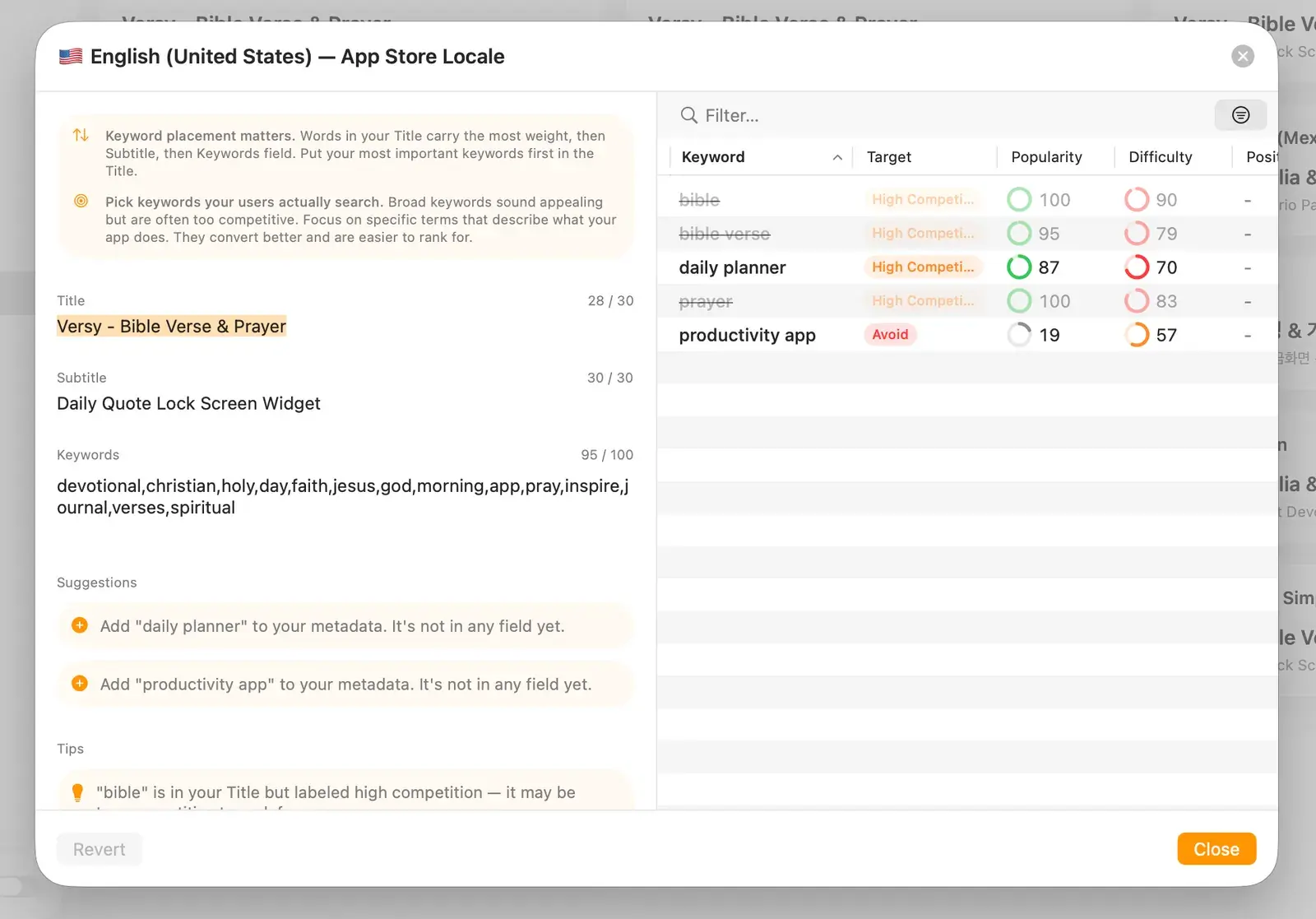
Simple metadata test
Read the title, subtitle, and keyword field together. If every word has a job and no word is repeated, you are probably close.
Screenshot rules
- The first screenshot must explain the app: A user should understand the main promise without swiping.
- Use short captions: Keep text easy to read in search results. Three to seven words is usually enough.
- Show real product proof: Do not hide the app behind pretty frames. Show the screen where the user gets value.
- Compare the current winners: If their first three screenshots sell the promise better, yours need work.
- Measure the baseline: If you do not run Apple Ads, check the current product page conversion rate in App Store Connect before changing screenshots.
Use the screenshot guide when you are ready to rebuild the first three screenshots.
Localization and pricing
- Do not translate blindly: Local users often search with different words. Research the country before copying the English keyword plan.
- Start with store localization: Localize metadata and screenshots first. Use it as a market test before localizing the full app.
- Check local competitors: Look at ratings, revenue, screenshots, and price in that country before judging the opportunity.
- Price for conversion and revenue: A lower price is only good if paid conversion and revenue improve. Watch both.
Use the localization guide when you want to choose a country, localize screenshots, or adjust prices.
Apple Ads rules
- Start with Search Results: It has the clearest intent because people are already searching.
- Turn Search Match off: Add keywords manually and use Exact match while you are still learning.
- Keep countries separate: Do not mix markets with different language, price sensitivity, or LTV.
- Judge by revenue: CPI is not enough. Look at trials, paid conversions, revenue, and ROAS by keyword and country.
- Use ads to support ASO: Test the same keywords you care about organically. Paid signal can help you find what is worth pushing in metadata.
For the full setup, bid, metric, and scaling workflow, use the Apple Ads playbook.
Ratings and conversion
- Ratings help rankings: More reviews and a stronger average rating can improve both ranking and conversion.
- Ask after value: The best rating prompt is after a user has paid and completed a useful action.
- Fix conversion before scale: If tap-through or install conversion is weak, raising Apple Ads bids usually makes the leak more expensive.
Weekly loop
Review keywords by country
Check rank movement, estimated downloads, difficulty, paid spend, installs, trials, paid conversions, and revenue.
Move the obvious winners forward
Put winners into metadata, build tighter Exact campaigns, improve screenshots for their intent, or localize the page for the market.
Cut one weak thing
Remove one keyword, pause one bad ad group, drop one country, or rewrite one screenshot. Small cleanups keep the account readable.
The real loop
Research, compare, change, measure. That is the game. The tool helps you make each loop smaller and less random.